How to Send and Receive Crypto: Step-by-Step Guide, Tips, Fees, Risks and Best Practices
Key takeaway: Sending crypto is like sending digital cash. You choose the asset, confirm the network, paste or scan the recipient address, review the fee, and approve the transaction. Receiving crypto means sharing the correct address for the correct asset and network. The biggest beginner risks are wrong networks, wrong addresses, scams, and not understanding fees.
1. What Does It Mean to Send and Receive Crypto?
To send crypto means to transfer a cryptocurrency such as Bitcoin, Ether, USDT, USDC, SOL, or another digital asset from one wallet or exchange account to another. To receive crypto means to give someone a wallet address or QR code so they can send funds to you.
A crypto transfer can happen between two personal wallets, from an exchange to a wallet, from a wallet to an exchange, or between two users on the same platform. Some transfers are recorded on a public blockchain. Others may happen internally inside an exchange and may not immediately create an on-chain transaction.
1.1. A simple example
Suppose Sara wants to send Majid $50 worth of USDT. Majid opens his wallet, chooses USDT, selects the correct network, and shares his receive address or QR code. Sara pastes that address into her wallet, chooses the same network, checks the fee, sends a small test amount if needed, and then sends the rest after the test arrives.
2. How Crypto Transfers Work
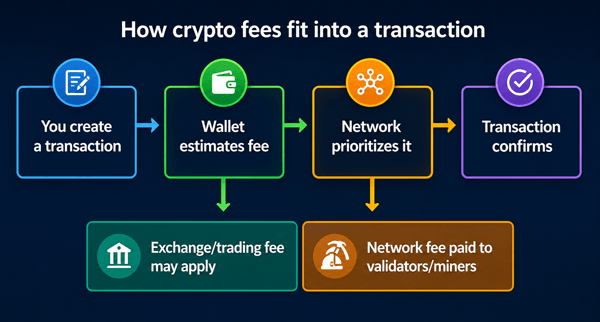
Most crypto transfers follow the same basic path: a wallet creates a transaction, the sender approves it with a private key or exchange account security, the transaction is broadcast to the network, validators or miners include it in a block, and the receiver sees the funds after enough confirmations.
2.1. Important beginner terms
| Term | Plain-English meaning | Why it matters |
|---|---|---|
| Wallet | An app, device, or account that lets you store, send, and receive crypto. | Your wallet is where you manage addresses, balances, and transactions. |
| Wallet address | A long string of letters and numbers, often shown as a QR code. | This is the destination for a crypto transfer. |
| Private key / seed phrase | Secret information that controls a self-custody wallet. | Anyone with it can move your crypto. Never share it. |
| Network / blockchain | The rail used to move the asset, such as Bitcoin, Ethereum, Solana, Tron, Arbitrum, or Polygon. | The asset and network must match. Wrong-network sends can be hard or impossible to recover. |
| Transaction fee | A fee paid to the blockchain network or platform. | Fees affect cost and sometimes speed. |
| Confirmation | A signal that a transaction has been included in the blockchain. | More confirmations generally mean the transaction is more settled. |
| Transaction hash / TXID | A unique transaction reference number. | You can use it to track the transfer in a blockchain explorer. |
3. Before You Start: What You Need
- A wallet or exchange account that supports the crypto asset you want to send or receive.
- The correct receive address for the exact asset and network.
- Enough crypto to cover the amount plus the transaction fee.
- Basic security: two-factor authentication on exchanges, a safe device, and no screen-sharing with strangers.
- A clear reason for the transfer, especially if an exchange asks for compliance information.
3.1. Custodial exchange vs self-custody wallet
| Option | Best for | Main advantage | Main trade-off |
|---|---|---|---|
| Exchange account | Beginners, buying/selling, fiat deposits, simple transfers. | Easy to use and may help with support or recovery inside the platform. | You rely on the exchange to custody funds and follow its withdrawal rules. |
| Software wallet | Regular on-chain use, DeFi, NFTs, direct control. | You control the wallet and can connect to blockchain apps. | You are responsible for seed phrase security and mistakes. |
| Hardware wallet | Long-term storage and larger balances. | Private keys stay offline, reducing many hacking risks. | Costs money and requires careful setup and backup. |
4. How to Receive Crypto Step by Step
4.1. Step 1: Open your wallet or exchange account
Open the app where you want to receive the crypto. Make sure you are logged into the correct account and using the official app or website.
4.2. Step 2: Choose the asset you want to receive
Select the exact crypto asset: for example, BTC, ETH, SOL, USDT, or USDC. Do not assume all versions of an asset are the same. A token like USDT can exist on several networks.
4.3. Step 3: Choose the correct network
This is one of the most important steps. If the sender will send USDT on Tron, you need a USDT address for Tron. If they will send USDC on Ethereum, you need a USDC address on Ethereum. Some wallets use the same address format across networks, but that does not mean every platform supports recovery if the wrong network is used.
4.4. Step 4: Copy the address or show the QR code
Use the copy button inside the wallet instead of typing the address. If you are with the sender in person, let them scan your QR code. For online transfers, paste the address into a message only after checking that it did not change.
4.5. Step 5: Share the asset, network, and address together
Do not send only the address. Send clear instructions such as: "Please send USDC on the Ethereum network to this address: [address]."
4.6. Step 6: Wait for the transaction and confirm it arrived
Your wallet may show the transaction as pending before it is fully confirmed. For small transfers, one or a few confirmations may be enough. For larger transfers, exchanges often wait for more confirmations before crediting the balance.
5. How to Send Crypto Step by Step
5.1. Step 1: Confirm the recipient and purpose
Before sending, make sure you know who you are paying and why. Crypto payments are usually final after confirmation. If the payment is for a purchase, confirm the invoice, asset, network, amount, and refund policy.
5.2. Step 2: Choose the crypto asset
Open your wallet or exchange and choose the asset you plan to send. If the recipient asks for BTC, do not send ETH. If they ask for USDT on Tron, do not send USDT on Ethereum unless they explicitly support it.
5.3. Step 3: Paste or scan the recipient address
Use copy-paste or QR scanning. After pasting, compare the first 4-6 and last 4-6 characters with the recipient address. This helps catch clipboard malware, wrong addresses, and copy errors.
5.4. Step 4: Select the network
Choose the same network the recipient provided. Many losses happen because the asset is correct but the network is wrong. For example, USDT on Ethereum, Tron, BNB Smart Chain, and Polygon are not automatically interchangeable at every exchange.
5.5. Step 5: Enter the amount
Enter either the crypto amount or the fiat-value equivalent, depending on your wallet. Remember that market prices can move and fees may reduce the final received amount in some cases.
5.6. Step 6: Review the fee and total
Your wallet should show the network fee or withdrawal fee before you confirm. On networks like Ethereum, fees can change based on demand. Some wallets let you choose a slower or faster fee setting.
5.7. Step 7: Send a test transaction for important transfers
For a large or first-time transfer, send a small test amount first. Wait until it arrives, then send the rest. This costs an extra fee but can prevent a much bigger loss.
5.8. Step 8: Confirm and save the transaction hash
After you approve the transfer, save the transaction hash or withdrawal ID. It is your tracking reference if the recipient, exchange, or support team needs proof.
6. Crypto Network Fees, Timing, and Confirmations
Crypto fees are not the same across all networks. A Bitcoin transfer, an Ethereum token transfer, and a Solana transfer can have very different costs and speeds. Fees also change with network demand, wallet settings, and platform policies.
| Fee type | Where you see it | What it pays for | Beginner note |
|---|---|---|---|
| Network fee / miner fee / gas fee | Self-custody wallet or exchange withdrawal screen. | Processing and securing the transaction on the blockchain. | Usually unavoidable for on-chain transfers. |
| Exchange withdrawal fee | Centralized exchange withdrawal screen. | The platform’s estimated network cost and sometimes a service fee. | May differ from the live network fee. |
| Trading or conversion fee | When swapping or buying crypto before sending. | The platform or liquidity provider. | Not always part of the send screen, but affects total cost. |
| Spread | When converting between assets or fiat. | Difference between quoted buy and sell price. | Can be hidden in the final exchange rate. |
6.1. Why fees change
- Network demand: busier networks usually cost more.
- Transaction complexity: sending a token or interacting with a smart contract may cost more than a simple coin transfer.
- Speed preference: paying a higher fee can sometimes help a transaction confirm sooner.
- Exchange policy: a platform may estimate, batch, or standardize withdrawal fees.
6.2. Typical speed expectations
Some networks confirm in seconds, while others may take minutes or longer. Exchanges may add extra processing time for security checks, compliance review, withdrawal batching, or minimum confirmation requirements. Do not promise someone an exact arrival time unless your platform gives a reliable estimate.
7. Choosing the Right Network
Many stablecoins and tokens exist on multiple networks. The cheapest network is not always the safest choice if the recipient cannot receive it. The right network is the one both sender and receiver support.
| Question to ask | Why it matters |
|---|---|
| Does the recipient support this exact network? | If not, the funds may not arrive or may require manual recovery. |
| Is the fee reasonable for the amount? | A high fee can make a small transfer uneconomical. |
| Is the network reputable and reliable enough for the use case? | Low fees are useful, but reliability and support matter. |
| Does the exchange require a memo, tag, or destination tag? | Some assets require extra information to credit your deposit. |
| Are there withdrawal limits or delays? | Platforms may pause or delay withdrawals during maintenance or risk checks. |
7.1. Memo, tag, and payment ID warnings
Some coins and exchanges require an extra memo, destination tag, or payment ID. This is common when an exchange uses one shared address for many customers. If a memo is required and you forget it, the exchange may not know which account to credit.
8. Common Beginner Mistakes and How to Avoid Them
| Mistake | What can happen | How to avoid it |
|---|---|---|
| Sending on the wrong network | Funds may be stuck, delayed, or unrecoverable. | Match the asset and network exactly before sending. |
| Typing an address manually | One wrong character can send funds elsewhere or fail. | Always copy-paste or scan a QR code. |
| Ignoring memo/tag requirements | Exchange deposit may not credit automatically. | Check the deposit screen for memo/tag instructions. |
| Sending all funds without fee balance | Transaction may fail or you may be unable to move remaining tokens. | Keep a small amount of the network’s native coin for fees. |
| Trusting screenshots as proof | Screenshots can be faked. | Use the transaction hash and blockchain explorer. |
| Responding to urgent messages | Scammers create panic and rush decisions. | Slow down, verify independently, and never share seed phrases. |
9. Risks, Limitations, and Misconceptions
9.1. Risk 1: Crypto transfers are usually irreversible
With bank cards, a mistaken or fraudulent charge may sometimes be disputed. With on-chain crypto, a confirmed transaction usually cannot be reversed by a wallet provider, exchange, bank, or blockchain support team. The only normal way to get funds back is for the recipient to send them back.
9.2. Risk 2: Scams often look professional
A scammer may pretend to be a support agent, investment manager, romantic partner, employer, exchange employee, or government official. A common warning sign is pressure to send crypto quickly, pay a "release fee," or share a seed phrase.
9.3. Risk 3: Wallet security is your responsibility
If you use a self-custody wallet, losing your seed phrase can mean losing access forever. Sharing the seed phrase lets someone else move the funds. Store backups offline, privately, and in more than one safe place if the balance is important.
9.4. Risk 4: Fees and prices can change
The value of crypto assets can change quickly. Network fees can also rise during busy periods. For time-sensitive payments, confirm the amount and expected fee shortly before sending.
9.5. Risk 5: Regulation and platform rules vary
Some exchanges require identity verification, source-of-funds information, recipient details, or additional checks for withdrawals. These rules vary by country, platform, asset, and transaction size.
10. Best Practices for Sending and Receiving Crypto Safely
- Start with small test transfers when using a new address, new wallet, or new network.
- Verify the asset, network, address, memo/tag, amount, and fee before confirming.
- Use address book allowlists for trusted destinations when your exchange supports them.
- Turn on two-factor authentication for exchange accounts, preferably with an authenticator app or security key.
- Never share your seed phrase, private key, password, or one-time login codes.
- Keep a record of transaction hashes, invoices, dates, and counterparties for taxes and support.
- Use hardware wallets for larger long-term holdings.
- Avoid sending crypto while distracted, tired, pressured, or screen-sharing.
- Use official apps and bookmark official exchange websites to avoid phishing.
- Check whether a stablecoin, token, or network is supported before sending it to an exchange.
11. Real-World Scenarios
11.1. Scenario 1: Sending crypto from an exchange to your own wallet
You buy ETH on an exchange and want to move it to your self-custody wallet. Open your wallet, choose receive ETH, copy the Ethereum address, paste it into the exchange withdrawal page, choose Ethereum as the network, check the fee, send a small test amount, then send the rest after it arrives.
11.2. Scenario 2: Receiving payment from a client
You invoice a client for 100 USDC. Your invoice should state the asset, network, address, amount, due date, and whether network fees are paid by the sender. Example: "Please send 100 USDC on the Ethereum network to [address]. Sender pays network fees."
11.3. Scenario 3: Sending to an exchange deposit address
You want to deposit XRP, XLM, or another asset that may require a memo or tag. Open the exchange deposit page, copy both the address and the tag, paste both into your wallet, and send a test amount if the platform minimum allows it.
11.4. Scenario 4: Choosing between networks for stablecoins
A friend can receive USDT on Tron and Ethereum. Ethereum may be more widely supported but could cost more during busy periods. Tron may be cheaper for many transfers, but only use it if both wallets support it and you understand the trade-off.
12. Pros and Cons of Sending Crypto
| Pros | Cons |
|---|---|
| Can be sent globally without traditional banking hours. | Transactions are usually irreversible after confirmation. |
| Useful for self-custody and direct wallet-to-wallet transfers. | Wrong address or wrong network can cause permanent loss. |
| Some networks offer fast settlement and low fees. | Fees and confirmation times can change. |
| Transaction hashes provide transparent tracking on public blockchains. | Public blockchains may reveal transaction history unless privacy steps are taken. |
| Stablecoins can reduce price volatility for payments. | Stablecoins still carry issuer, platform, regulatory, and network risks. |
13. Quick Checklists
13.1. Before receiving crypto
- Choose the correct asset.
- Choose the correct network.
- Check whether a memo/tag is required.
- Copy the address using the wallet’s copy button.
- Share asset + network + address + memo/tag together.
- Wait for confirmations before treating the payment as final.
13.2. Before sending crypto
- Verify the recipient outside the wallet app if the payment is important.
- Match the asset and network exactly.
- Paste or scan the address; do not type it manually.
- Compare the first and last characters of the address.
- Add memo/tag if required.
- Review fee, amount, and total.
- Send a small test transaction for large or first-time transfers.
- Save the transaction hash.
14. Frequently Asked Questions
14.1. Can I cancel a crypto transaction after sending it?
Usually no. Once an on-chain transaction is confirmed, it generally cannot be reversed. If it is still pending, some wallets may let advanced users replace or speed up certain transactions, but beginners should not rely on this.
14.2. What happens if I send crypto to the wrong address?
If the address belongs to someone else, only that person can send it back. If the address is invalid, the wallet may reject it before sending. If the funds were sent to a valid but wrong address, recovery is unlikely.
14.3. What happens if I use the wrong network?
The funds may not appear in the recipient account. Some exchanges can recover wrong-network deposits for a fee, but many cannot. Always match the network before sending.
14.4. Do I need a wallet to receive crypto?
Yes, but a wallet can be a self-custody app, hardware wallet, or an exchange account. Beginners often start with an exchange, then learn self-custody as they become more confident.
14.5. Why did the receiver get less than I sent?
Possible reasons include network fees, exchange withdrawal fees, conversion fees, spread, or the sender choosing an amount before fees were deducted. Check the transaction details and platform fee screen.
14.6. Is a QR code safer than copying an address?
It reduces typing errors, but you should still confirm the address and network. A malicious QR code can still point to the wrong address.
14.7. Why is my transaction pending?
It may be waiting for network confirmation, a low fee may have been selected, the exchange may be processing withdrawals in batches, or the platform may be running security checks.
14.8. Can I send crypto without paying a fee?
On-chain transfers usually require a network fee. Internal transfers within the same exchange may be free or cheaper, but they depend on the platform.
14.9. What is the safest way to send a large amount?
Use a trusted device, verify the recipient, confirm the network, send a small test amount first, use an address allowlist if available, and consider a hardware wallet for self-custody.
14.10. Should beginners use Bitcoin, Ethereum, or stablecoins for payments?
It depends on the purpose. Bitcoin is widely known, Ethereum is widely used for tokens and apps, and stablecoins reduce price volatility but depend on issuer and network support. The best choice is the asset and network both parties can use safely.
15. Final Beginner Advice
The safest crypto transfer is the one you do slowly and deliberately. Most mistakes happen when people rush, copy the wrong address, pick the wrong network, ignore a memo, or trust someone pressuring them. For every transfer, remember this simple rule: asset, network, address, amount, fee, memo, confirm. If any one of those is unclear, pause before sending.
Sources Consulted and Checked
These sources were consulted and checked while preparing this document to support accuracy and clarity.
- Bitcoin.org - Some things you need to know: Bitcoin payments are irreversible.
- Ethereum.org - Ethereum gas fees and how they work.
- Ethereum.org - Transactions and gas overview.
- Coinbase Help - Sending crypto and on-chain network fees.
- Coinbase Help - Pricing and fees disclosures.
- FATF - Virtual assets overview and Travel Rule context.
Reader Advice
This article is provided for educational and informational purposes only and is not personalized financial, legal, tax, investment, or security advice. Crypto transfers can be irreversible and may involve loss from wrong addresses or networks, scams, changing fees, price movements, platform failures, or regulatory restrictions. Rules, platform policies, laws, supported assets, fees, and statistics can change over time and vary by country or region, so verify important details through official wallet, exchange, network, and regulatory sources before sending funds or making a decision. Consider professional advice where your circumstances or the amount involved require it.