Bitcoin Lightning Network Explained: Fast Bitcoin Payments and Low Fees
Quick answer: The Bitcoin Lightning Network is a second-layer payment network built on top of Bitcoin. It lets people send small Bitcoin payments quickly and usually with very low fees by moving frequent transactions off the main blockchain and settling only the opening and closing of payment channels on-chain.
1. What Is the Bitcoin Lightning Network?
The Bitcoin Lightning Network is a payment system designed to make Bitcoin more practical for everyday payments. Instead of recording every small payment directly on the Bitcoin blockchain, Lightning lets users open payment channels, send many payments inside those channels, and later settle the final result on Bitcoin.
Think of it like opening a tab at a coffee shop. You do not swipe your card after every sip. You open a tab, buy several items, and settle the final balance later. Lightning applies a similar idea to Bitcoin, but with cryptographic rules that make the channel enforceable on the Bitcoin blockchain.
Lightning is often called a Layer 2 network because it sits above Bitcoin. Bitcoin remains the base layer that provides final settlement and security. Lightning adds speed and lower fees for smaller, more frequent payments.
2. Why Was Lightning Created?
Bitcoin is highly secure and decentralized, but its base layer was not designed to process unlimited instant payments. A normal Bitcoin transaction must be included in a block and wait for confirmations. When demand is high, fees can rise and confirmation times can feel slow for small purchases.
Lightning was created to improve Bitcoin payments in three practical ways:
- Speed: payments can often complete in seconds.
- Lower fees: small payments can be economical because they do not each require a separate on-chain transaction.
- Scalability: many payments can happen off-chain while Bitcoin handles final settlement.
2.1 Bitcoin On-Chain vs. Lightning Payments
| Feature | Bitcoin on-chain payment | Lightning payment |
|---|---|---|
| Best for | Large transfers, cold storage, final settlement | Small and frequent payments |
| Typical speed | Minutes to longer, depending on confirmations | Usually seconds when routing succeeds |
| Fees | Depend on block-space demand | Usually very low, but not always zero |
| Blockchain use | Every transaction is recorded on-chain | Only channel opens/closes usually go on-chain |
| User experience | Simple but slower for retail payments | Fast, but wallets/channels/liquidity add complexity |
| Finality | Strong on-chain settlement after confirmations | Instant from user perspective, backed by channel rules and later settlement |
3. How the Lightning Network Works in Simple Terms
Lightning works through payment channels. A payment channel is a shared Bitcoin balance between two parties. The channel is funded with an on-chain Bitcoin transaction. Once open, the two parties can update their balances many times without broadcasting every update to the blockchain.
3.1 Step-by-Step Example: Alice Pays Bob
- Alice opens a channel: Alice funds a Lightning channel with bitcoin. This opening transaction appears on the Bitcoin blockchain.
- Alice sends a Lightning payment: Alice pays Bob by updating channel balances. No new Bitcoin block confirmation is needed for that individual payment.
- The payment may route through other nodes: Alice does not need a direct channel with Bob. Her wallet can route the payment through connected Lightning nodes.
- The final state can settle on Bitcoin: When a channel closes, the final balance can be broadcast to Bitcoin as an on-chain transaction.
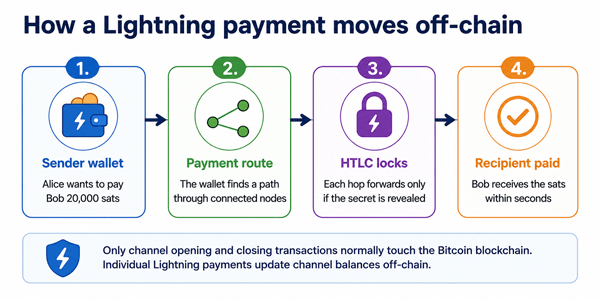
Figure 1: Simplified Lightning payment flow.
4. Important Lightning Concepts Beginners Should Know
4.1 Payment channels
A channel is a two-party balance that can be updated off-chain. Opening or closing a channel normally requires an on-chain Bitcoin transaction.
4.2 Nodes
A Lightning node runs software that communicates with other nodes. Wallets may run their own node, connect to a service, or use a custodial provider.
4.3 Routing
A payment can travel through several connected channels. Each routing node forwards the payment and may earn a tiny routing fee.
4.4 Liquidity
Liquidity means available balance in the right direction. You may have funds in a channel but still fail to receive or send if the channel balance is not positioned correctly.
4.5 Invoices
A Lightning invoice is a payment request. It usually includes the amount, destination, expiration time, and routing information. Some wallets also support reusable payment methods such as LNURL or Lightning addresses.
4.6 HTLCs
Hashed Time-Locked Contracts help make multi-hop payments atomic: either every hop completes or the payment fails and funds return.
4.7 Onion routing
Lightning uses onion-style routing so each forwarding node generally knows only the previous and next hop, not the full payment path.
5. Real-World Uses of the Lightning Network
- Coffee or food payments: A customer pays a merchant in seconds with a QR code. This is the classic Lightning example because the payment is small and speed matters.
- Online tips and creator payments: Fans can send small “sats” tips that would be uneconomical on-chain during high-fee periods.
- Gaming and app microtransactions: Apps can use small instant payments for pay-per-use features, rewards, or digital content.
- Cross-border transfers: Lightning can move bitcoin globally, but users still need to consider exchange rates, local regulations, liquidity, and wallet custody.
- Exchange deposits and withdrawals: Some exchanges support Lightning to let users move smaller bitcoin amounts faster and cheaper than standard on-chain withdrawals.
6. Benefits of the Bitcoin Lightning Network
- Fast payments: Lightning payments can complete quickly when a route is available and the wallet is working properly.
- Low fees for small payments: Because each payment does not need its own on-chain transaction, small payments can be much cheaper.
- Better everyday payment experience: QR-code payments, instant receipts, and small satoshi amounts can feel closer to modern digital payments.
- Less pressure on Bitcoin block space: Many off-chain updates can be settled later as fewer on-chain transactions.
- Global access: Anyone with a compatible wallet can potentially send or receive Lightning payments across borders.
7. Risks and Limitations You Should Understand
- Payments can fail: A payment may fail if no route has enough liquidity, if a node is offline, or if the invoice expires.
- Receiving is not always automatic: Non-custodial users may need inbound liquidity before they can receive payments.
- Channel management can be confusing: Opening, closing, rebalancing, and backing up channels are advanced tasks for users running their own nodes.
- Custodial wallets add counterparty risk: A custodial Lightning wallet is easier, but the provider controls the funds until you withdraw.
- Online availability matters: Non-custodial Lightning works best when wallets or nodes can monitor channel states. Watchtowers can help, but the concept is still more complex than a simple on-chain wallet.
- Not ideal for very large payments: Large payments may be harder to route and may be better handled on-chain.
- Privacy is improved, not perfect: Onion routing helps limit what routing nodes can see, but Lightning does not make every payment fully anonymous.
8. Custodial vs. Non-Custodial Lightning Wallets
| Wallet type | How it works | Best for |
|---|---|---|
| Custodial | A company manages the Lightning funds and channels for you. You log in and use the balance inside their system. | Beginners testing small amounts who prioritize convenience. |
| Non-custodial | You control the keys. The wallet may automate channel management, but you are responsible for backups and security. | Users who want more control and understand recovery responsibilities. |
| Self-run Lightning node | You run node software, choose peers, manage liquidity, and route payments yourself. | Advanced users, merchants, developers, and routing-node operators. |
Practical advice: Beginners should start with a small amount and learn the wallet’s backup, recovery, and custody model before using Lightning for meaningful funds.
9. How to Use Lightning Safely: Best Practices
- Start with a small test payment before sending more.
- Use wallets with clear backup and recovery instructions.
- Understand whether your wallet is custodial or non-custodial.
- Keep your app updated, especially if it manages channels for you.
- Do not treat Lightning as long-term cold storage; use on-chain cold storage for larger savings.
- For merchants, test invoice expiration, refunds, accounting exports, and exchange-rate handling before going live.
- Be careful with screenshots of invoices, seed phrases, and wallet backups. Never share your recovery phrase.
10. Common Mistakes and Misconceptions
- “Lightning replaces Bitcoin.” No. Lightning depends on Bitcoin for channel funding and final settlement.
- “Lightning fees are always zero.” No. They are usually low, but routing nodes can charge fees and failed routes can occur.
- “Every Lightning wallet gives you full control.” No. Some wallets are custodial, some are non-custodial, and some use hybrid designs.
- “If I have bitcoin, I can automatically receive on Lightning.” Not always. You may need inbound liquidity or a wallet/service that manages it for you.
- “Lightning is only for tiny payments.” It is strongest for small and frequent payments, but payment size depends on available liquidity and routing conditions.
11. When Should You Use Lightning Instead of On-Chain Bitcoin?
| Use Lightning when... | Use on-chain Bitcoin when... |
|---|---|
| You are sending a small payment. | You are moving a large amount. |
| You need a fast payment experience. | You need maximum settlement assurance after confirmations. |
| The recipient accepts Lightning invoices. | The recipient only accepts a normal Bitcoin address. |
| You are making frequent payments. | You are storing funds for the long term. |
| You are comfortable with wallet/channel trade-offs. | You want the simplest base-layer transaction record. |
12. Practical Example: Paying for Coffee With Lightning
Imagine a coffee costs 25,000 satoshis. With an on-chain Bitcoin transaction, the fee might be too high compared with the purchase, and the merchant may not want to wait for confirmations. With Lightning, the merchant shows a QR invoice, the customer scans it, and the wallet attempts to route the payment through the network. If liquidity and routing are available, the merchant sees the payment as completed almost immediately.
This does not mean Lightning is magic. The wallet still needs a working route, the invoice must be valid, and both sides must use compatible Lightning software. But for small retail payments, this is exactly the type of problem Lightning was designed to solve.
13. The Current State of the Lightning Network
Public Lightning dashboards show thousands of public nodes and tens of thousands of public channels, but these numbers are incomplete because some channels are private. Public capacity also changes over time and should not be treated as the same thing as total payment volume or user adoption. For example, public dashboard figures in 2026 have shown roughly thousands of BTC in public capacity, with different dashboards reporting different totals because of measurement methods and visibility limits.
The most important beginner takeaway is simple: Lightning is real and actively used, but it is still a specialized payment layer with trade-offs. It is not a guaranteed replacement for card networks, bank transfers, or on-chain Bitcoin in every situation.
14. FAQ: Bitcoin Lightning Network Explained
14.1 Is the Lightning Network part of Bitcoin?
It is built on top of Bitcoin, not inside every base-layer Bitcoin transaction. It uses Bitcoin transactions to open and close channels, while most Lightning payments happen off-chain.
14.2 Are Lightning payments instant?
They are often completed in seconds, but payment attempts can fail if routing or liquidity is unavailable.
14.3 Are Lightning fees always lower than Bitcoin fees?
For small payments, usually yes. But fees depend on routing, wallet design, and network conditions.
14.4 Can I send Lightning bitcoin to a normal Bitcoin address?
Not directly as a Lightning payment. Some wallets and services offer swaps between Lightning and on-chain Bitcoin, but that is an extra service with its own fees and risks.
14.5 Do I need to run a Lightning node?
No. Many wallets hide node management from the user. Running your own node gives more control but requires more technical skill.
14.6 Can I lose money on Lightning?
Yes, especially if you mishandle backups, use an unreliable custodial service, lose access to your wallet, or misunderstand channel recovery. Use small amounts until you understand the wallet.
14.7 Is Lightning private?
It can offer better payment-path privacy than broadcasting every payment on-chain, but it is not perfect anonymity.
14.8 Is Lightning good for businesses?
It can be useful for merchants that receive small payments, online businesses, creators, and exchanges. Businesses should test accounting, refunds, liquidity, taxes, and support workflows before relying on it.
14.9 What are sats?
Sats, or satoshis, are the smallest units of bitcoin. One bitcoin equals 100,000,000 satoshis. Lightning payments are often priced in sats.
14.10 What happens if a channel closes?
The final channel balance can be settled on the Bitcoin blockchain. Cooperative closes are usually smoother; forced closes can take longer and may cost more depending on on-chain fees.
15. Final Thoughts
The Bitcoin Lightning Network is best understood as a fast payment layer for Bitcoin. It keeps Bitcoin’s base layer for secure settlement while moving many small, frequent payments off-chain. For beginners, the practical lesson is to use Lightning where it fits: small payments, quick transfers, tipping, merchant checkout, and experimentation with sats.
At the same time, Lightning has real trade-offs. Liquidity, wallet custody, channel management, backups, and payment failures matter. The safest approach is to start small, choose a wallet carefully, understand who controls the funds, and use on-chain Bitcoin for larger savings or long-term storage.
Sources Consulted and Checked
The following sources were consulted and checked while preparing this document and reviewing its accuracy:
- Lightning Network official overview
- Lightning Labs documentation: Lightning Network overview and routing basics
- BOLT specifications and Lightning onion-routing documentation
- Mempool.space Lightning dashboard
- 1ML Lightning Network statistics
Reader Advice
This article is provided for educational and informational purposes only. It is not personalized legal, financial, tax, investment, cybersecurity, or technical advice, and it is not a recommendation to buy, sell, hold, or use bitcoin or any particular wallet or service. Bitcoin and Lightning Network use can involve price volatility, payment-routing failures, liquidity limits, fees, software vulnerabilities, loss of keys or backups, custodial-provider risk, fraud, tax consequences, and possible loss of funds. Laws, regulations, platform rules, network conditions, fees, statistics, and technical practices can change over time and vary by country or region. Before making a significant decision, verify current information through official and reliable sources, understand the custody and recovery model of any service you use, consider local requirements, and seek appropriately qualified professional advice where needed. Start with small amounts and never risk funds you cannot afford to lose.