Best Stock Market Apps for Beginners: A Simple, Practical Guide to Choosing Your First Investing App
1. Quick Answer: Which Stock Market App Is Best for Beginners?
For most beginners, the best stock market app is the one that helps them invest small amounts, understand what they are buying, avoid unnecessary trading, and keep costs low. A simple app with fractional shares, strong education, transparent fees, and a trusted brokerage behind it is usually better than an app packed with complicated charts and risky products.
A practical shortlist:
- Best all-around beginner brokerage: Fidelity - strong education, $0 online U.S. stock and ETF commissions, fractional shares starting at $1, and broad investment choices.
- Best traditional broker experience: Charles Schwab - established brokerage, $0 online equity commissions, fractional shares, good research, and strong customer support.
- Best simple app interface: Robinhood - very easy to use, fractional shares, and commission-free stock trading, but beginners must be careful not to overtrade.
- Best for banking plus investing: SoFi Invest - useful if a beginner wants investing, money tools, and automated investing in one financial app.
- Best for automatic small investing: Acorns - good for people who struggle to save because it can invest spare change and recurring amounts automatically.
- Best for chart-focused beginners who want to learn active trading tools: Webull - strong charts and market data, but it can feel too advanced for a true beginner.
- Best for hands-off investing: Betterment - good for people who want a robo-advisor to build and manage a diversified ETF portfolio.
The honest answer is that there is no single perfect app for everyone. A college student investing $25 a month, a parent opening a retirement account, and a beginner who wants to learn stock charts may need different tools. The best beginner investing app is the one that matches the reader’s behavior, not only the one with the most features.
2. What Is a Stock Market App?
A stock market app is a mobile application that lets a person open an investing account, deposit money, buy and sell investments, track a portfolio, read market news, and sometimes get automated portfolio help. In simple words, it is a doorway between your bank account and the stock market.
Before apps became common, many people thought investing required a financial advisor, a phone call to a broker, or a large amount of money. Modern investing apps changed that. Today, a beginner can open a brokerage account, deposit a small amount, and buy a fraction of a stock or ETF from a phone. That convenience is helpful, but it also creates a risk: when buying feels as easy as ordering food, some beginners trade too often without understanding the investment.
A good beginner stock app should make investing easier, not make risky behavior feel like a game. The app should help the user slow down, understand fees, choose appropriate investments, and stay focused on long-term goals.
3. How Stock Market Apps Work: The Simple Version
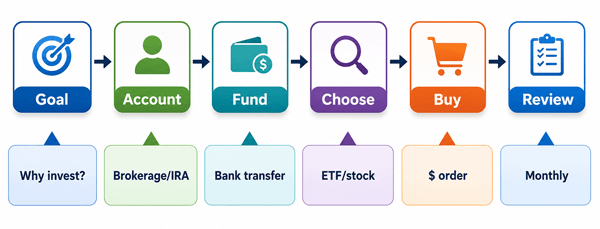
Figure 1: A simple beginner workflow for using a stock market app.
Most stock market apps follow the same basic process:
- You create an account and verify your identity. Regulated brokers must confirm who you are, usually with your name, address, tax information, and identity details.
- You choose an account type. Common choices include a taxable brokerage account, retirement account, custodial account, or automated investing account.
- You connect a bank account and deposit money. Some apps allow instant buying power, but the bank transfer may still take time to fully settle.
- You choose an investment. Beginners usually see stocks, ETFs, mutual funds, options, crypto, or robo-advisor portfolios. Not all choices are equally beginner-friendly.
- You place an order. A market order buys at the current available price. A limit order lets you set the maximum price you are willing to pay.
- You track performance and review periodically. Good investing is not checking the app every ten minutes; it is reviewing whether your portfolio still matches your goals.
Example: Sara has $100 and wants to start slowly. Instead of buying one expensive stock, she uses fractional shares to invest $80 into a broad U.S. stock market ETF and keeps $20 as cash. She sets a recurring monthly deposit of $50. This is not exciting, but it is much closer to real beginner investing than trying to guess tomorrow’s hottest stock.
4. What Beginners Should Know Before Downloading Any Investing App
4.1 Investing is not the same as saving
A savings account is usually for money you cannot afford to lose. Investing is for money you can leave alone long enough to handle market ups and downs. If someone needs rent money next month, a stock market app is not the right place for that money.
4.2 A $0 commission does not mean everything is free
Many apps offer $0 online stock and ETF commissions, but beginners still need to check other costs: ETF expense ratios, advisory fees, subscription fees, options contract fees, margin interest, account transfer fees, crypto spreads, and fund fees. A low-fee investing platform is valuable, but only if the reader understands where fees can still appear.
4.3 Fractional shares are powerful for small investors
Fractional shares let a beginner invest by dollar amount instead of buying a whole share. For example, if one share costs $500, a beginner may still be able to buy $10 or $25 worth. This helps small investors build diversified portfolios instead of putting all their money into one cheap stock.
4.4 Diversification matters more than finding the perfect stock
A common beginner mistake is trying to find one winning company. A more practical approach is to spread money across many companies through ETFs or diversified portfolios. Diversification cannot remove all risk, but it helps reduce the damage from being wrong about one company.
4.5 The app should be regulated and transparent
Beginners should check whether the brokerage is registered, whether it is a FINRA member, whether customer assets have SIPC protection, and whether fees are clearly disclosed. SIPC protection helps if a member brokerage fails and customer assets are missing; it does not protect against normal market losses.
5. Best Stock Market Apps for Beginners: Detailed Comparison
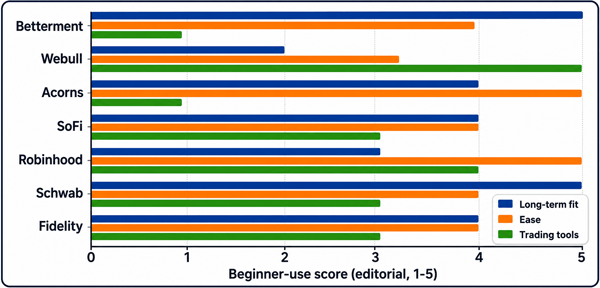
Figure 2: Editorial comparison based on beginner use cases, not investment performance.
| App | Best for | Beginner strengths | Possible drawback | Typical beginner use | Editorial verdict |
|---|---|---|---|---|---|
| Fidelity | All-around investing | Broad investments, fractional shares, research, education, retirement accounts | Interface may feel less playful than newer apps | Build a long-term ETF portfolio or buy fractional shares | Best first choice for many serious beginners |
| Charles Schwab | Traditional brokerage + support | Strong brand, research, $0 online stock/ETF trades, fractional shares | Fractional share availability can be more limited depending on program | Start with stocks/ETFs and grow into planning tools | Excellent for beginners who want support |
| Robinhood | Simple mobile trading | Clean design, fractional shares, quick account setup, easy stock access | Can encourage frequent trading; advanced products require caution | Buy small amounts of stocks/ETFs and learn basics | Good app, but users need discipline |
| SoFi Invest | Banking + investing in one place | Active and automated investing, simple interface, financial ecosystem | Investment research may be lighter than large brokers | Invest while managing banking, loans, and savings tools | Good for beginners who want convenience |
| Acorns | Automatic small investing | Round-ups, recurring deposits, diversified ETF portfolios, education | Monthly subscription can be high for very small balances | Invest spare change without thinking much | Great for habit-building |
| Webull | Charts and active learning | Advanced charts, market data, paper trading style experience | Too complex for a true beginner; active trading temptation | Learn charts after mastering basics | Better as a second app than first app |
| Betterment | Hands-off robo-advisor | Automated ETF portfolios, rebalancing, goal-based planning | Less control over individual stocks | Invest monthly toward goals without picking stocks | Best for hands-off beginners |
5.1 Fidelity - Best all-around stock market app for beginners
Fidelity is a strong choice for beginners who want to start simple but not outgrow the platform quickly. It offers $0 online U.S. stock and ETF commissions, fractional share investing, retirement accounts, educational content, screeners, and research. A beginner can start with a small dollar amount, buy diversified ETFs, and later explore retirement planning, mutual funds, bonds, and more advanced tools.
- Best for: beginners who want a serious long-term investing home.
- Beginner-friendly feature: dollar-based fractional investing makes it easier to start with small amounts.
- Practical example: a beginner can invest $25 a week into a broad-market ETF instead of waiting until they can buy full shares.
- Watch out for: too much information can feel overwhelming at first; focus on simple ETF investing before exploring advanced research.
5.2 Charles Schwab - Best beginner app from a traditional brokerage
Charles Schwab combines a strong brokerage reputation with a modern mobile app, $0 online stock and ETF commissions, fractional share availability, research, and customer support. It is useful for beginners who want the comfort of a major brokerage rather than a trendy trading-only app.
- Best for: beginners who value support, trust, and long-term account growth.
- Beginner-friendly feature: fractional shares help users buy smaller dollar amounts of selected stocks or ETFs.
- Practical example: a new investor can use Schwab to open a taxable brokerage account now and later add an IRA.
- Watch out for: some features may feel more traditional than app-first competitors.
5.3 Robinhood - Best simple interface, but not best for every behavior
Robinhood became popular because it made stock investing feel simple. The app offers commission-free stock trading, fractional shares, real-time market data, and an easy mobile experience. For a beginner who only wants a clean interface, it can be attractive. However, the same simplicity can encourage people to trade too often, follow hype, or touch advanced products before they understand risk.
- Best for: disciplined beginners who want a clean app and simple stock/ETF access.
- Beginner-friendly feature: fractional shares and easy order placement.
- Practical example: a beginner can buy $10 of an ETF and track it without needing a complicated desktop platform.
- Watch out for: avoid options, margin, crypto, and frequent trading until you understand the risks.
5.4 SoFi Invest - Best for beginners who want banking and investing together
SoFi Invest is useful for people who already use SoFi or want a simple financial ecosystem. It offers active investing and automated investing, which means a beginner can either choose investments personally or use a robo-style portfolio. This makes it easier for users who want investing, banking, budgeting, and loans under one login.
- Best for: beginners who want convenience and a simple money-management ecosystem.
- Beginner-friendly feature: active and automated investing options.
- Practical example: a user can start with automated ETF investing, then later learn how to buy individual stocks.
- Watch out for: compare advisory fees, fund fees, and product limitations before choosing automated investing.
5.5 Acorns - Best for automatic investing and building the habit
Acorns is designed around small, automatic investing. Its Round-Ups feature can invest spare change from everyday purchases, and recurring deposits can help beginners build consistency. This is helpful for people who say, “I never remember to invest.” The downside is that a monthly subscription can be expensive as a percentage of a tiny account balance.
- Best for: people who need automation more than stock-picking tools.
- Beginner-friendly feature: Round-Ups and recurring investing into diversified portfolios.
- Practical example: a $30.45 grocery purchase can round up and invest the spare change automatically.
- Watch out for: even a modest monthly subscription can be significant as a percentage of a very small account balance. Check the current pricing before opening an account.
5.6 Webull - Best for chart tools, not for nervous beginners
Webull offers advanced charts, market data, and trading tools. It can be useful for beginners who are genuinely studying markets, but it may be too much for someone who has never invested before. A chart-heavy platform can make investing feel like a daily game instead of a long-term plan.
- Best for: learners who want to study charts and market behavior.
- Beginner-friendly feature: strong tools and data in one app.
- Practical example: a beginner can use it to watch price movement and learn order types before making large trades.
- Watch out for: more tools can create more temptation to trade.
5.7 Betterment - Best hands-off investing app for beginners
Betterment is a robo-advisor rather than a stock-picking app. A beginner answers questions about goals, time horizon, and risk tolerance, and the platform builds a diversified ETF portfolio. This is a strong choice for someone who does not want to choose individual stocks at all.
- Best for: beginners who want portfolio management, not stock selection.
- Beginner-friendly feature: automated portfolio building and rebalancing.
- Practical example: a user saving for a house in five years may get a more conservative portfolio than a user investing for retirement in 30 years.
- Watch out for: advisory fees and limited control compared with self-directed brokerage apps.
6. How to Choose the Best Beginner Investing App: A Practical Checklist
| Question | Why it matters | Beginner-friendly answer |
|---|---|---|
| Can I buy fractional shares? | Small investors can start with dollar amounts instead of full shares. | Yes, especially for stocks and ETFs. |
| What are the real fees? | Fees reduce returns over time. | Look for $0 stock/ETF trades, low ETF expense ratios, and no unnecessary subscriptions. |
| Is the app easy to understand? | Confusing apps lead to mistakes. | The app should clearly show cash, holdings, order type, fees, and risk warnings. |
| Does it support ETFs? | ETFs are often easier for diversification. | A beginner should usually have access to broad-market ETFs. |
| Does it offer education? | New investors need context before buying. | Look for explainers, risk information, calculators, and plain-language help. |
| Can I open the right account type? | Taxable accounts and retirement accounts serve different goals. | Choose an app that supports the account type you actually need. |
| Is customer support available? | Beginners often need help with transfers, tax forms, and account issues. | Large brokerages may offer stronger support options. |
| Is it regulated and protected? | Trust and safety matter in finance. | Check FINRA BrokerCheck and SIPC membership; remember SIPC does not protect market losses. |
7. A Beginner’s First 30 Days: How to Use a Stock Market App Safely
Day 1-3: Learn before depositing. Read the app’s fee schedule, account agreement, order types, and available investments. Search the brokerage on FINRA BrokerCheck. Confirm whether the brokerage is a SIPC member.
Day 4-7: Open the right account. A taxable brokerage account is flexible, but a retirement account may be better for long-term retirement investing. A robo-advisor account may be best if you do not want to pick investments.
Week 2: Deposit a small test amount. Start with an amount that will not hurt your life if the market drops. Many beginners use $10, $25, $50, or $100 to learn the mechanics.
Week 3: Buy something simple. A broad-market ETF is often easier to understand than a single company. Use a dollar amount if fractional shares are available. Avoid margin, options, leveraged ETFs, and meme stocks at this stage.
Week 4: Set a review habit. Review monthly, not hourly. Ask: Did I invest according to my plan? Did I overreact to news? Are my fees low? Am I diversified?
8. Beginner Examples: Which App Fits Which Person?
- Aisha, age 22, wants to invest $25 a week for the long term. A low-fee brokerage like Fidelity or Schwab with fractional ETF investing may fit well.
- Bilal wants to invest but forgets every month. Acorns or another automated investing app may help him build the habit, as long as the subscription fee makes sense for his balance.
- Maya wants no stock-picking at all. Betterment or an automated investing option from SoFi can build and rebalance a portfolio for her.
- Omar wants to study charts and learn trading language. Webull can be useful for education and chart practice, but he should keep his actual trades small while learning.
- Nadia likes a simple app and wants to buy small amounts of companies she understands. Robinhood can work if she creates rules that prevent impulsive trading.
9. Common Beginner Mistakes to Avoid
- Choosing an app only because a friend uses it. The best app for a day trader may be the wrong app for a long-term beginner.
- Thinking commission-free means risk-free. A stock can still lose money even if the trade costs $0.
- Buying one “cheap” stock instead of a diversified ETF. A $2 stock is not automatically safer than a $500 stock.
- Using margin too early. Borrowed money can increase losses quickly.
- Trading options without understanding them. Options can expire worthless and are not necessary for beginner investing.
- Checking the app too often. Frequent checking creates emotional decisions.
- Ignoring taxes. Selling investments can create taxable events in a regular brokerage account.
- Following social media hype. If the only reason to buy is “everyone is talking about it,” pause.
10. Important Terms Explained Like You Are New
| Term | Simple meaning |
|---|---|
| Stock | A small ownership piece of a company. |
| ETF | A basket of investments that trades like a stock. |
| Brokerage account | An account that lets you buy and sell investments. |
| Fractional share | A piece of one share, useful when you invest by dollar amount. |
| Market order | An order to buy or sell quickly at the current available price. |
| Limit order | An order that only executes at your chosen price or better. |
| Dividend | A payment some companies or funds make to investors. |
| Expense ratio | The yearly cost of owning a fund, taken from the fund’s assets. |
| Robo-advisor | A digital service that builds and manages a portfolio for you. |
| SIPC | Protection if a member brokerage fails and assets are missing, within limits; it does not protect investment losses. |
11. Final Verdict: The Best Stock Market App for a Beginner
If a beginner wants the safest overall starting point, a full-service low-cost brokerage app such as Fidelity or Charles Schwab is usually a strong first choice because it combines low-cost trading, fractional investing, education, account choices, and long-term usefulness. If the beginner wants automation, Acorns or Betterment may be better. If the beginner wants the simplest mobile interface, Robinhood is easy to use, but discipline is essential. If the beginner wants charts and active trading tools, Webull is powerful but better after learning the basics. If the beginner already uses SoFi, SoFi Invest can be convenient.
The best app should help a beginner build good habits: invest regularly, diversify, understand fees, avoid hype, and stay patient. The app is only a tool. The real advantage comes from behavior.
12. FAQ: Best Stock Market Apps for Beginners
12.1 What is the easiest stock market app for beginners?
Robinhood and Acorns are among the easiest to understand, but Fidelity, Schwab, SoFi, and Betterment may be better depending on whether the reader wants long-term brokerage tools, automation, or support.
12.2 Can I start investing with $10?
Yes, many apps support fractional shares or small recurring deposits. Starting small is often a good way to learn the process.
12.3 Are stock market apps safe?
A regulated brokerage app can be safe from an account-access standpoint if the user uses strong passwords and two-factor authentication. But investments themselves can lose value. SIPC protection does not protect against normal market losses.
12.4 What should a beginner buy first?
Many beginners start with broad-market ETFs because they provide diversification. Individual stocks require more research and more emotional discipline.
12.5 Is a robo-advisor better than a stock trading app?
For people who do not want to pick investments, a robo-advisor can be better. For people who want control and are willing to learn, a brokerage app can be better.
12.6 Should beginners trade options?
Usually no. Options are complex and can create fast losses. Beginners should first understand stocks, ETFs, diversification, taxes, and risk.
12.7 How often should beginners check their app?
Monthly is enough for many long-term investors. Checking daily can lead to emotional trading.
12.8 Which fees matter most?
ETF expense ratios, advisory fees, subscription fees, transfer fees, options fees, margin interest, and crypto spreads can matter. Always read the fee schedule.
Sources Consulted and Checked
These sources were consulted and checked while preparing this article to support accuracy, clarity, and responsible presentation of the information.
- Fidelity: Fractional shares, mobile app, and $0 commission details: https://www.fidelity.com/trading/fractional-shares and https://www.fidelity.com/trading/mobile-trading
- Charles Schwab: Fractional shares and stock trading details: https://www.schwab.com/fractional-shares-stock-slices and https://www.schwab.com/stocks
- Robinhood: Commission-free investing and fractional share details: https://robinhood.com/
- SoFi: SoFi Invest, fractional shares, automated investing, and fee disclosures: https://www.sofi.com/invest/
- Acorns: Pricing, Round-Ups, and automatic investing details: https://www.acorns.com/pricing/ and https://www.acorns.com/round-ups/
- Webull: Commission-free trading and charting tools: https://www.webull.com/
- SEC Investor.gov: Beginner investing basics, fees, fraud red flags, and diversification: https://www.investor.gov/
- FINRA BrokerCheck: Broker and firm background checks: https://brokercheck.finra.org/
- SIPC: Brokerage protection limits and what SIPC protects: https://www.sipc.org/for-investors/what-sipc-protects
- Forbes Advisor: Recent investing app fee context and app category comparisons: https://www.forbes.com/advisor/investing/best-investment-apps/
Reader Advice
This article is provided solely for educational and informational purposes. It is not personal financial, investment, legal, tax, or accounting advice, and it does not recommend that any reader buy, sell, or hold a particular investment or use a particular platform. Investing involves risk, including the possible loss of principal. Before making any financial decision, consider your goals, time horizon, financial circumstances, risk tolerance, tax position, and the terms and risks of the relevant account or product. Seek advice from an appropriately qualified and regulated professional when needed. Fees, features, eligibility rules, investor protections, regulations, promotions, and product availability may change and may differ by country, state, account type, balance, or other factors. Verify current facts, figures, disclosures, and regulatory status directly through official sources, including the provider’s website and relevant regulators. Where affiliate or sponsored links are used, they should be clearly disclosed, and commercial relationships should not determine the substance of the article.