Best Budgeting Apps of 2026: Compare Features, Pricing, Pros & Cons
Quick Answer: Which Budgeting App Is Best?
The best budgeting app depends on how you manage money. Some apps are built for hands-on planning, some automate spending tracking, and others are better for seeing your whole financial life in one dashboard. For most beginners, the right choice is the app you will actually check every week.
For searchers comparing budgeting apps, the most important decision points are price, bank syncing, ease of use, privacy, shared access, debt-payoff support, and whether the app helps you plan before spending instead of only reporting after spending.
| Best for | App to consider | Why it fits |
|---|---|---|
| Zero-based budgeting and active planning | YNAB or EveryDollar | Both help you assign jobs to your money before you spend it. YNAB is more flexible and method-driven; EveryDollar is simple and goal-oriented. |
| Couples and households | Monarch Money or Goodbudget | Monarch is strong for shared dashboards and account tracking. Goodbudget is useful for envelope budgeting with a partner. |
| Low-cost paid option | Quicken Simplifi | It offers account syncing, spending plans and reports at a lower annual price than many premium competitors. |
| Avoiding overspending | PocketGuard | Its “in my pocket” style feature is designed to show what is safe to spend after bills and goals. |
| Free net worth and investment view | Empower | Strong for tracking accounts, net worth and investments; less detailed for category-by-category budgeting. |
| Free credit and general money tracking | NerdWallet | Useful for beginners who want a free dashboard with credit and financial tips, but not a deep budgeting system. |
1. What Is a Budgeting App?
A budgeting app is a digital tool that helps you plan, track and review how your money is used. Instead of writing every expense in a notebook, you can use an app to organize income, bills, savings goals, debt payments and spending categories.
Budgeting apps usually work in one of two ways. Manual apps ask you to enter or approve transactions yourself. Automatic apps connect to your bank accounts and import transactions for you. Some apps combine both approaches.
A good budgeting app does not magically fix money problems. It gives you visibility, structure and reminders. You still decide what matters, how much to spend, and which habits to change.
2. How Budgeting Apps Work
Most budgeting apps follow a simple process: you add your income, create categories, connect or enter transactions, compare actual spending with your plan, and adjust the budget as life changes.
For example, imagine you earn $3,000 per month. You might plan $1,000 for rent, $400 for groceries, $250 for transportation, $300 for debt payments, $300 for savings and the rest for utilities, insurance, personal spending and irregular expenses. A budgeting app helps you see whether your real spending follows that plan.
3. Main Types of Budgeting Apps
| Type | How it works | Best for | Possible drawback |
|---|---|---|---|
| Zero-based budgeting apps | You give every dollar a specific job before spending. | People who want control and intentional planning. | Requires regular attention and habit-building. |
| Envelope budgeting apps | You divide money into digital envelopes such as groceries, rent and savings. | Visual planners, couples and cash-style budgeters. | Can feel manual unless bank syncing is included. |
| Spending tracker apps | The app imports transactions and shows where money goes. | Beginners who want awareness before strict planning. | Tracking alone may not change behavior. |
| Net worth dashboard apps | The app shows bank accounts, investments, loans and total net worth. | People with several financial accounts. | Budgeting features may be basic. |
| Banking apps with budget tools | Your bank categorizes transactions and offers alerts. | People who want a simple free option. | Limited when you use multiple banks or cards. |
■ Best Budgeting Apps Compared
Prices and features can change, and app availability may vary by country, bank connection provider and device. The pricing below was checked against official app pages and reputable financial review sources in July 2026. Always verify current pricing before subscribing.
| App | Approx. price | Main budgeting style | Best for | Free option/trial |
|---|---|---|---|---|
| YNAB | $14.99/month or $109/year | Zero-based, proactive budgeting | People who want a complete budgeting method and are willing to learn it | 34-day free trial; free year for eligible college students |
| Monarch Money | $14.99/month or about $99.99/year | Full financial dashboard with budgeting and goals | Couples, households and people replacing Mint-style tracking | 7-day trial; no permanent free plan |
| Quicken Simplifi | Often listed from about $3.99/month billed annually | Spending plan, reports and account tracking | Users who want a lower-cost paid tracker with clean reports | Trial or promotional offers may vary |
| PocketGuard | $12.99/month or $74.99/year | Automated spending limit and cash-flow tracking | People who ask, “How much can I safely spend?” | 7-day trial; limited free access may vary |
| EveryDollar | Free basic plan; Premium $17.99/month or $79.99/year | Zero-based budget with Ramsey-style debt focus | Beginners who want a simple monthly budget and debt-payoff direction | Free basic plan and 14-day Premium trial |
| Goodbudget | Free plan; Premium $10/month or $80/year | Digital envelope budgeting | Couples and families who like envelope budgeting | Free plan available |
| Empower Personal Dashboard | Free dashboard; advisory fees apply only if using paid wealth management | Net worth, cash flow and investment tracking | People who want a free whole-picture dashboard | Free |
| NerdWallet app | Free | General money tracking, credit and financial tips | Beginners who want a free financial overview | Free |
Chart: Approximate Annual Cost of Popular Budgeting Apps
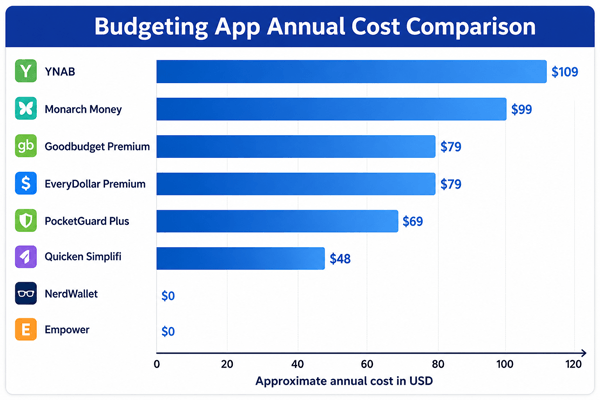
Image. Costs are approximate USD prices based on public pricing pages and review sources checked in July 2026. Promotional rates, taxes, app store pricing and regional pricing may differ.
The recommendations below consider beginner usefulness, budgeting method, cost, privacy and security factors, bank-connection availability, shared budgeting needs, and whether the app encourages real behavior change rather than passive tracking only.1. YNAB
YNAB stands for You Need A Budget. It is best known for a hands-on zero-based budgeting method. Instead of simply showing what you spent last month, it pushes you to decide what today’s available money needs to do before your next paycheck.
Pros:
- Strong method for people who want behavior change, not just tracking.
- Works well for irregular expenses because you can set money aside monthly for future bills.
- Helpful education, reports and category-based planning.
Cons:
- Costs more than many apps.
- Takes time to learn.
- May feel too active for people who only want passive tracking.
Best practical use: Choose YNAB if you want to become more intentional with money and do not mind checking your budget often.
2. Monarch Money
Monarch Money is a modern personal finance dashboard with budgeting, goals, recurring expenses, account tracking and collaboration features. It became popular among people looking for a strong Mint alternative.
Pros:
- Good for couples and shared household planning.
- Clean interface and broad financial overview.
- Useful for tracking goals, recurring expenses and net worth in one place.
Cons:
- No permanent free plan.
- More expensive than basic apps.
- May be more than a beginner needs if they only want simple expense tracking.
Best practical use: Choose Monarch if you want a polished all-in-one money dashboard and share finances with a spouse or partner.
3. Quicken Simplifi
Quicken Simplifi focuses on spending plans, transactions, account syncing, reports and projected cash flow. It is designed to be lighter than full desktop Quicken but more structured than a basic bank app.
Pros:
- Lower annual cost than many premium budgeting apps.
- Good reports and spending plan features.
- Useful for people who want tracking without a strict budgeting philosophy.
Cons:
- Usually billed annually.
- Less method-driven than YNAB or envelope systems.
- Connection reliability can vary by financial institution.
Best practical use: Choose Simplifi if you want a paid app with broad tracking and reports at a relatively budget-friendly price.
4. PocketGuard
PocketGuard is built around a practical question: after bills, goals and necessities, how much money is left to spend? This makes it appealing for people who overspend because they do not have a clear spending limit.
Pros:
- Simple safe-to-spend concept.
- Good for cash-flow awareness and spending limits.
- Debt payoff features may help users focused on reducing balances.
Cons:
- Premium features require payment.
- Less ideal for people who want detailed manual category planning.
- May oversimplify complex budgets.
Best practical use: Choose PocketGuard if your main problem is not knowing how much you can safely spend between paychecks.
6. EveryDollar
EveryDollar is a simple zero-based budgeting app connected to the Ramsey budgeting approach. The basic version lets you build a monthly budget, while Premium adds bank connectivity, paycheck planning and additional tools.
Pros:
- Easy for beginners to understand.
- Free basic version is useful for manual budgeters.
- Clear focus on debt payoff and monthly planning.
Cons:
- Premium monthly plan is expensive compared with some competitors.
- Manual categorization may feel time-consuming.
- The Ramsey approach may not fit everyone’s financial philosophy.
Best practical use: Choose EveryDollar if you want a simple zero-based budget and like a structured debt-payoff approach.
7. Goodbudget
Goodbudget turns the envelope method into a digital system. You create envelopes for categories such as groceries, eating out, rent, gifts and savings, then track spending against each envelope.
Pros:
- Great for visual planning.
- Useful for couples and families who want shared envelopes.
- Free plan is available for basic use.
Cons:
- The free plan has limits.
- Manual use can require discipline.
- Bank syncing is tied to paid options.
Best practical use: Choose Goodbudget if you already like envelope budgeting or want a simple category-by-category spending plan.
9. Empower Personal Dashboard
Empower is less of a strict budgeting app and more of a full financial dashboard. It is strong for tracking net worth, investments, cash flow and linked accounts.
Pros:
- Free to use for dashboard features.
- Strong investment and net worth view.
- Useful when your money is spread across several accounts.
Cons:
- Budgeting tools are more basic than dedicated budget apps.
- Users may receive wealth management prompts.
- Not ideal if you need detailed category planning.
Best practical use: Choose Empower if you want a free overview of your full financial picture, especially investments and net worth.
11. NerdWallet App
The NerdWallet app is a free personal finance app that combines account tracking, net worth tools, credit score features and personalized financial tips. It is more of a general finance companion than a deep budgeting system.
Pros:
- Free and beginner-friendly.
- Helpful for credit awareness and financial education.
- Good starting point if you are not ready to pay for budgeting software.
Cons:
- Less powerful for detailed monthly budgeting.
- Recommendations may include financial products.
- Not the best choice for envelope or zero-based budgeting.
Best practical use: Choose NerdWallet if you want a free financial overview and learning tool before moving to a more structured budget app.
■ How to Choose the Best Budgeting App for You
Before choosing an app, think about your actual money behavior. A powerful app is not automatically better. The best budgeting app is the one that solves your main problem without creating a new habit you hate.
- Start with your main problem. If you overspend, choose an app with clear spending limits. If you forget bills, choose one with recurring bill tracking. If you and your partner need transparency, choose shared budgeting features.
- Decide how much manual work you can handle. Manual budgeting builds awareness, but automatic syncing saves time. Many beginners do best with automation plus a weekly review.
- Check bank connection availability. Not every app connects smoothly with every bank, credit card or country.
Also confirm whether the app works in your country, supports your currency, and whether subscription cancellation must be handled through the website, Google Play, or Apple App Store.
- Compare the annual cost, not only the monthly price. A $15 monthly app can cost around $180 per year if you do not use the annual discount.
- Test the free trial with real data. Add your accounts, create categories and review at least one week of spending before paying.
- Review privacy and security. Look for read-only connections, two-factor authentication, clear privacy policies and the ability to delete your data.
■ Important Budgeting App Features Explained
| Feature | What it means | Why it matters for beginners |
|---|---|---|
| Bank syncing | The app imports transactions from linked bank and credit card accounts. | Saves time, but you still need to check categories for accuracy. |
| Manual transactions | You enter purchases yourself. | Builds awareness and works when bank syncing is unavailable. |
| Custom categories | You can create categories that match your life. | Makes the budget realistic instead of forcing generic labels. |
| Recurring bills | The app tracks bills that repeat monthly or annually. | Helps avoid late fees and surprise expenses. |
| Goals | You set savings, debt payoff or spending targets. | Turns budgeting into progress rather than restriction. |
| Reports | Charts show trends in spending, income or net worth. | Helps you spot patterns and adjust your plan. |
| Shared access | More than one person can view or manage the budget. | Useful for couples, roommates and families. |
| Export data | You can download transactions or reports. | Helpful if you want backups or spreadsheet analysis. |
■ A Simple Beginner Workflow for Using Any Budgeting App
- Create categories for essentials, debt, savings, giving and flexible spending.
- Add your income and fixed bills first.
- Set realistic limits for groceries, transportation, eating out and personal spending.
- Connect accounts only if you are comfortable with the app’s security and privacy policy.
- Review transactions once or twice per week.
- Adjust categories before judging yourself. A budget improves through practice.
- At the end of the month, review what worked, what failed and what should change next month.
■ Benefits, Risks and Limitations of Budgeting Apps
| Benefits | Risks or limitations |
|---|---|
| You can see where your money is going. | Bad categories or ignored alerts can make the app less useful. |
| Automation reduces the work of tracking expenses. | Bank connections can fail or misclassify transactions. |
| Goals and reports can motivate better habits. | Too many charts can distract from simple actions. |
| Shared budgets can improve household communication. | Shared access requires trust and clear rules. |
| Mobile access makes the budget easier to check before spending. | Privacy and data sharing should be reviewed carefully. |
■ Common Mistakes to Avoid
- Choosing the app with the most features instead of the app that matches your habits.
- Paying for an annual subscription before testing the app with real transactions.
- Setting unrealistic category limits and quitting after the first bad week.
- Tracking spending without making decisions before spending.
- Ignoring irregular expenses such as car repairs, gifts, school costs, insurance and annual subscriptions.
- Not reviewing privacy settings, connected accounts and cancellation rules.
■ Practical Recommendations by Situation
| Situation | Recommended app type | Why |
|---|---|---|
| You live paycheck to paycheck | PocketGuard, EveryDollar or YNAB | You need a clear plan for what money is available before the next paycheck. |
| You are a student | YNAB student offer, free Goodbudget, NerdWallet or your bank app | Start with low-cost tools and focus on habit-building. |
| You have irregular income | YNAB or envelope-style budgeting | You need to plan from money already available, not ideal monthly averages. |
| You share expenses with a partner | Monarch Money or Goodbudget | Shared dashboards and categories make household planning easier. |
| You want a free investment/net worth dashboard | Empower | Budgeting is basic, but the whole-picture view is strong. |
| You want simple reports at a lower paid price | Quicken Simplifi | Good balance of account tracking and spending reports. |
■ FAQs About Budgeting Apps
1. Are budgeting apps worth it?
They can be worth it if they help you spend less, avoid late fees, save consistently or reduce debt. A paid app is not worth it if you rarely open it or only use features your bank already provides for free.
2. What is the best free budgeting app?
For a free broad dashboard, Empower and NerdWallet are useful starting points. For manual envelope budgeting, Goodbudget has a free plan. Your bank app may also be enough if you only need basic categorization and alerts.
3. Is YNAB better than Monarch?
YNAB is better for people who want a detailed budgeting method and active money decisions. Monarch is better for people who want a shared full financial dashboard with budgeting, goals and account tracking.
4. Is it safe to connect my bank account to a budgeting app?
Many reputable apps use secure, read-only data connections, but safety depends on the app, the data provider and your own account security. Use strong passwords, two-factor authentication and review privacy policies before connecting accounts.
Also check whether the app supports multi-factor authentication, lets you revoke linked accounts, explains how data is shared, and allows account deletion if you stop using the service.
5. Should I use a spreadsheet instead of an app?
A spreadsheet is cheaper and more customizable, but it requires more manual work. An app is better if automation, reminders and mobile access help you stay consistent.
6. Can budgeting apps help me get out of debt?
Yes, but they do not repay debt automatically. They help you find extra cash, plan payments and avoid new overspending. Debt payoff still requires a realistic repayment plan and consistent action.
7. How often should I check my budgeting app?
Most beginners should check it once or twice per week. Daily checking can help during the first month, but weekly reviews are enough for many people once the budget is stable.
8. What should I do if the app categorizes transactions incorrectly?
Correct the category, create rules if the app supports them and review transactions regularly. Incorrect categories are normal in automated budgeting and should not be ignored.
9. What is the easiest budgeting app for beginners?
The easiest app is usually the one with the fewest steps for your main goal. EveryDollar and Goodbudget are simple for manual planning, PocketGuard is simple for safe-to-spend awareness, and NerdWallet or a bank app may be enough for a free first step.10. What is the best budgeting app for couples?
Monarch Money and Goodbudget are strong options for couples because they support shared visibility and household planning. The best choice depends on whether you prefer a full dashboard or a simpler envelope-style budget.■ Final Verdict: The Best Budgeting App Is the One That Changes Your Behavior
Budgeting apps are tools, not magic solutions. YNAB and EveryDollar are strong for intentional zero-based budgeting. Monarch Money is useful for households and full financial dashboards. Quicken Simplifi offers good paid tracking at a lower annual price. PocketGuard is practical for people who need a quick safe-to-spend number. Goodbudget keeps envelope budgeting simple. Empower and NerdWallet are useful free options for people who want financial visibility before paying for a dedicated budget app.
If you are a beginner, start with one goal: understand where your money is going and decide what your next dollar should do. Use a free plan or trial first, keep categories simple, and review your budget weekly. The app matters, but the habit matters more.
Sources and Pricing Notes
- YNAB pricing page: annual plan $109/year, monthly plan $14.99/month, 34-day free trial; student offer availability should be verified on YNAB’s official student page.
- Monarch Money public app and review sources: 7-day trial; pricing commonly listed around $14.99/month or $99.99/year.
- Quicken pricing pages: Simplifi is commonly promoted from about $3.99/month billed annually for first-year offers; standard pricing and renewal pricing may be higher, so verify before subscribing.
- PocketGuard pricing page and app listings: Premium commonly lists $12.99/month or $74.99/year, with a 7-day free trial; app-store pricing and lifetime offers may vary.
- EveryDollar help center: Premium listed at $17.99/month or $79.99/year after a 14-day free trial.
- Goodbudget pricing and update pages: Premium listed at $10/month or $80/year; free plan available.
- Empower Personal Dashboard pages and review sources: dashboard tools available for free; advisory fees apply only for paid wealth management services.
- NerdWallet app listings: free app with tracking, credit and personal finance features.
Reader Advice: This article is for educational and informational purposes only and should not be taken as financial, legal, tax, or professional advice. Please check the latest details from official sources because prices, features, rules, availability, and policies can change over time.