Block Explorers Explained: How to Read Crypto Transactions on Etherscan and Blockchain.com
1. Quick answer: what is a block explorer?
A block explorer is a searchable website for a public blockchain. It lets you look up transactions, wallet addresses, blocks, fees, and network activity. Think of it like a search engine for blockchain records: you paste in a transaction hash, wallet address, block number, or token contract, and the explorer shows what happened on-chain.
For this guide, we focus on two popular examples: Etherscan for Ethereum and Ethereum-compatible activity, and Blockchain.com Explorer for Bitcoin, Ethereum, Bitcoin Cash, and other major chains. Etherscan describes itself as a block explorer that indexes Ethereum’s public ledger and makes transactions searchable. Blockchain.com’s explorer shows live network data, latest transactions, latest blocks, pending transactions, average fees, and market statistics.
2. Why beginners should learn to use block explorers
When you send crypto, your wallet or exchange may show a simple status such as “pending,” “completed,” or “failed.” A block explorer gives you the deeper evidence behind that status. It helps you answer practical questions:
- Did my transaction actually reach the blockchain?
- Was it successful, pending, failed, or dropped?
- Which address sent the funds and which address received them?
- How much crypto moved, and how much was paid in network fees?
- Was the transaction a simple coin transfer, a token transfer, a swap, an NFT transfer, or a smart contract interaction?
- How many confirmations does it have?
This is especially useful when an exchange deposit is delayed, a wallet transfer looks stuck, a DeFi swap does not appear in your wallet, or someone sends you a transaction hash as proof of payment.
3. How block explorers work in simple terms
Public blockchains record transactions in blocks. A block explorer runs infrastructure that reads blockchain data, organizes it, and displays it in a human-friendly format. You are not logging into the blockchain itself; you are searching an indexed copy of public blockchain data.
Here is the basic flow:
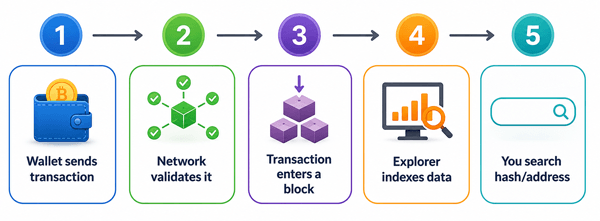
Diagram: How a blockchain transaction becomes searchable in a block explorer.
A block explorer usually gathers data from blockchain nodes, labels it, calculates useful summaries, and updates pages for transactions, addresses, blocks, tokens, contracts, and fees. Because blockchains are public, anyone can view this data. Because explorers are independent websites, small display differences can happen between explorers, especially for newly broadcast or pending transactions.
4. Key terms you need before using Etherscan or Blockchain.com
| Term | Plain-English meaning | Why it matters |
|---|---|---|
| Transaction hash / TxID | A unique ID for one blockchain transaction. | Use it to search the exact transaction. |
| Address | A public wallet or contract destination, similar to an account number. | Use it to view deposits, withdrawals, and token balances. |
| Block | A batch of confirmed transactions added to the chain. | Shows when the transaction became part of the blockchain. |
| Confirmations | How many blocks have been added after the block containing your transaction. | More confirmations usually means stronger settlement confidence. |
| Fee | The network cost paid to include or process a transaction. | Explains why the received amount may differ from the sent amount. |
| Gas | Ethereum’s unit for measuring computation and transaction work. | Needed to understand Ethereum transaction cost. |
| Nonce | An Ethereum account’s transaction number. | Useful for stuck or replacement transactions. |
| Mempool / pending pool | A waiting area for transactions not yet included in a block. | Explains pending Bitcoin and Ethereum transactions. |
| Smart contract | Code deployed on-chain that can receive transactions and perform rules. | Explains swaps, token transfers, NFT transfers, and approvals. |
5. Etherscan vs Blockchain.com: which explorer should you use?
| Feature | Etherscan | Blockchain.com Explorer |
|---|---|---|
| Best for | Ethereum transactions, ERC-20 tokens, NFTs, smart contracts, gas, approvals, and contract verification. | Bitcoin transactions, Bitcoin blocks, BTC addresses, plus quick views for Ethereum and selected chains. |
| Beginner use case | Check an ETH transfer, USDT/USDC token transfer, NFT movement, DeFi swap, or contract interaction. | Check a BTC payment, Bitcoin confirmations, miner fee, address activity, or latest Bitcoin blocks. |
| Search by | Transaction hash, address, block, token, ENS name, contract. | Transaction hash, address, block, and supported asset pages. |
| Fee style | Gas fee, gas price, gas used, base fee, priority fee, max fee. | Miner/network fee, fee rate, transaction size or weight details depending on the view. |
| Main limitation | It shows Ethereum data; Bitcoin activity needs a Bitcoin explorer. | It is simpler for Ethereum smart-contract detail than Etherscan. |
A simple rule: use Etherscan when the transaction is on Ethereum or an Ethereum-compatible explorer in the Etherscan family. Use Blockchain.com when you are checking a Bitcoin transaction or want a broad, beginner-friendly market and chain overview.
6. How to read an Ethereum transaction on Etherscan
You can search Etherscan using a transaction hash, wallet address, block number, token name, token contract address, or ENS name. If you are checking a specific transfer, the transaction hash is best because it takes you directly to one transaction.
6.1 Step-by-step: checking an Ethereum transaction hash
- Copy the transaction hash from your wallet, exchange withdrawal page, or the person who sent you crypto.
- Open Etherscan and paste the hash into the search bar.
- Open the transaction page and start with the Status field.
- Check the From and To fields to confirm the sender and receiver.
- Check Value for the ETH amount, and Token Transfers for ERC-20, ERC-721, or ERC-1155 assets.
- Check Transaction Fee, Gas Price, Gas Used, and confirmations if you need cost or settlement details.
- Check Input Data or Logs only if you are reviewing a smart contract interaction.
6.2 What the main Etherscan transaction fields mean
| Etherscan field | What it tells you | Beginner tip |
|---|---|---|
| Transaction Hash | The unique ID of this transaction. | Use this when asking support teams about a transfer. |
| Status | Success, Failed, Pending, or another state depending on the transaction. | Success means it was included and executed; failed means it was included but did not complete as intended. |
| Block | The block number containing the transaction. | A block number means it is no longer merely pending. |
| Timestamp | When the transaction was included in a block. | Useful for matching deposits and exchange records. |
| From | The address that signed or sent the transaction. | This is not always the final economic sender in complex contract calls. |
| To | The receiving address or smart contract called. | For swaps, “To” may be a contract, not the wallet receiving tokens. |
| Value | The amount of ETH directly transferred. | Token transfers may show under a separate Token Transfers area, not Value. |
| Transaction Fee | The ETH paid for the transaction. | This fee goes to network participants; it is not sent to the recipient. |
| Gas Limit | The maximum gas the sender allowed. | A high limit is not always fully spent. |
| Gas Used | How much gas the transaction actually consumed. | Out-of-gas failures happen when the transaction needs more gas than allowed. |
| Nonce | The sender account’s transaction sequence number. | If one nonce is stuck, later transactions from the same account may wait. |
| Input Data | Encoded instructions sent to a smart contract. | Beginners usually do not need to decode this unless reviewing a contract call. |
6.3 Example: reading a normal ETH transfer
Imagine Alice sends 0.20 ETH to Bob. On Etherscan, you should expect to see Alice’s address in From, Bob’s address in To, Value as 0.20 ETH, Status as Success after confirmation, and a Transaction Fee paid by Alice. Bob receives 0.20 ETH; Alice pays 0.20 ETH plus the network fee.
Common beginner confusion: the fee is not deducted from Bob’s received amount in a normal ETH transfer. It is paid by the sender separately from the sender’s ETH balance.
6.4 Example: reading a token transfer such as USDT or USDC
Now imagine Alice sends 100 USDC to Bob on Ethereum. The transaction might show Value as 0 ETH because no ETH was directly transferred. The useful part is usually the Token Transfers section, where you may see 100 USDC moving from Alice to Bob. Alice still pays gas in ETH, even though the asset transferred is USDC.
This is one of the biggest beginner mistakes on Etherscan: looking only at the ETH Value field and assuming nothing moved. For ERC-20 token transfers, always check Token Transfers.
6.5 Example: reading a DeFi swap
A swap may involve several internal steps: your wallet sends a transaction to a router contract, the contract pulls Token A, trades through a liquidity pool, and sends Token B back. The To field may show a contract address, not the person or wallet you expected. For swaps, review Token Transfers and Logs to understand the real asset movement.
Practical tip: if you used a DEX, compare the token amounts shown in Etherscan with the swap quote, but remember that slippage, price movement, and fees can change the final received amount.
7. How to read a Bitcoin transaction on Blockchain.com
Bitcoin transactions look different from Ethereum transactions. Bitcoin uses inputs and outputs. Instead of a simple “from one account to another account” model, a Bitcoin transaction spends previous outputs and creates new outputs. That is why a Bitcoin transaction page can show several sending and receiving addresses.
7.1 Step-by-step: checking a Bitcoin transaction on Blockchain.com
- Copy the Bitcoin transaction ID, often called a TxID or transaction hash.
- Open Blockchain.com Explorer and paste the TxID into the search bar.
- Check whether the transaction is confirmed or still pending.
- Review the number of confirmations.
- Check the inputs and outputs to understand where BTC came from and where it went.
- Check the fee and, when shown, the fee rate. A low fee rate can explain slow confirmation during network congestion.
7.2 What the main Blockchain.com Bitcoin fields mean
| Blockchain.com field | What it tells you | Beginner tip |
|---|---|---|
| Hash / TxID | The unique ID of the Bitcoin transaction. | Use it as proof that a transaction was broadcast. |
| Status / Confirmations | Whether the transaction is pending or confirmed, and how many blocks have followed. | Many services wait for several confirmations before crediting deposits. |
| Block | The Bitcoin block that included the transaction. | No block usually means it is still unconfirmed. |
| Inputs | The previous BTC outputs being spent. | A transaction can have many inputs, like using several bills to make one payment. |
| Outputs | The new BTC destinations created by the transaction. | One output may be payment; another may be change back to the sender. |
| Fee | The miner fee paid to include the transaction. | Fees affect confirmation priority, especially when the network is busy. |
| Size / Weight | How large the transaction is in blockchain terms. | Bitcoin fees often depend on data size, not just the BTC amount. |
7.3 Example: why Bitcoin transactions often show a “change” output
Suppose you have one unspent Bitcoin output worth 0.50 BTC and you send 0.10 BTC to a friend. Your wallet may spend the full 0.50 BTC input, send 0.10 BTC to your friend, pay a small fee, and send the remaining BTC back to a change address controlled by you. On a block explorer, this can look confusing because there may be two outputs. It does not necessarily mean you sent money to a stranger.
8. How to know whether a transaction is successful, pending, failed, or missing
| What you see | Likely meaning | What to do |
|---|---|---|
| Success / Confirmed | The transaction was included in a block and accepted by the network. | Check recipient address, amount, token transfers, and confirmations. |
| Pending / Unconfirmed | The transaction has been broadcast but not yet included in a block. | Wait, check fee level, and avoid sending repeated duplicate payments unless your wallet supports safe replacement. |
| Failed on Ethereum | The transaction was included but contract execution failed. The gas fee was still paid. | Review error, gas used, contract call, slippage, token approval, or out-of-gas issue. |
| Not found | The explorer cannot see the transaction hash. | Check the chain, verify the hash, wait a few minutes, or use another explorer. |
| Dropped / replaced | A pending transaction may have been removed or replaced by a transaction with the same nonce. | Check your wallet activity and nonce history. |
A confirmed transaction is not the same as a successful business outcome. For example, an Ethereum transaction can be confirmed but failed. A Bitcoin transaction can be confirmed but sent to the wrong address. A token transfer can succeed on-chain but still not appear in an exchange account if the exchange does not support that token or network.
9. Confirmations explained: how many are enough?
A confirmation means the transaction is in a block. Each new block added after it increases the confirmation count. More confirmations reduce the chance that the transaction will be affected by a short-lived chain reorganization.
There is no universal confirmation number for every use case. Wallets may show funds quickly. Exchanges and merchants often set their own confirmation rules based on the asset, network risk, and deposit value.
| Scenario | Typical practical approach | Why |
|---|---|---|
| Small personal ETH transfer | Often visible after one confirmation, but wait longer for high-value transfers. | Ethereum blocks are frequent, but applications may still wait for safety. |
| Exchange ETH or token deposit | Follow the exchange’s required confirmation count. | The exchange controls when it credits your account. |
| Small BTC payment | One confirmation may be enough for casual cases. | The transaction is included in a mined block. |
| Large BTC payment | Wait for several confirmations. | Higher value means lower tolerance for reorg risk or payment disputes. |
10. Fees: gas on Ethereum vs miner fees on Bitcoin
Fees are one of the most confusing parts of reading crypto transactions because Ethereum and Bitcoin calculate them differently.
| Topic | Ethereum / Etherscan | Bitcoin / Blockchain.com |
|---|---|---|
| Fee purpose | Pays for computation and inclusion in a block. | Pays miners to include transaction data in a block. |
| Main unit | Gas and gwei; total fee is based on gas used and fee settings. | Satoshis, often shown as a total fee and fee rate. |
| Depends on | Network demand, contract complexity, gas used, base fee, priority fee. | Network demand and transaction size/weight. |
| Simple transfer cost | Usually lower gas use than a contract interaction. | Depends on number of inputs/outputs and fee rate. |
| Common mistake | Thinking token transfers do not need ETH for gas. | Thinking the fee depends only on BTC amount sent. |
Best practice: before sending, check your wallet’s fee estimate and the explorer’s network fee data. For Ethereum, make sure you have enough ETH to pay gas even when sending tokens. For Bitcoin, remember that consolidating many small inputs can make a transaction larger and more expensive.
11. What block explorers can and cannot prove
11.1 What they can prove
- A transaction hash exists on a specific chain.
- A transaction was pending, confirmed, successful, or failed according to the chain data.
- Which public addresses and contracts were involved.
- How much crypto or which tokens moved on-chain.
- What fee was paid and when the transaction was included in a block.
11.2 What they cannot prove by themselves
- The real-world identity of an address owner.
- That a screenshot is genuine; screenshots can be edited.
- That an exchange has credited a deposit internally.
- That a token is safe, valuable, or legitimate.
- That funds can be recovered after being sent to the wrong address.
For serious verification, use the transaction hash directly in the explorer. Do not rely only on screenshots, copied text, or someone else’s claim.
12. Privacy and safety risks beginners should understand
Block explorers are powerful because public blockchain data is transparent. That transparency also creates privacy risks. If you share one wallet address, people may be able to inspect other transactions connected to that address.
- Do not share wallet addresses publicly unless you are comfortable with people seeing their activity.
- Never enter a seed phrase or private key into a block explorer. A real explorer does not need it.
- Be careful with fake explorer ads or phishing copies. Type the official domain yourself or use bookmarks.
- Treat unexpected tokens and NFTs with suspicion. Some are spam or phishing bait.
- Be cautious when using token approval tools. Understand what you are revoking or approving before signing anything.
13. Common mistakes and misconceptions
| Mistake | Why it is wrong | Better approach |
|---|---|---|
| “The explorer says success, so the exchange must credit me immediately.” | Exchanges use internal checks and required confirmations. | Check the exchange’s deposit rules and make sure you used the correct network and memo/tag if required. |
| “Value is 0 ETH, so nothing happened.” | Many token transfers show 0 ETH value but have ERC-20 transfers. | Check Token Transfers on Etherscan. |
| “The To address must be the final recipient.” | For smart contract calls, To may be a contract. | Review token transfers, internal transactions, and logs. |
| “A confirmed transaction can be cancelled.” | Confirmed blockchain transactions generally cannot be reversed by a block explorer. | Contact the receiving platform if relevant, but do not expect network-level reversal. |
| “Any token page on an explorer means the token is legitimate.” | Explorers display data; they do not guarantee investment quality. | Check official links, contract verification, liquidity, audits, and community warnings. |
| “Bitcoin has one sender and one receiver like a bank transfer.” | Bitcoin transactions can have many inputs and outputs. | Identify payment output and change output carefully. |
14. Practical scenarios: how to use explorers in real life
14.1 Scenario 1: Your exchange deposit has not arrived
- Find the transaction hash from your sending wallet or exchange.
- Open the correct explorer for the network you used.
- Confirm the recipient address matches the exchange deposit address.
- Confirm the token and network are supported by the exchange.
- Check confirmations against the exchange’s required count.
- If everything is correct, send the transaction hash to exchange support. If the address, network, or memo/tag is wrong, support may or may not be able to help.
14.2 Scenario 2: Someone claims they paid you
- Ask for the transaction hash, not just a screenshot.
- Search the hash in the correct explorer.
- Check the destination address is yours.
- Check the amount, token, and chain.
- Wait for enough confirmations before treating the payment as final.
14.3 Scenario 3: Your Ethereum transaction is stuck
If an Ethereum transaction is pending, check the nonce and fee. Transactions from the same address are processed in nonce order, so a low-fee pending transaction can hold up later transactions. Some wallets allow you to speed up or cancel by replacing the pending transaction with a higher-fee transaction using the same nonce. Only use your wallet’s official feature or clear instructions from the wallet provider.
14.4 Scenario 4: You interacted with a suspicious token
On Etherscan, check the token contract page, token transfers, holders, contract verification, and approval history. A verified contract is more transparent, but verification does not automatically mean the project is safe. If you granted spending approval to a suspicious contract, consider using a reputable approval checker and revoking unnecessary approvals.
15. Best practices for reading crypto transactions safely
- Always check the network first. Ethereum, BNB Chain, Polygon, Arbitrum, Bitcoin, and Bitcoin Cash are different chains.
- Use the transaction hash for exact lookup. Address searches are useful, but they show many transactions and can be confusing.
- Match the recipient address character by character, especially the first and last characters.
- For tokens, check token transfers, not only native coin value.
- For Bitcoin, understand inputs, outputs, and change addresses before assuming funds went somewhere suspicious.
- Wait for the confirmation count required by the service you are using.
- Never connect your wallet, sign a message, or enter private information just to view a transaction.
- Use official explorer domains and bookmark them to avoid phishing.
16. Pros and cons of block explorers
| Pros | Cons / limitations |
|---|---|
| Free and public access to blockchain transaction data. | Can be overwhelming for beginners. |
| Useful for verifying payments, deposits, fees, and confirmations. | Does not identify real-world owners by default. |
| Helps diagnose stuck, failed, or incorrect transactions. | Cannot reverse confirmed transactions or recover funds. |
| Makes smart contracts and token movements more transparent. | Explorer labels and interpretations may be incomplete. |
| Supports support tickets with objective transaction hashes. | Fake explorer websites and phishing links are a real risk. |
17. Summary: block explorers in one minute
A block explorer is a public search tool for blockchain data. Etherscan is the go-to explorer for Ethereum transactions, token transfers, NFTs, gas fees, smart contracts, and wallet activity. Blockchain.com Explorer is especially useful for Bitcoin transaction lookup, confirmations, fees, blocks, and network statistics. To read a crypto transaction, search the transaction hash, check the status, confirm the sender and receiver, review the amount and fee, and look at confirmations. For Ethereum tokens, check Token Transfers. For Bitcoin, check inputs, outputs, and possible change addresses. Block explorers are excellent for verification, but they cannot reverse transactions, recover funds, or prove real-world identity on their own.
18. FAQs about block explorers, Etherscan, and Blockchain.com
18.1 What is a block explorer used for?
A block explorer is used to search blockchain transactions, wallet addresses, blocks, fees, confirmations, token transfers, and smart contract activity. It helps users verify what happened on-chain.
18.2 Is Etherscan a wallet?
No. Etherscan is a block explorer. It indexes Ethereum blockchain data and makes it searchable. It does not store your private keys and cannot reverse or redirect transactions.
18.3 Is Blockchain.com Explorer only for Bitcoin?
Blockchain.com is widely known for Bitcoin transaction lookup, but its explorer also includes pages for other supported assets such as Ethereum and Bitcoin Cash. For deep Ethereum smart contract analysis, Etherscan is usually more detailed.
18.4 Can I cancel a crypto transaction from a block explorer?
No. A block explorer only displays blockchain data. Some pending transactions may be replaceable through your wallet, but the explorer itself does not cancel or reverse transactions.
18.5 Why does my Ethereum token transfer show 0 ETH?
Because the ETH Value field only shows native ETH moved directly. ERC-20 tokens such as USDT or USDC usually appear under Token Transfers. You still pay gas in ETH.
18.6 Why does a Bitcoin transaction show multiple receiving addresses?
Bitcoin often uses change outputs. Your wallet may send the payment to the recipient and return leftover BTC to a change address controlled by you.
18.7 How many confirmations do I need?
It depends on the chain, amount, and service. Wallets may show funds quickly, while exchanges often require a specific number of confirmations before crediting deposits.
18.8 Can a block explorer show who owns a wallet?
Usually no. It shows public addresses and transactions. Some addresses may be labeled if they are known exchanges, contracts, or public entities, but most wallet ownership is not directly proven.
18.9 Is a verified smart contract always safe?
No. Verification means the source code is published and can be compared to deployed code. It improves transparency, but it does not guarantee that the contract is safe, audited, or a good investment.
18.10 What should I send to support when a transaction is delayed?
Send the transaction hash, the network used, the sending and receiving addresses, the asset, the amount, and a short explanation. The transaction hash is the most important evidence because support can inspect it directly.
Sources Consulted and Checked
These sources were consulted and checked while preparing this document to support accuracy:
- Etherscan Information Center: “What is Etherscan?” - confirms that Etherscan is an Ethereum block explorer, indexes Ethereum’s public ledger, and is not a wallet service provider.
- Blockchain.com Explorer - shows live explorer pages with latest transactions, latest blocks, network statistics, pending transactions, and average fee data for supported chains.
- Etherscan educational material on pending Ethereum transactions - explains gas fees, gas used vs gas limit, nonce, pending transaction pools, and replacement/cancellation concepts.
- General blockchain references - used only for foundational explanations of blocks, public ledgers, and transaction records.
Reader Advice
This article is provided for educational and informational purposes only and is not personalized financial, legal, investment, tax, or professional advice or a recommendation to take any particular action. Blockchain rules, platform policies, laws, fees, statistics, and technical interfaces can change over time and may vary by country, region, network, and service provider. Before making a transaction or other decision, verify current information through official sources and consider the risks, including irreversible transfers, wrong-network or wrong-address errors, scams, phishing, privacy exposure, smart-contract vulnerabilities, price volatility, and possible loss of funds. When the situation is important or unclear, seek guidance from a suitably qualified professional or the relevant platform’s official support team.
Important safety note: A block explorer can help you verify what happened on-chain, but it cannot reverse a transaction, recover lost funds, or prove that a wallet belongs to a specific person unless that identity is confirmed somewhere else.
Moreover, explorer interfaces and labels can change over time. The core concepts in this guide remain useful, but always check the current fields shown by the explorer you are using.