What Is a Crypto Wallet? Beginner Guide to Wallets, Keys & Seed Phrases
1. What Is a Crypto Wallet?
A crypto wallet is a tool that helps you access and manage crypto assets recorded on a blockchain. It usually does not hold coins in the way a leather wallet holds cash. Instead, it manages cryptographic keys, shows addresses and balances, and signs transactions that tell the blockchain what you authorize.
The most important beginner lesson: the person or company controlling the private key generally controls the ability to move the associated crypto. A wallet can be convenient, but self-custody also makes you responsible for backups, security, and transaction accuracy. [1][2]
Key takeaways: Your public address can be shared to receive crypto. Your private key and seed phrase must stay secret. A seed phrase can restore many wallet accounts, so anyone who obtains it may be able to take the assets. Blockchain transfers may be difficult or impossible to reverse after confirmation.
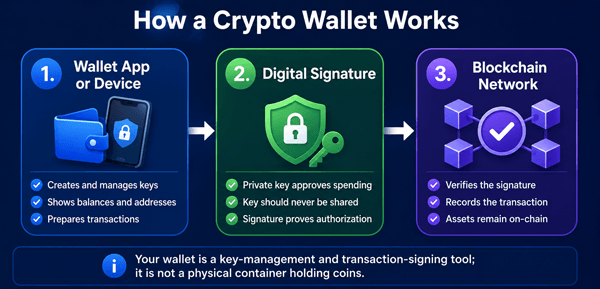
Figure 1. A wallet manages keys and signs transactions; the blockchain records ownership and transfers.
2. How Does a Crypto Wallet Work?
A wallet connects three ideas: an address people can send crypto to, a private key that authorizes transactions, and wallet software or hardware that helps you use those keys. The exact process varies by blockchain, but the beginner-level flow is similar.
- You install or access a wallet from a legitimate source.
- The wallet creates or imports cryptographic keys.
- It derives one or more public addresses from those keys.
- When someone sends crypto to an address, the blockchain records the transaction.
- The wallet reads blockchain data and displays the resulting balance.
- When you send crypto, the wallet uses the private key to create a digital signature.
- The network verifies the signature and, if valid, records the transaction.
2.1 A Simple Real-World Example
Suppose Aisha wants to receive a small amount of bitcoin from Bilal. Aisha opens her wallet and copies a Bitcoin receiving address. Bilal pastes that address into his wallet, confirms the network and amount, and sends. Aisha’s wallet does not catch a digital coin and place it inside the phone. Instead, the Bitcoin network records the transfer, and Aisha’s wallet displays the updated on-chain result associated with keys she controls.
2.2 Wallet, Account, Address, and Blockchain: What Is the Difference?
| Term | Beginner-Friendly Meaning | Can It Be Shared? |
|---|---|---|
| Wallet | The app, device, or service used to manage keys and transactions. | The app name can be shared; secrets inside it cannot. |
| Wallet address | A public destination used to receive assets on a particular network. | Usually yes, but sharing it reduces privacy. |
| Private key | A secret value used to sign and authorize transactions. | No. Never share it. |
| Seed phrase | A human-readable recovery backup that can recreate wallet keys in compatible systems. | No. Treat it as a master secret. |
| Blockchain | The network and ledger that record transactions and balances. | Public blockchains are generally viewable by anyone. |
3. Public Keys, Private Keys, and Wallet Addresses
3.1 What Is a Public Key?
A public key is mathematically related to a private key. Depending on the blockchain, a wallet address is derived from the public key or related account data. Public information helps the network identify where assets are associated and verify signatures, but it should not reveal the private key.
3.2 What Is a Private Key?
A private key is a secret cryptographic value used to approve transactions. It is better to think of it as a signing authority than as an ordinary website password. A password may be reset by a company; a self-custody private key normally cannot be reset by customer support. Investor.gov warns that losing a private key may permanently remove access to the associated assets. [1]
- Never type a private key into a website, form, chat, direct message, or “support” ticket.
- Never send it to someone claiming to verify, synchronize, repair, or unlock a wallet.
- Do not photograph it or store it in an ordinary cloud-synced note.
- If exposed, assume the wallet is compromised and move assets using a trusted, clean setup.
3.3 What Is a Wallet Address?
A wallet address is a public identifier used to receive assets. It is often a long string of letters and numbers, although some systems support readable names. An address is not automatically compatible with every asset or network. Sending to the wrong network, wrong token contract, or wrong address can result in loss.
3.4 Why “Not Your Keys, Not Your Coins” Is Useful but Incomplete
The phrase means that when a third party controls the keys, you depend on that company to honor withdrawals and secure the assets. It is a useful custody warning, but it does not mean self-custody is always safer for every beginner. A careful custodian may be safer than a poorly protected seed phrase. The real question is which risks you are prepared to manage: provider risk or personal key-management risk.
4. What Is a Seed Phrase or Recovery Phrase?
A seed phrase is a sequence of words generated by many wallets to help recreate a set of cryptographic keys. The words are sometimes called a recovery phrase, mnemonic phrase, secret recovery phrase, or backup phrase. BIP-39 is a widely used standard describing mnemonic words that are converted into a seed for deterministic wallets. [5]
A seed phrase is usually more dangerous to expose than a single wallet password because it may restore multiple accounts and addresses. Ethereum.org describes it as a master key and warns that anyone with it may be able to access the wallet’s accounts. [3]
4.1 Seed Phrase vs. Private Key vs. Password
| Item | What It Does | Typical Recovery Role | Safe to Share? |
|---|---|---|---|
| Seed phrase | Recreates a wallet’s key tree in compatible wallets. | Primary backup for many self-custody wallets. | Never. |
| Private key | Signs transactions for a specific account or address. | Can restore control of that specific key. | Never. |
| Wallet password or PIN | Locks the local app or device interface. | May protect local access, but often cannot restore funds alone. | No; keep secret. |
| Public address | Receives crypto and identifies an on-chain destination. | Not a recovery secret. | Usually yes, with privacy caution. |
4.2 Important Seed-Phrase Safety Rules
- Write the words exactly, in the correct order, using a durable offline method.
- Create the backup privately. Cameras, screen sharing, browser extensions, and people nearby can expose it.
- Do not keep the only copy beside the device it protects; one theft, fire, or flood could destroy both.
- Do not enter it because a website, wallet pop-up, social-media account, or “support agent” asks for it.
- Only enter it when intentionally restoring a wallet in trusted software or hardware that you independently verified.
- Test your backup method before storing a meaningful amount, ideally with a small balance and a carefully controlled restore test.
- Consider inheritance and emergency access, but avoid giving one person an unprotected copy without understanding the risk.
4.3 What Is an Optional BIP-39 Passphrase?
Some wallets support an additional passphrase, sometimes informally called a “25th word.” It is not simply an extra word added to the displayed phrase; it changes the derived wallet. This can add protection if implemented correctly, but forgetting or mistyping it may create a different empty wallet with no reset option. Beginners should use this feature only after understanding backup, recovery, and inheritance consequences.
5. Types of Crypto Wallets
Wallet categories overlap. For example, a mobile wallet can be self-custodial and hot, while an exchange account can be custodial and hot. Compare wallets by custody, internet exposure, device type, supported networks, recovery design, and transaction controls.
5.1 Custodial Wallets
A custodial wallet or exchange account is controlled by a provider that holds or manages the private keys on the user’s behalf. You normally sign in with an email, password, and additional authentication rather than handling a seed phrase directly.
| Potential Advantages | Potential Risks and Limitations |
|---|---|
| Easier account recovery and familiar login experience. | The provider may freeze withdrawals, fail, suffer a breach, or restrict access. |
| May offer customer support, compliance checks, and integrated buying or selling. | You depend on the provider’s security, solvency, policies, and jurisdiction. |
| Can reduce the chance of losing funds through a misplaced seed phrase. | Phishing and account takeover can still cause losses. |
| Convenient for active trading or small learning amounts. | Assets may not have the same protections as bank deposits or traditional brokerage assets. |
5.2 Non-Custodial or Self-Custody Wallets
A self-custody wallet gives you control of the private keys or recovery method. The wallet provider may supply software, but it generally cannot reset the underlying keys or reverse a valid transaction. This offers independence but creates personal responsibility.
5.3 Hot Wallets
A hot wallet is connected to the internet or used on an internet-connected device. Examples include browser-extension, desktop, web, and mobile wallets. Hot wallets are convenient for regular transactions but face greater exposure to phishing, malicious software, fake apps, and unsafe smart-contract interactions.
5.4 Cold Wallets
A cold wallet keeps signing keys offline or more isolated from internet-connected systems. Hardware wallets are the most common consumer example. Cold storage can reduce remote-attack exposure, but it does not protect against every mistake. A user can still approve a malicious transaction, reveal the seed phrase, buy a tampered device, lose the backup, or send to the wrong address.
5.5 Software Wallets
Software wallets run on phones, computers, browsers, or websites. They are often free and convenient, but security depends heavily on the device, operating system, extensions, download source, and user behavior.
5.6 Hardware Wallets
A hardware wallet is a dedicated device designed to store or use private keys in a more isolated environment. It typically signs transactions inside the device so the key does not need to leave it. Hardware wallets may be appropriate for larger, longer-term holdings, but they add cost, setup complexity, firmware considerations, and backup responsibility.
5.7 Paper Wallets
A paper wallet is a printed or written private key or recovery secret. Although it sounds offline and simple, modern beginners should be cautious. Generating keys securely, avoiding printer or computer leaks, preventing physical damage, and spending from the wallet safely can be difficult. Many modern wallet systems provide safer backup workflows than old-style paper-wallet generators.
5.8 Multisignature and Smart-Contract Wallets
A multisignature wallet requires more than one key to authorize a transaction, such as two of three keys. This can reduce the risk of one lost or stolen key, but setup and recovery are more complex. Smart-contract wallets can add spending limits, multiple approvers, recovery guardians, or other programmable controls. These features may improve usability but add contract, compatibility, and fee risks.
6. Crypto Wallet Comparison Table
| Wallet Type | Best For | Main Strength | Main Risk |
|---|---|---|---|
| Custodial exchange account | Beginners buying small amounts or active traders | Convenient recovery and trading | Provider failure, freezes, account takeover |
| Mobile self-custody wallet | Everyday payments and learning | Portable and simple | Phone compromise, phishing, seed loss |
| Browser-extension wallet | Using decentralized applications | Fast website connection | Malicious sites, approvals, fake extensions |
| Desktop wallet | Users who prefer a computer interface | More screen space and control | Malware, unsafe downloads, backups |
| Hardware wallet | Longer-term or higher-value self-custody | Keys are more isolated | Supply-chain mistakes, seed loss, signing errors |
| Multisignature wallet | Teams, families, businesses, advanced holders | No single key controls funds | Complex setup and recovery |
| Smart-contract wallet | Users needing programmable controls | Flexible permissions and recovery options | Contract and ecosystem risk |
7. How to Choose a Crypto Wallet
There is no universally best wallet. The best choice depends on what you hold, how often you transact, your technical comfort, the amount at risk, and whether you prefer a custodian or personal control.
- Define the purpose. Decide whether the wallet is for learning, daily use, decentralized applications, trading, or long-term storage.
- Decide who should control the keys. Compare the risks of a custodian with the responsibilities of self-custody.
- Confirm network and asset support. A wallet that supports one network may not safely support another.
- Research the developer or provider. Verify the official website, company identity, security history, update practices, and support channels.
- Check the recovery design. Understand exactly what happens if the phone, password, device, provider, or seed phrase is lost.
- Review transaction details. Prefer wallets that clearly display the recipient, network, amount, fees, and contract permissions before approval.
- Start small. Set up the wallet, receive a small test amount, send a small test transaction, and confirm recovery before increasing the balance.
- Separate use cases. Consider a small hot wallet for routine activity and a more protected wallet for long-term holdings.
7.1 Questions to Ask Before Trusting a Wallet
- Is it custodial or self-custodial?
- Who can reset access, freeze withdrawals, or approve transactions?
- Where do updates come from, and how are they authenticated?
- Does the wallet reveal the seed phrase during setup, or use another recovery model?
- Can it connect to websites and approve smart-contract permissions?
- Does it support address verification on a separate device screen?
- Are independent security audits, source code, or reproducible builds available?
- What happens if the company stops operating?
- Does the wallet support the exact network and token contract you intend to use?
8. How to Set Up a Self-Custody Wallet Safely
The following process is general. Always follow the official instructions for the specific wallet and verify that you are using the genuine product.
- Use a clean, updated device. Install operating-system updates and remove unnecessary browser extensions.
- Find the wallet through an independently verified official source. Avoid search ads, social-media links, direct messages, and unofficial app stores.
- Confirm the publisher, domain, device packaging, and download signature where available.
- Create a new wallet in private. Do not screen-share, record, or allow cameras to view the recovery words.
- Write down the seed phrase exactly. Check spelling and order twice.
- Set a strong local password or PIN. This protects the app or device but usually does not replace the seed backup.
- Enable appropriate device protections, such as screen lock and automatic locking.
- Receive a tiny test transaction and confirm the address and network.
- Practice reading transaction details before signing. Understand fees, destination, token, network, and permissions.
- Perform a controlled recovery test before storing a large amount, following the manufacturer’s official procedure.
- Store backups in separate, secure physical locations and create an emergency or inheritance plan.
9. How to Receive and Send Crypto Safely
9.1 How to Receive Crypto
- Open the correct wallet and select the exact asset and network.
- Generate or copy a receiving address.
- Confirm the address on the trusted device screen when possible.
- Share the address or QR code through a reliable channel.
- Ask the sender to confirm the network and, for higher amounts, send a small test first.
- Wait for appropriate network confirmations before treating the payment as final.
9.2 How to Send Crypto
- Confirm the recipient’s exact address and intended network using a second communication channel when the amount is meaningful.
- Paste or scan the address, then compare the beginning and ending characters. Clipboard-stealing malware can replace copied addresses.
- Check the asset, network, amount, fee, and any memo or destination tag.
- Send a small test transaction when using a new address, bridge, exchange, or network.
- Review every detail on the wallet or hardware-device screen rather than trusting only the computer display.
- Approve the transaction once. Do not repeat it merely because the receiving interface is slow to update.
- Use a block explorer or the receiving platform to confirm status.
9.3 Why Crypto Transactions Can Be Hard to Reverse
Many blockchain transactions are designed to become final after network confirmation. There may be no bank, card issuer, or central administrator able to cancel a correctly signed transfer. Ethereum.org states that no central authority can recover funds sent to the wrong address or reverse a confirmed transaction. [4] This makes pre-transaction verification essential.
10. Networks, Fees, Tokens, and Compatibility
A wallet may display assets from several blockchains, but each network has its own addresses, fees, confirmation rules, and token standards. Similar names do not guarantee compatibility.
- Network fee: payment to validators or miners for processing a transaction. The wallet provider may also charge separate service fees.
- Native asset: the main asset used to pay fees on a network, such as ETH on Ethereum. You may need a small amount even when moving a token.
- Token contract: the on-chain program defining a token. Scammers can create fake tokens with familiar names or symbols.
- Bridge: a service or protocol that moves representations of assets between networks. Bridges add smart-contract, liquidity, and operational risks.
- Memo or destination tag: additional information required by some exchanges or networks. Omitting it may delay or prevent crediting.
10.1 Example of a Network Mistake
A user sees “USDT” in two apps and assumes it is the same transfer route. One app expects USDT on Ethereum, while the other sends USDT on a different network. The token name matches, but the receiving platform may not support that route. Recovery may be impossible or may require a provider’s manual process and fee. Always match the asset, network, and destination requirements.
11. Crypto Wallet Security Best Practices
- Keep the seed phrase and private keys offline and private.
- Use unique passwords and phishing-resistant multi-factor authentication for custodial accounts and email.
- Bookmark official wallet and exchange sites rather than relying on ads or search results.
- Keep software, firmware, browsers, and operating systems updated.
- Limit browser extensions and applications on devices used for crypto.
- Use separate wallets for savings, routine spending, and experimental decentralized applications.
- Revoke unnecessary token approvals and disconnect unused website sessions when supported.
- Verify transaction information on a trusted display, especially with a hardware wallet.
- Avoid public Wi-Fi for sensitive setup or account recovery.
- Keep device and wallet inventories, backup locations, and recovery instructions updated.
- Treat unexpected urgency as a warning sign. Real support should not need your seed phrase.
- Use a small test transfer for new destinations or unfamiliar workflows.
11.1 Wallet Drainers and Malicious Approvals
Some scams do not ask directly for a seed phrase. Instead, a malicious website persuades the user to connect a wallet and sign a message or transaction that grants broad token permissions or transfers assets. The request may look like a mint, airdrop, account verification, security update, or refund. Read the requested action, use transaction simulation where available, keep a low-value wallet for unfamiliar applications, and avoid unlimited approvals unless clearly necessary.
11.2 Fake Support and Recovery Scams
Fraudsters often impersonate wallet companies, exchanges, regulators, or recovery specialists. FTC and Investor.gov guidance warns about crypto scams, guaranteed returns, impersonation, and requests for private keys or additional payments. [6][7] Legitimate support should not ask for a seed phrase or private key.
12. Common Crypto Wallet Mistakes to Avoid
| Mistake | Why It Is Dangerous | Safer Practice |
|---|---|---|
| Saving the seed phrase in screenshots, email, or cloud notes | Online accounts and synced devices can be breached. | Use a private offline backup and secure physical storage. |
| Buying a hardware wallet from an unknown reseller | The device or packaging may be tampered with. | Buy through verified channels and follow authenticity checks. |
| Skipping a recovery test | A backup error may only appear after the device is lost. | Test recovery carefully before storing a large balance. |
| Sending the full amount first | Wrong network or address mistakes become expensive. | Use a small test transaction. |
| Trusting token names and logos | Fake tokens can copy symbols and branding. | Verify the contract address through reliable sources. |
| Approving every wallet prompt | A signature may grant spending permission or transfer assets. | Read the action, recipient, amount, and permissions. |
| Using one wallet for everything | One malicious site can expose the entire balance. | Separate savings from experimental activity. |
| Believing support can reverse blockchain transfers | Many valid transfers are irreversible. | Verify before signing; contact providers quickly but expect limits. |
| Sharing a public address without considering privacy | Blockchain activity can sometimes be linked and analyzed. | Use wallet privacy features responsibly and avoid unnecessary disclosure. |
| Assuming a PIN alone is a backup | A PIN may only unlock one device. | Maintain the wallet’s official recovery method. |
13. Benefits, Risks, and Limitations of Crypto Wallets
| Benefits | Risks and Limitations |
|---|---|
| Direct access to blockchain assets and applications. | Loss, theft, scams, malware, and irreversible mistakes. |
| Self-custody can reduce dependence on a single provider. | Self-custody removes many familiar recovery options. |
| Global, around-the-clock transfers may be possible. | Fees, congestion, network outages, and compatibility issues vary. |
| Wallets can support tokens, collectibles, identity, and decentralized services. | Smart contracts and token approvals add technical risk. |
| Multiple security models are available, including hardware and multisignature. | More advanced controls can create setup and inheritance complexity. |
A wallet does not remove investment risk. Crypto asset prices can be volatile, tokens may fail, platforms may become insolvent, and legal or tax treatment varies by country. A secure wallet can protect keys but cannot make an unsafe asset valuable or guarantee that a transaction is legitimate.
14. What to Do If a Wallet Is Lost, Compromised, or Scammed
14.1 If You Lose the Device but Still Have the Recovery Phrase
- Use a clean device and independently verify a compatible wallet from its official source.
- Restore only in a private environment.
- After recovery, consider moving assets to a new wallet if the old device may be stolen or accessible to someone else.
- Update your backup and security plan.
14.2 If the Seed Phrase or Private Key Was Exposed
- Assume the wallet is compromised.
- Create a new wallet using a trusted clean device or hardware wallet.
- Move remaining assets promptly, while carefully checking for malicious approvals or active attackers.
- Revoke approvals where useful, but understand that revocation does not make an exposed seed safe again.
- Stop using the old wallet for storage.
- Preserve transaction records and report scams to relevant platforms, law enforcement, and consumer-protection authorities.
14.3 If You Lose the Seed Phrase and Cannot Access the Wallet
For a true self-custody wallet, there may be no recovery service. Ethereum.org states that without the seed phrase or private keys, funds cannot be recovered and no one can reset access. [8] Be especially cautious of strangers promising guaranteed recovery; they may be attempting a second scam.
15. A Practical Wallet Strategy for Beginners
A simple layered approach can reduce risk without requiring advanced technical knowledge:
- Learn with a small amount you can afford to lose.
- Use a reputable custodial platform only for the functions you need, and enable strong account security.
- Practice self-custody with a small mobile wallet before handling a larger amount.
- For meaningful long-term holdings, consider a hardware wallet or another more isolated setup.
- Keep long-term funds separate from decentralized-application experiments.
- Create redundant, private backups and a realistic inheritance plan.
- Review the setup periodically because devices, providers, networks, and personal circumstances change.
16. Frequently Asked Questions About Crypto Wallets
16.1 Does a crypto wallet actually store cryptocurrency?
Usually not in the literal sense. The blockchain records the assets and transactions, while the wallet manages the keys and data needed to view and authorize activity.
16.2 Can someone steal crypto with only my wallet address?
A public address alone normally does not let someone spend the funds. However, it can reveal transaction history and may be used in targeted scams or privacy analysis.
16.3 Can two wallets have the same seed phrase?
A restored wallet can use the same phrase on more than one device or compatible app, which means each copy may control the same keys. Never test a phrase in untrusted software.
16.4 What happens if I forget my wallet password?
For a self-custody wallet, the seed phrase may restore access even if the local password is forgotten. For a custodial wallet, the provider may offer account recovery. The exact process depends on the wallet.
16.5 Is a seed phrase the same as a private key?
No. A seed phrase is commonly used to derive many private keys. A private key usually controls a specific account or address.
16.6 How many words are in a seed phrase?
Many wallets use 12 or 24 words, but other recovery methods and lengths exist. Follow the wallet’s official documentation rather than assuming a format.
16.7 Should I take a photo of my seed phrase?
No. Photos may sync to cloud accounts, appear in backups, or be accessed by malicious apps or account intruders.
16.8 Can a wallet company recover my seed phrase?
In genuine self-custody designs, the provider generally cannot retrieve or reset it. Custodial services may use different recovery systems.
16.9 Are hardware wallets completely safe?
No. They can reduce some remote risks, but users can still reveal the seed, approve malicious transactions, mishandle backups, or buy compromised products.
16.10 Is a mobile wallet safe for beginners?
It can be suitable for small amounts and learning when the phone is updated, the app is genuine, backups are secure, and risky links or applications are avoided.
16.11 What is the safest type of crypto wallet?
There is no single safest type for everyone. Security depends on custody, device hygiene, backup quality, transaction habits, amount held, and the user’s ability to operate the wallet correctly.
16.12 Can I use one wallet for Bitcoin, Ethereum, and other coins?
Some wallets support multiple networks, but support must be verified for each asset. Similar-looking addresses and token names do not guarantee compatibility.
16.13 Why does my wallet show a zero balance after recovery?
Possible reasons include the wrong seed phrase, wrong optional passphrase, different derivation path, wrong account, wrong network, or a wallet that has not finished syncing. Do not send the phrase to support.
16.14 What is a watch-only wallet?
A watch-only wallet tracks addresses and balances without holding the private keys needed to spend. It is useful for monitoring while keeping signing keys elsewhere.
16.15 What is wallet connection or “Connect Wallet”?
It links a wallet to a website or decentralized application. Connection alone may reveal addresses, while later signatures or approvals can authorize actions. Read every request.
16.16 Do crypto wallets charge fees?
The blockchain usually charges network fees. Wallet providers may add service, swap, purchase, or withdrawal fees. Review the full quote before confirming.
16.17 Can crypto sent to the wrong address be recovered?
Usually not through the blockchain itself. Recovery depends on whether someone controls the destination and is willing and able to return it. Prevention is far more reliable.
16.18 Is it safe to type a seed phrase into a wallet website?
Only during an intentional recovery using independently verified official software or hardware. Unexpected requests are a strong scam warning.
17. Beginner Crypto Wallet Safety Checklist
- I know whether my wallet is custodial or self-custodial.
- I downloaded it from a verified official source.
- I understand which networks and assets it supports.
- My seed phrase and private keys are offline and never shared.
- I have more than one secure backup location.
- I tested receiving, sending, and recovery with a small amount.
- I use strong account security and keep devices updated.
- I verify address, network, token, amount, fees, and permissions before signing.
- I separate long-term storage from risky or experimental activity.
- I have an emergency and inheritance plan that does not expose the secret prematurely.
18. Final Thoughts
A crypto wallet is best understood as a key-management and transaction-signing system. The technology can give users direct control, but direct control comes with direct responsibility. Beginners should focus less on finding a wallet with the most features and more on understanding custody, recovery, network compatibility, transaction review, and scam resistance.
Start small, verify every step, protect the seed phrase as a master secret, and use a wallet setup that matches your actual skills and needs. Security is not a single device or product; it is a repeatable process involving trusted software, careful backups, clean devices, accurate transactions, and realistic recovery planning.
Reader Advice
This article is provided for general educational and informational purposes only. It is not personalized financial, investment, legal, tax, cybersecurity, regulatory, or other professional advice, and it is not a recommendation to buy, sell, hold, transfer, or custody any crypto asset. Crypto assets and wallet use involve risks, including price volatility, scams, malware, loss of access, provider failure, technical errors, and transactions that may be difficult or impossible to reverse. Wallet features, network rules, fees, statistics, laws, tax treatment, consumer protections, and platform policies can change over time and vary by country or region. Before making a decision, verify current information through official wallet documentation, blockchain or platform sources, relevant regulators, and qualified professionals where appropriate. Never share a seed phrase or private key, and only use amounts you can afford to lose.
Sources Consulted and Checked
The following sources were consulted and checked while preparing this article for accuracy and reliability.
- [1] U.S. Securities and Exchange Commission, Investor.gov - Crypto Asset Custody Basics for Retail Investors
- [2] U.S. Securities and Exchange Commission, Investor.gov - Crypto Assets
- [3] Ethereum.org - Security and Scam Prevention
- [4] Ethereum.org - Common Misconceptions
- [5] Bitcoin Improvement Proposal 39 - Mnemonic Code for Generating Deterministic Keys
- [6] U.S. Federal Trade Commission - What to Know About Cryptocurrency and Scams
- [7] U.S. Securities and Exchange Commission, Investor.gov - Five Ways Fraudsters May Lure Victims Into Crypto Scams
- [8] Ethereum.org - Frequently Asked Questions: Lost Seed Phrase
- [9] FINRA - Crypto Assets: Buying and Selling
- [10] FINRA - Storing Crypto Assets