Crypto Wallet Security Best Practices: How to Protect Your Coins and Tokens
1. Introduction: Why Crypto Wallet Security Matters
A crypto wallet lets you hold, send, receive, and manage digital assets such as Bitcoin, Ethereum, stablecoins, NFTs, and other tokens. But unlike a bank account, many crypto wallets do not have a customer support team that can reverse a mistaken transfer or reset access after a theft. If you lose your recovery phrase, approve a malicious transaction, or send coins to the wrong address, the loss may be permanent.
That sounds scary, but the goal is not to make crypto feel impossible. The goal is to understand where the real risks are and build simple habits that protect you before something goes wrong. Most wallet security comes down to a few repeatable practices: choosing the right wallet, protecting your recovery phrase, securing your devices, avoiding scams, and checking transactions carefully.
This guide explains crypto wallet security best practices in plain English, with beginner examples, checklists, comparisons, and practical steps you can use today.
2. Quick Answer: The Most Important Crypto Wallet Security Best Practices
- Never share your seed phrase, recovery phrase, private key, or wallet password with anyone.
- Store your recovery phrase offline, preferably in more than one secure physical location.
- Use a hardware wallet for meaningful long-term holdings.
- Keep only small spending amounts in hot wallets used for apps, swaps, and NFTs.
- Use strong unique passwords and phishing-resistant two-factor authentication where available.
- Verify wallet addresses, blockchain networks, transaction amounts, and smart contract approvals before confirming.
- Do not connect your main wallet to random websites, airdrops, or unknown decentralized apps.
- Update wallet apps, operating systems, browsers, and hardware wallet firmware from official sources only.
- Send a small test transaction before transferring a large amount.
- Have a written emergency plan for lost devices, suspected compromise, or death/inheritance.
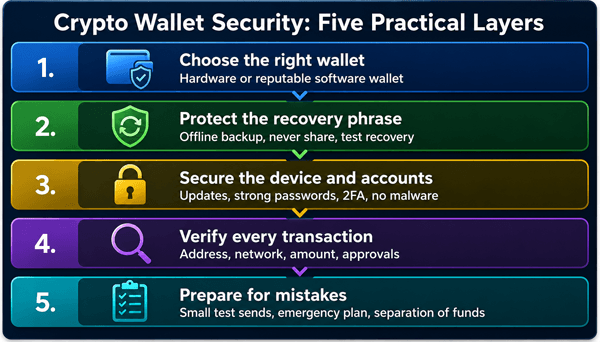
Diagram: A layered approach to crypto wallet security. No single tool protects you from every risk, so combine several habits.
3. What Is a Crypto Wallet?
A crypto wallet is software or hardware that helps you control crypto assets on a blockchain. The wallet does not usually “store” coins inside the device the way a leather wallet stores cash. Your coins and tokens exist on the blockchain. The wallet stores or protects the keys that allow you to prove ownership and sign transactions.
3.1. Public Keys, Private Keys, and Recovery Phrases Explained
| Term | Beginner explanation | Security rule |
|---|---|---|
| Public address | The address people can use to send crypto to you, similar to an account number. | You can share this, but check it carefully. |
| Private key | A secret key that can authorize spending from a wallet address. | Never share it or store it carelessly. |
| Seed phrase / recovery phrase | A list of words, often 12 or 24, that can restore access to your wallet. | Treat it like the master key to your crypto. |
| Wallet password or PIN | A local lock for the wallet app or hardware device. | Useful, but it usually does not replace the recovery phrase. |
| Transaction signature | A cryptographic approval that authorizes a transfer or smart contract action. | Only sign what you understand. |
The recovery phrase is the most important concept for beginners. If someone gets it, they can often restore your wallet on another device and move your funds. If you lose it and your device fails, you may not be able to recover the wallet.
3.2. Custodial vs. Non-Custodial Wallets
The first wallet decision is whether someone else holds the keys for you or whether you hold them yourself.
| Wallet type | Who controls the keys? | Pros | Cons | Best for |
|---|---|---|---|---|
| Custodial wallet or exchange account | A company such as an exchange controls the private keys. | Easier account recovery, familiar login, customer support may exist. | You rely on the company’s security, rules, solvency, and withdrawal access. | New users buying small amounts or trading occasionally. |
| Non-custodial wallet / self-custody | You control the private keys or recovery phrase. | More personal control, fewer platform restrictions, direct use of DeFi and on-chain apps. | You are responsible for backups, scams, mistakes, and device security. | Users who want direct control and can follow security practices. |
A common beginner mistake is assuming “not your keys, not your coins” means everyone must immediately move everything to self-custody. Self-custody can be powerful, but it also creates responsibility. Many people use both: an exchange for buying and selling, a hardware wallet for savings, and a small hot wallet for everyday crypto activity.
3.3. Hot Wallets vs. Cold Wallets
| Feature | Hot wallet | Cold wallet / hardware wallet |
|---|---|---|
| Internet exposure | Connected to an online phone, browser, or computer. | Private keys stay offline or isolated in a hardware device. |
| Convenience | Fast and easy for small transfers, swaps, NFTs, and apps. | Less convenient because you must use the device to approve transactions. |
| Security level | Good for small amounts if used carefully, but exposed to malware and phishing. | Better for long-term holdings and larger balances. |
| Main risk | Malicious sites, infected devices, fake wallet apps, bad approvals. | Lost recovery phrase, fake hardware device, unsafe setup, signing without checking. |
| Best use | Spending wallet or app wallet. | Savings wallet or treasury wallet. |
A simple rule: Treat a hot wallet like the cash in your pocket and a hardware wallet like a safe. You would not carry your entire savings in your pocket every day. Use the same logic with crypto.
4. Step 1: Choose a Reputable Wallet
Wallet security starts before you create the wallet. A fake or poorly maintained wallet can steal your funds from the beginning.
Look for these signs when choosing a wallet:
- Official website and verified app store listing. Avoid sponsored search results that mimic wallet brands.
- Clear documentation, active development, security history, and transparent support channels.
- Control over your recovery phrase if it is a self-custody wallet.
- Compatibility with the coins, tokens, and networks you plan to use.
- Ability to review transaction details before signing.
- For hardware wallets, buy directly from the manufacturer or a trusted authorized seller.
Avoid wallets promoted through direct messages, surprise airdrops, “guaranteed profit” groups, or unknown browser extensions. Scammers often create fake versions of real wallets with similar logos and names.
5. Step 2: Protect Your Recovery Phrase Like a Master Key
Your recovery phrase is usually the single most important part of wallet security. It is not a normal password. You cannot safely email it to yourself, screenshot it, upload it to cloud storage, or type it into random websites.
5.1. Recovery Phrase Do’s and Don’ts
| Do | Do not |
|---|---|
| Write it down carefully during setup and check every word in order. | Do not take a screenshot or photo of it. |
| Store it offline in a secure place, such as a safe. | Do not save it in Google Drive, iCloud, email, notes apps, or chat apps. |
| Consider a metal backup for large holdings because paper can burn, fade, or flood. | Do not share it with support agents, friends, influencers, or “recovery experts.” |
| Keep at least one backup in a separate secure location if the funds are significant. | Do not enter it into a website to “verify,” “sync,” “unlock,” or “claim” tokens. |
| Test your backup with a small wallet before storing large funds. | Do not laminate or hide it somewhere obvious if others can access your home. |
5.2. Practical Example
Suppose Maria creates a wallet and writes her 24-word phrase on paper. She stores it in a desk drawer and takes a photo “just in case.” Six months later her phone gets malware, and the photo is scanned. Her wallet is drained even though she never told anyone the phrase. The safer approach would have been to store the phrase offline only, ideally in a secure container, and avoid any digital copy.
6. Step 3: Use a Hardware Wallet for Larger Holdings
A hardware wallet is a physical device that keeps private keys isolated from your internet-connected computer or phone. When you send crypto, the transaction is prepared on your computer or phone, but the hardware device signs it after you review and approve it.
A hardware wallet does not make you invincible. It cannot stop you from sending funds to a scam address, approving a malicious contract, or storing your recovery phrase badly. But it can reduce the risk that malware steals your private key directly from your computer.
6.1. Hardware Wallet Safety Tips
- Buy new devices from official or authorized sources. Avoid second-hand devices.
- Initialize the device yourself. If the device arrives with a pre-written recovery phrase, do not use it.
- Update firmware only through the official app or official website.
- Confirm addresses and transaction details on the hardware wallet screen, not only on the computer screen.
- Keep the PIN private and separate from the recovery phrase.
- Use a small test transfer before moving a large balance.
7. Step 4: Separate Your Funds Into Different Wallets
Do not use one wallet for everything. Separation limits damage if one wallet is compromised.
| Wallet purpose | What to keep there | Security level |
|---|---|---|
| Savings wallet | Long-term Bitcoin, Ethereum, stablecoins, or major holdings. | Hardware wallet, rarely connected to apps. |
| Spending wallet | Small amounts for regular transfers or purchases. | Hot wallet with limited balance. |
| DeFi / NFT wallet | Small amount used to connect to decentralized apps, mint NFTs, or test protocols. | High caution; assume websites and approvals can be risky. |
| Exchange account | Funds you plan to trade, sell, or withdraw soon. | Strong password, 2FA, withdrawal allowlist if available. |
This is similar to using separate bank accounts: one for savings, one for daily spending, and one for experiments. If your DeFi wallet signs a bad approval, your long-term savings wallet should not be exposed.
8. Step 5: Secure Your Devices and Accounts
Wallet security is also device security. A good wallet used on an infected phone or computer is still risky.
- Keep your operating system, browser, wallet app, and antivirus or security tools updated.
- Use strong, unique passwords for exchanges, email, password managers, and wallet-related accounts.
- Use a reputable password manager for account passwords, but do not store your seed phrase in it unless you fully understand the risk model.
- Enable two-factor authentication on exchanges and email accounts. An authenticator app or security key is usually safer than SMS.
- Do not install random browser extensions, cracked software, trading bots, or “free” tools from unknown sources.
- Avoid logging into crypto accounts on public computers or shared devices.
- Lock your phone and computer with a strong PIN, password, or biometric lock.
Your email account is especially important. If an attacker controls your email, they may reset exchange passwords, intercept alerts, or trick you with convincing messages.
9. Step 6: Learn the Most Common Crypto Wallet Scams
Many crypto losses happen because users are tricked into approving something, not because the blockchain itself was hacked. Scams often rely on urgency, greed, fear, romance, fake support, or fake investment opportunities.
| Scam type | How it works | How to protect yourself |
|---|---|---|
| Seed phrase phishing | A fake website or support agent asks for your recovery phrase to “verify” or “sync” your wallet. | Never enter your recovery phrase except when restoring your wallet in a trusted wallet app or device. |
| Fake airdrops and token claims | A site promises free tokens but asks you to connect your wallet and approve a transaction. | Use a separate low-balance wallet; verify official sources; avoid unknown links. |
| Address poisoning | A scammer sends tiny transactions from an address that looks similar to one you use, hoping you copy the wrong address later. | Never copy addresses from transaction history without checking the full address. Use saved address books where possible. |
| Fake support | Someone pretending to be wallet or exchange support asks for keys, remote access, or payment. | Use only official support channels; real support should not need your seed phrase. |
| Investment or romance scam | A person builds trust and pushes you to send crypto to a fake platform or wallet. | Be skeptical of guaranteed profits and pressure to deposit more. Verify platforms independently. |
| Recovery scam | After a theft, someone claims they can recover stolen crypto for an upfront fee. | Be extremely cautious; report to official authorities instead of paying another stranger. |
Consumer protection agencies warn that scammers often impersonate government agencies, law enforcement, companies, romantic partners, or investment experts and direct victims to send cryptocurrency to an address controlled by the scammer. Once sent, the funds are usually very difficult to recover.
10. Step 7: Verify Every Transaction Before You Sign
Crypto transactions can be confusing because wallets show technical details. Slow down before pressing confirm. A 30-second check can prevent a permanent mistake.
10.1. Transaction Safety Checklist
- Check the receiving address. Compare the first several and last several characters, and use a trusted address book for repeat transfers.
- Check the network. Sending a token on the wrong chain can make recovery difficult or impossible.
- Check the amount, fees, and token symbol. Scam tokens can use names that look similar to real tokens.
- For hardware wallets, verify the address and amount on the device screen.
- For large transfers, send a small test transaction first.
- Avoid rushing because of countdown timers, threats, or “limited time” messages.
- For smart contracts, read what permission you are granting. “Unlimited approval” can be dangerous if the contract is malicious or later compromised.
10.2. Smart Contract Approvals: A Beginner Explanation
On networks such as Ethereum, tokens often require an approval before a decentralized app can move them. For example, if you use a decentralized exchange, you may approve the exchange contract to spend a token from your wallet. Some approvals are limited to one transaction. Others are unlimited.
Unlimited approvals are convenient but can be risky. If you approve a malicious contract, it may be able to drain the approved token balance. If you regularly use DeFi, review and revoke unnecessary approvals using reputable approval-checking tools. Always navigate to such tools from official sources, not random links.
11. Step 8: Use Exchanges Safely
Many beginners start with a crypto exchange. Exchanges can be useful, but they have different risks from self-custody wallets.
- Use a strong unique password and two-factor authentication.
- Secure the email account connected to the exchange.
- Enable withdrawal allowlists if available, so funds can only be sent to approved addresses.
- Beware of fake exchange login pages. Bookmark the official site.
- Do not keep more on an exchange than you are comfortable leaving under someone else’s custody.
- Understand withdrawal fees, network choices, and waiting periods before moving funds.
If you are not ready for self-custody, it may be safer to learn with small amounts on a reputable exchange before moving larger funds to your own wallet. Security is not only about control; it is about matching the tool to your knowledge and habits.
12. Step 9: Back Up More Than the Seed Phrase
A recovery phrase is essential, but a good backup plan includes context. Future you, or a trusted person handling your estate, may need to understand what the phrase is for without exposing it to unnecessary risk.
Consider keeping a separate non-secret instruction sheet that explains:
- Which wallet app or hardware wallet brand you use.
- Which major blockchains or assets you hold.
- Where the recovery phrase backup is stored, without writing the phrase on the instruction sheet if others may access it.
- Whether a passphrase or multisig setup exists.
- Who to contact for legal or estate help, if appropriate.
Do not create a document that gives a thief everything needed to steal your funds. The goal is controlled recoverability, not careless convenience.
12.1. Advanced Option: Passphrases and Multisig
Beginners should first master the basics. After that, two advanced options may be useful for larger holdings: passphrases and multisig.
| Option | What it does | Benefit | Risk or limitation |
|---|---|---|---|
| Passphrase | Adds an extra secret word or phrase to the recovery phrase. Sometimes called a 25th word. | If someone finds the seed phrase alone, they may still not access the real wallet. | If you forget the passphrase, the funds may be unrecoverable. It must be backed up carefully. |
| Multisig | Requires more than one key to spend funds, such as 2 of 3 keys. | Protects against one lost or stolen key and can support family or business controls. | More complex setup, more recovery planning, and higher risk of user error if misunderstood. |
These tools are powerful, but they are not magic. A badly documented multisig setup can be harder to recover than a simple wallet. Use them only after learning, testing with small amounts, and documenting the process safely.
13. What To Do If You Think Your Wallet Is Compromised
Act quickly, but do not panic. A rushed mistake can make the loss worse.
- Stop using the suspected wallet. Do not connect it to more websites.
- If the recovery phrase may be exposed, create a new wallet on a clean device or hardware wallet.
- Move remaining funds to the new wallet, starting with the highest-value assets. Use correct networks and test if time allows.
- Revoke risky token approvals if funds are still present and you can do so safely.
- Change passwords for related exchange, email, and cloud accounts from a clean device.
- Scan devices for malware or reset them if necessary.
- Report scams to your exchange, wallet provider, and relevant authorities. In the U.S., the FBI’s IC3 accepts cryptocurrency complaints.
- Be skeptical of anyone claiming they can recover stolen crypto for an upfront fee.
If a wallet has already been drained, moving fast may not recover funds, but it can prevent additional losses from related accounts or tokens.
14. Common Mistakes Beginners Make
| Mistake | Why it is dangerous | Better habit |
|---|---|---|
| Screenshotting the seed phrase | Photos and cloud backups can be stolen by malware or account compromise. | Write it offline and secure it physically. |
| Using one wallet for everything | One bad approval or scam can expose all funds. | Separate savings, spending, and app wallets. |
| Skipping test transactions | A wrong address or network can lose a large amount. | Send a small test first. |
| Trusting search ads | Scammers buy ads for fake wallet or exchange pages. | Bookmark official sites and verify URLs. |
| Approving unlimited token access without thinking | A bad contract can drain approved tokens. | Limit approvals where possible and revoke unused approvals. |
| Buying used hardware wallets | The device may be tampered with or preconfigured. | Buy new from official or authorized sources. |
| Believing crypto is always recoverable | Transactions are usually irreversible. | Build prevention habits before transferring money. |
15. Myths and Misconceptions About Crypto Wallet Security
Myth 1: “A wallet stores my coins.” In most cases, the wallet stores keys that control coins recorded on a blockchain.
Myth 2: “A hardware wallet protects me from every scam.” It protects private keys from many online attacks, but you can still sign a bad transaction.
Myth 3: “If I lose my wallet app, support can restore it.” With self-custody wallets, the recovery phrase is usually the recovery method. Support cannot recreate it for you.
Myth 4: “A small transaction from an address means it is safe to copy that address.” Address poisoning scams rely on this exact behavior.
Myth 5: “Only beginners get scammed.” Experienced users can also be tricked by urgency, fake websites, compromised social accounts, or complex smart contract approvals.
16. Beginner-Friendly Security Setup: A Practical Example
Here is a simple setup for a cautious beginner who plans to hold crypto long term and occasionally use apps:
- Buy crypto on a reputable exchange using a strong password and authenticator app 2FA.
- Buy a new hardware wallet directly from the manufacturer or an authorized seller.
- Set up the hardware wallet at home, offline from distractions, and write down the recovery phrase on paper or metal.
- Store the recovery phrase securely. Do not photograph it.
- Send a small test amount from the exchange to the hardware wallet.
- After confirming the test, send the rest of the long-term holdings.
- Create a separate hot wallet with a small balance for learning decentralized apps.
- Never connect the long-term hardware wallet to random websites.
- Review backups and wallet access every few months.
17. Crypto Wallet Security Checklist
| Area | Checklist item | Done? |
|---|---|---|
| Wallet choice | I downloaded the wallet from the official source only. | |
| Recovery phrase | I stored the phrase offline and did not take a photo or screenshot. | |
| Backup | I have a secure backup plan in case of fire, flood, loss, or death. | |
| Device security | My phone/computer is updated and protected with a strong lock. | |
| Accounts | My email and exchange accounts use strong passwords and 2FA. | |
| Separation | I use different wallets for savings, spending, and risky app activity. | |
| Transactions | I verify addresses, networks, amounts, and approvals before signing. | |
| Test transfers | I send a small test before large transfers. | |
| Scam awareness | I never share my seed phrase and I avoid urgent or guaranteed-profit offers. | |
| Emergency plan | I know what steps to take if a wallet is compromised. |
18. Frequently Asked Questions
18.1. What is the safest type of crypto wallet?
For most long-term holders, a reputable hardware wallet combined with careful recovery phrase storage is safer than keeping large funds in a hot wallet. However, the safest setup is the one you understand and can recover correctly.
18.2. Can someone steal my crypto with only my wallet address?
Usually no. A public wallet address is meant to be shared. But sharing it can reveal transaction history on public blockchains, and scammers may use it for targeted phishing.
18.3. Should I store my seed phrase in a password manager?
For most beginners, offline physical storage is simpler and safer. Password managers are excellent for account passwords, but storing a seed phrase digitally changes the risk. If the password manager or device is compromised, the phrase may be exposed.
18.4. What happens if I lose my recovery phrase?
If you still have access to the wallet, move funds to a new wallet with a properly backed-up recovery phrase. If you lose both the device access and the recovery phrase, self-custody funds may be unrecoverable.
18.5. Is two-factor authentication enough to protect a crypto wallet?
2FA helps protect exchange accounts and online logins. It usually does not protect a non-custodial wallet recovery phrase. You still need safe backups and transaction hygiene.
18.6. Are mobile crypto wallets safe?
They can be safe for small amounts if downloaded from official sources and used on a secure device. They are not ideal for large long-term holdings because phones are exposed to apps, phishing, theft, and malware.
18.7. What is a wallet drainer?
A wallet drainer is malicious software or a malicious smart contract flow designed to trick you into signing transactions or approvals that move assets out of your wallet.
18.8. Can stolen crypto be recovered?
Sometimes exchanges, investigators, or law enforcement can trace or freeze funds, but recovery is not guaranteed. Be cautious of recovery services that demand upfront fees.
18.9. Do I need a VPN for crypto wallet security?
A VPN can protect privacy on untrusted networks, but it does not protect you from phishing, seed phrase theft, malicious approvals, or fake apps. It is optional, not a substitute for core security practices.
18.10. How often should I check my wallet security?
Review your setup after major purchases, device changes, wallet updates, travel, or every few months. Confirm backups still exist, apps are updated, and unnecessary approvals are revoked.
19. Final Thoughts
Crypto wallet security is not about being paranoid. It is about building simple habits that match the responsibility of controlling digital assets. Start with the basics: protect your recovery phrase, use reputable wallets, secure your devices, separate funds, verify transactions, and avoid rushed decisions. As your holdings grow, consider a hardware wallet, better backups, and possibly advanced tools such as passphrases or multisig.
The best security system is one you can use correctly under stress. Keep it simple, document it safely, test it with small amounts, and never let anyone pressure you into sharing secrets or signing transactions you do not understand.
Sources Consulted and Checked
The following sources were consulted and checked while preparing this article and reviewing its accuracy.
- Federal Trade Commission (FTC), “What To Know About Cryptocurrency and Scams.”
- FBI Internet Crime Complaint Center (IC3), “Cryptocurrency.”
- Chainalysis, “2025 Crypto Crime Mid-Year Update” and “2026 Crypto Crime Report: Scams.”
- NIST cybersecurity guidance on authentication and phishing-resistant multi-factor authentication concepts.
- Major wallet and hardware wallet security documentation from reputable wallet providers.
Reader Advice
This article is provided for educational and informational purposes only and is not personalized legal, financial, investment, tax, cybersecurity, or recovery advice. Crypto assets, self-custody, smart-contract use, and online transactions involve risks, including scams, irreversible transfers, loss of access, device compromise, platform failure, and market loss. Rules, policies, laws, technical standards, product features, and statistics may change over time and vary by country or region. Before acting, verify current information through official sources, use small test transactions where appropriate, and seek qualified professional advice for decisions involving significant funds, legal obligations, taxation, estate planning, or suspected theft.