Hardware Wallet Guide: How Cold Storage Works and How to Use It Safely
1. Quick Answer: What Is a Hardware Wallet?
A hardware wallet is a small physical device that protects the private keys used to control cryptocurrency. It is often called cold storage because the keys are generated and kept offline, away from internet-connected apps, browsers, and malware. You can still send and receive crypto, but sensitive signing happens inside the device rather than on your phone or computer.
The most important beginner idea is this: your crypto is not stored inside the hardware wallet. Your coins or tokens exist on the blockchain. The hardware wallet stores the secret keys that prove you are allowed to move them.
| Term | Simple meaning |
|---|---|
| Public address | Like an account number. You can share it to receive crypto. |
| Private key | The secret that can authorize spending. Anyone who gets it can usually move the funds. |
| Recovery phrase / seed phrase | A human-readable backup of your wallet keys, usually 12, 18, or 24 words. |
| PIN | A device lock. It protects the hardware wallet if someone physically gets it. |
| Passphrase | An optional extra secret that creates a separate wallet. Powerful, but risky if forgotten. |
2. How Cold Storage Works
Cold storage means the private keys are kept in an offline environment. In a typical hardware wallet setup, the wallet app on your computer or phone prepares a transaction, but the private key never leaves the hardware device. The device shows the important transaction details on its own screen, asks you to approve them, signs the transaction internally, and sends only the signed transaction back to the online app.
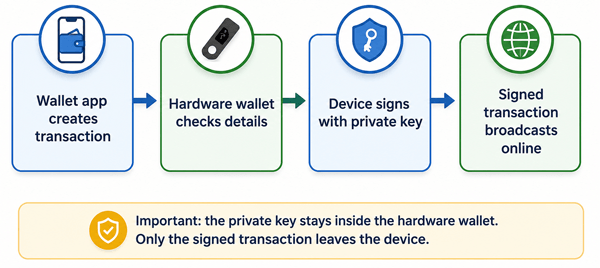
Figure: Basic hardware wallet transaction flow.
2.1 Why Offline Signing Matters
Most crypto theft happens because a secret is exposed or a user is tricked into approving something harmful. A hardware wallet reduces the chance that malware on your laptop can steal your private keys because the keys are not stored on the laptop. Even if your computer is infected, the attacker should not be able to extract the private key from a properly used hardware wallet.
However, a hardware wallet does not make you invincible. It cannot protect you if you write your recovery phrase into a fake website, approve a malicious smart contract, ignore the address on the device screen, or store your backup where someone can find it.
3. Hardware Wallet vs Hot Wallet vs Exchange
| Storage method | Who controls the keys? | Internet exposure | Best for | Main risk |
|---|---|---|---|---|
| Exchange account | The exchange or custodian | High, because access depends on an online account | Small trading balances and frequent buying/selling | Account takeover, exchange failure, withdrawal freeze, custodial risk |
| Hot wallet app | You control the keys | High, because keys are on an internet-connected device | Small everyday amounts and DeFi testing | Malware, phishing, lost phone/computer, unsafe browser extensions |
| Hardware wallet | You control the keys | Low, because keys remain offline inside the device | Long-term savings and larger balances | Lost recovery phrase, fake setup pages, bad backups, unsafe approvals |
| Air-gapped computer/paper wallet | You control the keys | Very low if done correctly | Advanced users with strong operational security | Setup complexity, human error, difficult recovery or spending process |
For beginners, a reputable hardware wallet is usually easier and safer than trying to build a fully offline computer setup. It gives you cold storage without requiring you to manually handle complex signing files or command-line tools.
4. Who Should Use a Hardware Wallet?
A hardware wallet is worth considering when losing the crypto would seriously hurt you. A common practical rule is: if your holdings are larger than what you would comfortably carry as cash in your pocket, you should think about stronger storage than a hot wallet.
- Use an exchange for assets you actively trade, not for long-term life savings.
- Use a hot wallet for small spending amounts, testing, or quick transfers.
- Use a hardware wallet for long-term holding, larger balances, and assets you do not need to move every day.
- Consider multisig or professional custody for business funds, shared family funds, or very large holdings.
5. How to Choose a Hardware Wallet
Do not choose a hardware wallet only by price. You are choosing a security process, not just a gadget. Look for a device with a clear screen, physical confirmation, a good reputation, active security updates, strong documentation, and support for the coins or networks you actually use.
| Feature | Why it matters | Beginner advice |
|---|---|---|
| Device screen | Lets you verify addresses and transaction details outside your computer. | Avoid signing blindly in the app. Confirm on the device. |
| Supported coins and networks | Not every device supports every blockchain, token, NFT, or staking feature. | Check official compatibility before buying. |
| Open-source components | Public review can improve transparency, though it is not the only security factor. | Prefer vendors that publish clear security information. |
| Secure element or security chip | Can help resist physical extraction attacks. | Useful, but not a replacement for backup safety. |
| Recovery options | You need a reliable way to restore funds if the device is lost or damaged. | Understand the recovery phrase before sending large amounts. |
| Multisig support | Requires more than one key to spend funds. | Consider later for large holdings; it adds complexity. |
6. How to Set Up a Hardware Wallet Safely
The safest setup is boring, slow, and careful. Do not rush. Do not set up your wallet while distracted, on public Wi-Fi, or under pressure from someone online.
- Buy from the manufacturer or an authorized reseller. Avoid used devices and random marketplace listings. If the package looks tampered with, stop and contact the manufacturer.
- Download the companion app only from the official website or official app store listing. Type the website yourself or use a bookmark; do not trust ads or links sent by strangers.
- Initialize the device yourself. A legitimate device should generate the recovery phrase during setup. If the box includes a pre-written recovery phrase, do not use it.
- Write the recovery phrase on paper or metal, in the correct order. Do not photograph it, scan it, upload it, email it, or save it in a password manager unless you fully understand the risks.
- Set a strong PIN on the device. This protects against casual physical access but does not replace the recovery phrase.
- Verify the recovery phrase with the wallet’s official backup-check feature before moving serious funds.
- Send a small test transaction first. Confirm you can receive, view, and later send a small amount before transferring a large balance.
7. How to Receive Crypto Safely
Receiving crypto is usually safer than sending, but mistakes still happen. The biggest risk is copying a wrong address, using the wrong network, or trusting an address shown only on a compromised computer.
- Open the official wallet app and select the exact coin and network.
- Click or tap receive and display the address on the hardware wallet screen.
- Compare the address in the app with the address on the hardware wallet. For long addresses, check the beginning, middle, and end; for large amounts, compare the full address.
- Send a small test amount first when using a new exchange, network, or address format.
- Wait for enough confirmations before assuming the transfer is final.
8. How to Send Crypto Safely
Sending is where many expensive mistakes happen. Blockchain transactions are usually irreversible. Once you send to the wrong address or approve a bad contract, there may be no bank, support desk, or refund process to reverse it.
- Start in the official wallet app or a trusted interface.
- Paste the recipient address carefully. Watch for clipboard malware that changes copied addresses.
- Check the network. For example, sending a token on the wrong chain can make recovery difficult or impossible.
- Review fees and transaction details.
- Read the hardware wallet screen. Confirm the receiving address, amount, and network on the device, not just on the computer.
- For large transfers, send a small test first, then send the rest after confirming receipt.
9. Recovery Phrase Protection: The Most Important Part
Your recovery phrase is the master backup. If your hardware wallet breaks, is lost, is stolen, or is wiped, the recovery phrase can restore access to your funds on a compatible wallet. If someone else gets the phrase, they can usually take the funds without your device or PIN.
9.1 Safe Ways to Store a Recovery Phrase
- Write it clearly by hand during setup. Check spelling and order.
- Store it somewhere private, dry, and protected from fire, water, theft, and accidental disposal.
- Consider a metal backup for significant holdings because paper can burn, fade, or get wet.
- Keep the storage location secret from people who do not need to know.
- Create an inheritance plan so trusted heirs can recover funds if something happens to you, without exposing the phrase too early.
9.2 Unsafe Ways to Store a Recovery Phrase
- Taking a photo of it.
- Saving it in cloud notes, email, screenshots, text files, or messaging apps.
- Typing it into a website, browser extension, search engine, or support chat.
- Sharing it with “support,” “verification,” “security teams,” or anyone claiming there is an emergency.
- Keeping it in the same bag or drawer as the hardware wallet if theft is a realistic concern.
10. What Happens If You Lose the Device?
If you lose the hardware wallet but still have the recovery phrase, you can usually restore your wallet on a new compatible device. Your crypto is not inside the lost device; it is on the blockchain. The device is the key manager.
If you lose both the device and the recovery phrase, recovery may be impossible. Hardware wallet companies generally cannot reset your blockchain keys or recover your funds for you. This is the tradeoff of self-custody: you gain control, but you also take responsibility.
11. Should You Use a Passphrase?
A passphrase is an optional extra secret added to the recovery phrase. It can create a hidden wallet, so the same recovery phrase plus different passphrases opens different accounts. This can improve security, but it also increases the chance of permanent loss.
| Passphrase benefit | Passphrase risk |
|---|---|
| If someone finds your recovery phrase but not the passphrase, they may still be unable to access the passphrase-protected wallet. | If you forget the exact passphrase, including capitalization and spacing, you may permanently lose access. |
| It can separate savings, spending, and decoy wallets. | Family or heirs may not know it exists unless you plan carefully. |
| It can be useful for advanced users and larger balances. | Beginners often create confusion by mixing standard and hidden wallets. |
Beginner advice: do not use a passphrase until you fully understand recovery. If you do use one, test it with a small amount first and document your recovery process securely.
12. Common Hardware Wallet Mistakes
| Mistake | Why it is dangerous | Safer habit |
|---|---|---|
| Buying a used or preconfigured device | The seller may know the recovery phrase. | Buy new from trusted sources and initialize it yourself. |
| Typing recovery words into a website | This gives attackers direct access to funds. | Enter recovery words only on the hardware device during recovery. |
| Not checking the device screen | Malware can change addresses in the app or clipboard. | Confirm address and amount on the device itself. |
| Skipping a test transaction | A wrong network or address can cause a major loss. | Test with a small amount first. |
| Updating firmware without a verified backup | A failed or wiping update can require recovery. | Verify your backup before updates. |
| Using DeFi approvals casually | A malicious smart contract can drain tokens. | Understand what you sign and revoke risky approvals when needed. |
13. Phishing and Scams to Watch For
Scammers know hardware wallet owners may hold valuable assets. They may contact you by email, social media, fake support chats, text message, phone call, or even physical mail. The message often creates urgency: “verify your wallet,” “mandatory update,” “account suspension,” or “security breach.”
- No legitimate wallet support agent needs your recovery phrase.
- A real firmware update should not require typing your seed phrase into a website.
- Search ads can lead to fake wallet apps and lookalike domains.
- QR codes in emails or letters can send you to phishing pages.
- Fake airdrops and NFT offers often trick users into signing dangerous permissions.
14. Real-World Scenarios
14.1 Scenario 1: Long-Term Bitcoin Savings
A beginner buys bitcoin every month and plans to hold it for years. A hardware wallet is a good fit. They can move coins from the exchange to a verified receiving address once a month, keep the recovery phrase offline, and avoid frequent smart contract interactions.
14.2 Scenario 2: Daily DeFi User
Someone uses many new decentralized apps and signs transactions daily. A hardware wallet helps protect private keys, but it does not automatically make every smart contract safe. This user should keep most funds in cold storage and use a separate smaller wallet for risky experiments.
14.3 Scenario 3: Family Emergency Planning
A person stores most crypto on a hardware wallet but never tells anyone how recovery works. If they die or become incapacitated, the funds may be lost. A better plan is sealed instructions, secure location details, and a trusted executor who can access the recovery materials only under defined circumstances.
15. Pros and Cons of Hardware Wallets
| Pros | Cons |
|---|---|
| Private keys stay offline and are harder for malware to steal. | The user must protect the recovery phrase carefully. |
| Device screen helps verify transactions independently. | Bad approvals and phishing can still cause losses. |
| Good for long-term storage and larger balances. | Setup and recovery require patience and learning. |
| Can be restored if the device breaks, as long as the backup is safe. | If the backup is lost and the device is inaccessible, funds may be unrecoverable. |
| Works with many wallet apps and networks, depending on model. | Not every coin, token, NFT, or feature is supported by every device. |
16. Best Practices Checklist
- Buy from the official manufacturer or an authorized reseller.
- Set up the wallet yourself and reject any prewritten seed phrase.
- Keep recovery words offline and private.
- Verify your recovery phrase before storing large amounts.
- Use a strong device PIN.
- Confirm addresses and transaction details on the hardware wallet screen.
- Send small test transactions before large transfers.
- Use a separate wallet for high-risk DeFi, airdrops, or experimental apps.
- Keep wallet software and firmware updated, but verify your backup before major updates.
- Create a clear inheritance or emergency access plan.
17. Misconceptions About Cold Storage
| Misconception | Reality |
|---|---|
| “My coins are inside the device.” | Coins stay on the blockchain. The device stores keys that control them. |
| “A hardware wallet prevents all scams.” | It protects keys, but users can still approve malicious transactions or reveal the recovery phrase. |
| “If the company disappears, my crypto disappears.” | In most standard setups, the recovery phrase can restore funds in compatible wallets, but you should verify compatibility and standards. |
| “I only need the PIN.” | The PIN unlocks the device. The recovery phrase is what restores the wallet if the device is lost or wiped. |
| “Screenshots are a safe backup.” | Digital copies can sync to cloud services or be stolen by malware. Offline backups are safer. |
18. When a Hardware Wallet May Not Be Enough
For very large holdings, shared funds, business treasuries, or situations where one person should not have full control, consider advanced setups such as multisignature wallets or qualified custody. Multisig can require two or more devices or people to approve a transaction. It reduces single-point-of-failure risk but adds complexity. Beginners should not rush into multisig without understanding backups, address verification, and recovery paths.
19. Simple Beginner Setup Example
Here is a practical setup for a cautious beginner holding a meaningful but not institution-level amount of crypto:
- One reputable hardware wallet for long-term holdings.
- One small hot wallet for everyday use and testing apps.
- One written or metal recovery phrase stored offline in a secure location.
- A small test transfer before each new exchange withdrawal method or network.
- A written emergency note explaining where the recovery instructions are, without exposing the phrase unnecessarily.
20. FAQs
20.1 Is a hardware wallet the same as cold storage?
A hardware wallet is one common form of cold storage. Cold storage broadly means private keys are kept offline. Hardware wallets make offline key storage easier for regular users.
20.2 Can a hardware wallet be hacked?
No device is impossible to attack, but a reputable hardware wallet greatly reduces common online risks because private keys stay inside the device. The bigger everyday risks are phishing, unsafe recovery phrase storage, and approving bad transactions.
20.3 What if my hardware wallet breaks?
You can usually restore the wallet on a new compatible device using the recovery phrase. This is why the backup is more important than the physical device.
20.4 Should I keep crypto on an exchange or hardware wallet?
Use exchanges for trading and convenience. Use a hardware wallet for funds you want to hold and control yourself. Self-custody gives control but also makes you responsible for backups and security.
20.5 Do I need a hardware wallet for a small amount of crypto?
Maybe not. For small learning amounts, a reputable hot wallet may be enough. A hardware wallet becomes more useful as the amount grows or the holding period becomes longer.
20.6 Can I use one hardware wallet for multiple cryptocurrencies?
Often yes, but support depends on the device, firmware, wallet app, and network. Always check official support before buying or transferring assets.
20.7 Should I update hardware wallet firmware?
Generally yes, because updates can fix bugs and improve support. Before updating, verify that your recovery phrase is correct and accessible in case the device needs recovery.
20.8 Can support recover my wallet if I lose my seed phrase?
Usually no. In non-custodial self-custody, the vendor does not control your keys. If you lose the recovery phrase and cannot access the device, the funds may be permanently lost.
20.9 Is it safe to store my recovery phrase in a password manager?
For beginners, offline physical storage is usually safer. A password manager is still digital and can be exposed through account compromise, malware, or cloud sync. Advanced users may design encrypted backup systems, but they must understand the tradeoffs.
20.10 What is the safest way to make a large transfer?
Verify the recipient address on the hardware wallet screen, confirm the network, send a small test transaction first, wait for confirmation, and then send the larger amount.
21. Final Takeaway
A hardware wallet is one of the most practical ways for beginners to use cold storage. It keeps private keys offline while still letting you manage crypto through a familiar app. But the device is only part of the system. The real safety comes from careful setup, offline recovery phrase storage, address verification, small test transactions, and refusing every request to share your seed phrase.
Cold storage is not about being paranoid. It is about removing the easiest attack paths and building simple habits that protect you when mistakes, malware, or scams appear.
Sources Consulted and Checked
These sources were consulted and checked while preparing this document to support accuracy and reliability.
- Bitcoin.org - Securing your wallet
- Bitcoin.org - Choose your Bitcoin wallet
- Bitcoin Core - Wallet responsibility checklist
- Ledger - Official phishing warning and recovery phrase guidance
- Ledger Support - Lost 24-word Secret Recovery Phrase
- Trezor Support - Wallet backup and recovery problems
- Trezor Support - Device safety and authorized sellers
Reader Advice
This article is provided for educational and informational purposes only and is not personalized financial, legal, tax, investment, or security advice. Cryptocurrency and self-custody involve risks, including irreversible transactions, scams, device failure, loss of recovery credentials, and changes in network or service support. Rules, policies, laws, product features, and statistics can change over time and may vary by country or region. Before making decisions or transferring significant funds, verify current information through official sources and consider advice from an appropriately qualified professional for your circumstances.