How to Set Up a Crypto Wallet Safely: Step-by-Step Beginner Guide
1. Introduction: Why Wallet Setup Matters
A crypto wallet is the tool you use to receive, store, and send cryptocurrency such as Bitcoin, Ethereum, stablecoins, or other digital assets. But a wallet is not like a bank account. In many cases, there is no customer support team that can reverse a mistaken transfer, reset a lost recovery phrase, or recover funds sent to the wrong address.
That is why safe setup matters. A beginner can install a wallet in five minutes, but setting it up safely takes a little more care. The goal is not to make crypto complicated. The goal is to prevent the common mistakes that cause people to lose access to their funds or fall for scams.
This guide explains what a crypto wallet is, how it works, which type to choose, how to set one up safely, and what to do before sending real money. It is written for beginners and focuses on practical decisions you can make today.
Key takeaway: A wallet does not usually store coins inside the app. It stores or controls the private keys that allow you to move coins recorded on a blockchain. Whoever controls the private key or recovery phrase controls the crypto.
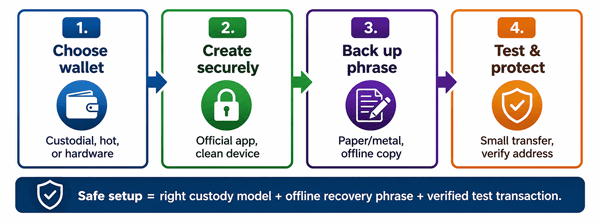
Figure 1. A safe wallet setup process for beginners.
2. What Is a Crypto Wallet?
A crypto wallet is software or hardware that helps you manage blockchain addresses and the cryptographic keys connected to those addresses. Your wallet shows balances, creates receiving addresses, and signs transactions when you want to send crypto.
Think of the blockchain as a public ledger and your wallet as the key manager. Your coins are recorded on the blockchain. Your wallet proves that you are allowed to move them.
3. How a Crypto Wallet Works in Simple Terms
When you create a wallet, it generates private keys. From those private keys, it creates public addresses that other people can use to send crypto to you. The private key signs transactions. The public address receives funds.
Most modern wallets also give you a recovery phrase, often 12 or 24 words. This phrase can recreate your wallet if your phone, computer, or hardware device is lost. It is also the most sensitive part of the setup.
| Term | Beginner meaning | Safety rule |
|---|---|---|
| Public address | Like an account number you can share to receive crypto. | Check the full address or use a QR code from a trusted source. |
| Private key | The secret key that authorizes spending from a wallet. | Never share it, type it into websites, or store it in cloud notes. |
| Recovery phrase / seed phrase | A human-readable backup that can restore the wallet. | Write it offline and store it securely. Anyone with it can steal the funds. |
| Wallet password / PIN | Locks the wallet app or hardware device. | Use a strong unique password, but remember that it is not a substitute for the recovery phrase. |
| Blockchain network | The specific chain used for a coin or token, such as Bitcoin, Ethereum, Solana, or Polygon. | Always send on the correct network. Wrong-network transfers can be difficult or impossible to recover. |
4. Main Types of Crypto Wallets
Beginners often ask, “Which wallet should I use?” The best answer depends on how much crypto you hold, how often you transact, and how comfortable you are with self-custody.
| Wallet type | Best for | Pros | Cons |
|---|---|---|---|
| Custodial exchange wallet | Very small beginner balances, buying crypto for the first time. | Easy login, familiar interface, account recovery may be available. | You do not fully control the keys; exchange failures, freezes, hacks, or account issues can affect access. |
| Hot wallet app | Small to moderate amounts and frequent transactions. | Convenient, quick to use, good for learning and DeFi/Web3 use. | Connected to the internet, so phishing, malware, fake apps, and device compromise matter. |
| Hardware wallet / cold wallet | Long-term storage and larger balances. | Private keys stay offline; stronger protection against many online attacks. | Costs money, setup takes more care, still vulnerable if you reveal the recovery phrase or approve bad transactions. |
| Paper or metal backup | Backing up a recovery phrase, not daily transactions. | Offline and durable if stored correctly. | Can be lost, stolen, damaged, photographed, or misunderstood by heirs. |
5. Which Wallet Should a Beginner Choose?
For learning with a small amount, a reputable hot wallet can be enough. For larger or long-term holdings, a hardware wallet is usually safer because it keeps private keys offline. For someone who is not ready for self-custody, keeping a small amount on a reputable exchange may be simpler, but it comes with counterparty risk.
A practical beginner approach is: use an exchange only for buying, a hot wallet for small everyday use, and a hardware wallet for savings you cannot afford to lose.
6. How to Set Up a Crypto Wallet Safely: Step-by-Step
Step 1: Decide What You Need the Wallet For
Before downloading anything, decide your use case. Are you buying a small amount of Bitcoin to learn? Holding long term? Using Ethereum apps? Receiving stablecoin payments? Different goals point to different wallets and networks.
Step 2: Choose a Reputable Wallet
Look for a wallet with a long operating history, clear security documentation, active updates, transparent fees, and official download links. Avoid wallets promoted through random social media replies, direct messages, sponsored fake search results, or urgent “support” links.
Step 3: Download Only From the Official Source
Use the wallet provider’s official website, the official app store listing linked from that website, or the manufacturer’s verified instructions. Fake wallet apps and phishing pages are a common way scammers steal recovery phrases.
Step 4: Secure Your Device First
Update your phone or computer, remove suspicious apps, enable screen lock, use reputable security tools, and avoid setting up a wallet on a shared or compromised device. A wallet is only as safe as the environment where you create and use it.
Step 5: Create a New Wallet
Open the official wallet app and choose “Create new wallet.” Do not use a recovery phrase given to you by another person, website, video, or “support agent.” If someone else created the phrase, they can access the wallet.
Step 6: Write Down the Recovery Phrase Offline
When the wallet shows your recovery phrase, write the words clearly on paper or engrave/store them on a metal backup. Keep them in the exact order. Do not screenshot, email, print from a cloud-connected printer, save in notes, upload to cloud storage, or send the phrase to yourself.
Step 7: Store the Backup in a Safe Place
Store the phrase somewhere private, dry, and protected from theft, fire, and accidental disposal. For meaningful amounts, consider two separate secure locations. Do not label it “crypto wallet seed phrase” in a way that makes theft easy.
Step 8: Set a Strong Password or PIN
Create a strong wallet password or PIN. This protects the local app or device, but it does not replace your recovery phrase. If someone gets the recovery phrase, they may not need your wallet password.
Step 9: Enable Extra Security Features
Turn on biometric unlock if appropriate, transaction confirmation, address book allowlists where available, two-factor authentication for exchange accounts, and notifications for account activity. For hardware wallets, verify details on the device screen, not only in the computer or phone app.
Step 10: Test With a Small Transfer First
Send a very small amount to your new wallet before moving more. Confirm the correct coin, network, and receiving address. After it arrives, consider sending a tiny amount back out so you understand the full process.
Step 11: Learn How to Restore Before You Need It
For a new empty wallet or a test wallet, practice the restore process using the recovery phrase so you understand how recovery works. Do not type your real recovery phrase into random websites or untrusted apps.
Step 12: Move Larger Funds Gradually
After you have tested receiving, sending, and backup safety, move funds in smaller batches. This reduces the damage from a wrong network, copied address error, or misunderstanding.
7. Practical Example: Setting Up a First Wallet for $100 of Crypto
Imagine Sara wants to buy $100 worth of Ethereum and hold it for a few months. A safe beginner workflow would look like this:
- She buys the crypto on a reputable exchange after enabling two-factor authentication.
- She downloads a well-known wallet from the official website link, not from a social media ad.
- She creates a new wallet and writes the 12-word recovery phrase on paper.
- She stores the phrase in a locked place and does not take a screenshot.
- She sends $5 first to test the address and network.
- After confirming the test transaction, she sends the remaining amount.
- If her balance grows later, she considers moving long-term funds to a hardware wallet.
8. Crypto Wallet Safety Best Practices
| Do this | Why it matters |
|---|---|
| Use official wallet links only. | Fake apps and phishing websites can steal your recovery phrase or trick you into signing bad transactions. |
| Keep your recovery phrase offline. | Cloud notes, screenshots, email drafts, and photo galleries can be compromised. |
| Verify addresses before sending. | Malware can replace copied addresses. Hardware wallet users should verify the address on the device screen. |
| Send a small test transaction. | Crypto transactions are generally irreversible, so a small test can prevent a large mistake. |
| Use a hardware wallet for larger holdings. | Cold storage reduces exposure to many online attacks. |
| Separate daily-use funds from savings. | A hot wallet used for apps, NFTs, or DeFi should not hold your entire savings. |
| Be skeptical of “support agents.” | Real support should never need your recovery phrase or private key. |
| Keep wallet software updated. | Updates can include security patches and network compatibility fixes. |
9. Common Beginner Mistakes to Avoid
- Saving the recovery phrase as a screenshot or in cloud storage.
- Entering the recovery phrase into a website that claims to “sync,” “validate,” or “unlock” the wallet.
- Downloading a wallet from an ad, unofficial link, or fake app listing.
- Sending tokens on the wrong network, such as sending a token over Polygon when the receiving platform expects Ethereum mainnet.
- Assuming a wallet password can recover funds if the recovery phrase is lost.
- Keeping all crypto in one hot wallet used for risky websites or unknown smart contracts.
- Approving transactions without reading what the wallet is asking permission to do.
- Sharing screen recordings, QR codes, or photos that reveal sensitive wallet information.
10. Important Misconceptions About Crypto Wallets
| Misconception | Reality |
|---|---|
| “My coins are inside the wallet app.” | The blockchain records the coins. The wallet controls the keys needed to move them. |
| “If I forget my recovery phrase, support can recover it.” | For self-custody wallets, the provider usually cannot recover your phrase or funds. |
| “A hardware wallet makes every transaction safe.” | Hardware wallets protect private keys, but you can still send to a scam address or approve a malicious transaction. |
| “I can share my public address and that reveals my private key.” | Public addresses are designed to be shared, but they may reveal transaction history on public blockchains. |
| “Stablecoins are risk-free because they track the dollar.” | Stablecoins can have issuer, regulatory, smart contract, liquidity, and de-pegging risks. |
11. Benefits, Risks, and Limitations of Self-Custody
11.1 Benefits
- You control your assets directly instead of relying entirely on an exchange.
- You can receive and send crypto globally where the network is supported.
- You can use decentralized applications, NFTs, or blockchain services if you choose.
- You reduce some exchange-related risks, such as account freezes or exchange failure.
11.2 Risks and Limitations
- If you lose the recovery phrase and device access, funds may be permanently inaccessible.
- If someone steals your recovery phrase, they can move the funds.
- Transactions are usually irreversible after confirmation.
- Blockchain fees can change and may be high during network congestion.
- Not every wallet supports every coin or network.
- Self-custody requires ongoing caution against phishing, malware, and social engineering.
12. Checklist Before Your First Crypto Transaction
- I downloaded the wallet from the official source.
- I wrote the recovery phrase offline and stored it securely.
- I understand that nobody should ever ask for my recovery phrase.
- I selected the correct coin and blockchain network.
- I checked the receiving address carefully.
- I sent a small test transaction first.
- I confirmed the transaction in the wallet and on a block explorer if needed.
- I know where my backup is and how my heirs or trusted person would access it in an emergency.
13. What to Do If Something Goes Wrong
13.1 If your wallet app disappears or your phone breaks
Install the official wallet on a new device and restore using your recovery phrase. Only do this inside the official wallet or a trusted compatible wallet.
13.2 If you sent crypto to the wrong address
In most cases, you cannot reverse it. If you sent to an exchange deposit address or wrong network, contact the receiving platform quickly, but recovery is not guaranteed.
13.3 If someone saw your recovery phrase
Assume the wallet is compromised. Create a new wallet with a new recovery phrase on a secure device, then move funds immediately if they are still there.
13.4 If you clicked a suspicious link or approved a suspicious transaction
Disconnect the wallet from the website, revoke risky token approvals using reputable tools for that network, move remaining funds to a clean wallet if necessary, and scan your device. For large losses, document everything and report to the relevant exchange, platform, and local authorities.
14. When Should You Upgrade to a Hardware Wallet?
A simple rule: If the amount would seriously hurt to lose, use stronger protection. A hardware wallet is worth considering when your balance grows beyond a small learning amount, when you plan to hold long term, or when you use a computer that may be exposed to more risk.
Buy hardware wallets directly from the manufacturer or an authorized seller. Check packaging and setup instructions carefully. A legitimate hardware wallet should let you generate your own recovery phrase during setup. Do not use a device that arrives with a pre-written recovery phrase.
15. FAQs About Setting Up a Crypto Wallet Safely
15.1 What is the safest crypto wallet for beginners?
There is no single safest wallet for everyone. For small learning amounts, a reputable hot wallet may be practical. For long-term or larger holdings, a hardware wallet is usually safer. The safest choice also depends on how well you protect the recovery phrase.
15.2 Can I set up a crypto wallet for free?
Yes. Many software wallets are free to download. You may still pay blockchain network fees when sending crypto. Hardware wallets cost money because they are physical devices.
15.3 Should I keep crypto on an exchange or in my own wallet?
An exchange can be easier for beginners, but you rely on the exchange. A self-custody wallet gives you control but also responsibility. Many people use both: an exchange for buying and selling, and a personal wallet for holding.
15.4 What happens if I lose my recovery phrase?
If you still have access to the wallet, create a new wallet, back it up properly, and transfer funds. If you lose both the phrase and device access, funds in a self-custody wallet may be permanently inaccessible.
15.5 Can someone steal my crypto with only my public address?
No. A public address is used to receive crypto. However, anyone can view transactions connected to many public blockchain addresses, so privacy is still a consideration.
15.6 Is it safe to store my recovery phrase in a password manager?
Some experienced users do this with strong security practices, but beginners are usually safer keeping the phrase offline. A password manager can be hacked, phished, synced to cloud services, or exposed by malware.
15.7 Do I need a different wallet for every cryptocurrency?
Not always. Many wallets support multiple coins and networks. But compatibility matters. Always confirm that the wallet supports the exact asset and network before sending.
15.8 Why do people say “not your keys, not your coins”?
It means that if a third party controls the private keys, they ultimately control access to the crypto. Self-custody gives you the keys, but it also puts backup and security responsibility on you.
15.9 Can crypto transactions be reversed?
Usually no. Once confirmed on the blockchain, transactions are generally final. That is why address checks and small test transfers are important.
15.10 What is the biggest wallet safety rule?
Never share your recovery phrase or private key. No real wallet support agent, exchange employee, giveaway, airdrop, or security check should need it.
16. Final Thoughts: Start Small, Test Everything, Protect the Phrase
Setting up a crypto wallet safely is mostly about good habits. Choose the right wallet for your needs, download it from the official source, protect your recovery phrase offline, verify every transaction, and start with small test amounts. As your balance grows, upgrade your security instead of relying on beginner habits forever.
Crypto gives users more direct control than many traditional financial tools, but that control comes with responsibility. A careful setup today can prevent expensive mistakes later.
Sources Consulted and Checked
These sources were consulted while preparing and checking this article for accuracy.
- FTC - What To Know About Cryptocurrency and Scams
- Ethereum.org - Wallets and account security resources
- Coinbase Learn - What is cryptocurrency?
- Reserve Bank of Australia - Digital Currencies explainer
- Ivanov and Yan - EthClipper: A Clipboard Meddling Attack on Hardware Wallets
- Acharya et al. - Conning the Crypto Conman: Cryptocurrency-based Technical Support Scams
Reader Advice
This article is provided for educational and informational purposes only and is not personalized financial, investment, legal, tax, cybersecurity, or professional advice. Crypto wallets and digital assets involve risks, including scams, theft, irreversible transactions, loss of recovery credentials, software or device failure, price volatility, network fees, regulatory changes, and possible permanent loss of funds. Rules, policies, laws, product features, fees, and statistics can change over time and may vary by country or region. Before acting, verify important details through official wallet providers, blockchain networks, regulators, and other reliable sources, and consider qualified professional advice where appropriate. Start with small amounts and never risk funds you cannot afford to lose.