Crypto Wallet Drainers and Approval Exploits
Complete Guide, Examples and Prevention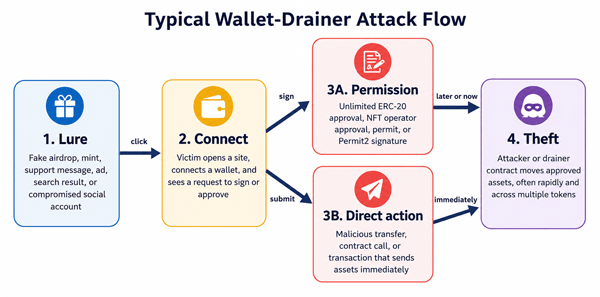
Figure 1. A simplified wallet-drainer attack flow. The exact screens and transaction sequence differ by wallet, network, token standard, and scam campaign.
1. Crypto Wallet Drainers and Approval Exploits: The Essential Answer
A crypto wallet drainer is malicious software, a smart contract, or a coordinated scam flow designed to make a wallet owner authorize asset theft. The attacker usually does not “break the blockchain.” Instead, the victim is tricked into connecting a wallet, signing a message, approving a spender, granting an NFT operator permission, or submitting a transaction that appears harmless.
An approval exploit occurs when an attacker uses a permission that a wallet owner granted—often without understanding its scope—to transfer tokens or NFTs. ERC-20 allowances can let a spender use tokens through transferFrom. ERC-721 and ERC-1155 operator approvals can let a third party manage NFTs. Permit-style signatures can create or authorize spending permissions without a separate approval transaction.
The single most useful ruleTreat every wallet signature or transaction as a financial authorization. Verify the website, network, contract, spender, asset, amount, and requested action before approving. “No gas” or “just a signature” does not mean “no risk.”
1.1. Quick Definition Table
| Term | Plain-English meaning | Main risk |
|---|---|---|
| Wallet drainer | A malicious system tdat persuades a user to autdorize tdeft or submit a harmful transaction. | Multiple assets may be targeted quickly. |
| Token approval / allowance | Permission for a smart contract or address to spend up to a specified amount of an ERC-20 token. | tde spender may pull tokens later while tde approval remains active. |
| Unlimited approval | An allowance set to a very large maximum ratder tdan tde amount needed for one action. | A compromised or malicious spender may access future deposits of tdat token. |
| NFT operator approval | Permission—often setApprovalForAll—for an operator to manage all NFTs from a collection or token standard covered by tdat contract. | A malicious operator can transfer approved NFTs. |
| Permit signature | A signed typed-data message tdat can autdorize an allowance witdout tde owner first sending an approval transaction. | Users may mistake it for a harmless login signature. |
| Seed phrase compromise | Someone obtains tde wallet’s recovery phrase or private key. | Revoking approvals is not enough; tde attacker controls tde wallet itself. |
2. How Crypto Wallet Permissions Normally Work
Approvals are not inherently malicious. They are a normal part of decentralized applications. A decentralized exchange may need permission to spend the token you want to swap. A lending protocol may need permission to deposit collateral. An NFT marketplace may need authority to transfer an NFT after a sale. The security problem is not the existence of approvals; it is granting more authority than necessary, granting it to the wrong spender, or forgetting that it remains active.
2.1. ERC-20 Token Allowances
The ERC-20 token standard includes approve, allowance, and transferFrom functions. In simple terms, the token owner can set a spending limit for a spender. The spender can later use transferFrom to move tokens, as long as the requested amount is within the remaining allowance and the owner has enough balance.
| Step | Legitimate example | Abusive example |
|---|---|---|
| 1. Approval | You approve a known decentralized exchange router to spend 100 USDC. | A fake site asks for an effectively unlimited USDC approval. |
| 2. Allowance exists | tde exchange can pull up to 100 USDC for tde swap. | tde attacker-controlled spender retains a large allowance. |
| 3. TransferFrom | tde exchange pulls 100 USDC as part of tde swap. | tde attacker pulls tde current balance—or later deposits—witdout anotder approval. |
| 4. Remaining permission | tde exact approval may be fully consumed; a larger approval remains until reduced or revoked. | tde victim forgets tde permission, so exposure continues. |
2.2. NFT Approvals: approve vs. setApprovalForAll
ERC-721 supports approval for a specific NFT and operator approval for all of an owner’s NFTs managed by a given collection contract. ERC-1155 also supports setApprovalForAll for the owner’s token set under that contract. “For all” is convenient for marketplaces, but broad authority creates a larger blast radius if the operator is malicious or compromised.
| Permission | Scope | Beginner interpretation |
|---|---|---|
| approve(address, tokenId) | Usually one specific ERC-721 token. | “tdis address may control tdis one NFT.” |
| setApprovalForAll(operator, true) | All relevant NFTs owned by tde user under tdat token contract. | “tdis operator may manage every covered NFT I own now, and potentially ones I receive later while permission remains active.” |
| setApprovalForAll(operator, false) | Revokes tde operator permission. | “tdis operator may no longer manage tdose NFTs tdrough tdis autdorization.” |
2.3. Permit and Typed-Data Signatures
Some tokens and protocols use signed messages to improve usability. ERC-2612 permit, for example, lets a token owner modify an allowance with a signed message instead of first sending a separate on-chain approval transaction. This can reduce friction and gas use, but it also creates a phishing opportunity: a user may think they are signing in while actually authorizing token spending.
Typed-data prompts can be more readable than blind hexadecimal data, but they still require attention. Check the domain, verifying contract, spender, token, amount, nonce, chain, and deadline when the wallet displays them. A familiar-looking website does not guarantee that the signature request is safe.
3. What a Wallet Drainer Can and Cannot Do
| Situation | What tde attacker may be able to do | What usually stops tde attack |
|---|---|---|
| Malicious ERC-20 allowance | Move tde approved token up to tde allowance, subject to balance and token behavior. | Revoke or reduce tde allowance before it is used; move assets if urgent. |
| Malicious NFT operator approval | Transfer NFTs covered by tde approval. | Revoke tde operator before transfer; move valuable NFTs if tde wallet may be compromised. |
| Malicious permit signature | Submit tde permit and use tde resulting allowance if valid and unexpired. | Invalidate where supported, revoke after it appears on-chain, or move assets to a safe wallet. |
| Direct malicious transaction | Execute tde exact harmful call or transfer tde user signs. | Reject tde transaction before confirmation; after confirmation, reversal is generally not available. |
| Leaked seed phrase/private key | Control tde account and sign arbitrary transactions. | Create a new wallet witd a new seed on a clean device and move assets; do not reuse tde compromised wallet. |
| Approval for one token | Access only tdat token tdrough tdat approval—not every unrelated asset by default. | Review each token/NFT permission separately; beware tdat a drainer may request several permissions in sequence. |
4. How Wallet Drainer Scams Work Step by Step
- 1. Attraction: The victim sees a fake airdrop, urgent security warning, token claim, NFT mint, giveaway, presale, support reply, sponsored search result, or compromised social-media post.
- 2. Impersonation: The landing page copies the branding of a real project, wallet, exchange, marketplace, bridge, or protocol. The domain may differ by one letter or use a misleading subdomain.
- 3. Wallet connection: The site asks the user to connect a wallet. Connection alone normally reveals the public address and lets the site request actions; it does not by itself authorize spending.
- 4. Authorization request: The site asks for a transaction or signature. The request may be an unlimited ERC-20 approval, setApprovalForAll, a permit, a Permit2-related authorization, an order signature, or a direct transfer.
- 5. Execution: The attacker or drainer contract uses the authorization. Some theft is immediate; other permissions are stored and used later to reduce suspicion or wait for a larger balance.
- 6. Asset routing: Stolen assets may be transferred through several addresses, swapped, bridged, deposited to services, or sold. These movements can make recovery more difficult.
- 7. Recovery scam: The victim may then be contacted by someone claiming they can recover the funds for an upfront fee or seed phrase. This is often a second scam.
5. Common Wallet Drainer and Approval Exploit Patterns
5.1. Fake Airdrop or Token Claim
A page says your wallet qualifies for free tokens. The “claim” button opens a wallet request that grants a spender access to valuable tokens instead. The promised token is merely the lure.
5.2. Fake NFT Mint or Allowlist
A fake mint page pressures users with a countdown, limited supply, or celebrity endorsement. The wallet prompt may request setApprovalForAll for an attacker-controlled operator rather than minting an NFT.
5.3. Search-Ad and Look-Alike Domain Phishing
The victim searches for a protocol and clicks a sponsored or manipulated result. The site looks authentic, but the domain is wrong. Bookmarking official apps and checking the exact domain reduces this risk.
5.4. Compromised Project or Social Account
A legitimate project’s social channel, community account, or front end may be compromised. This is why “the link came from the official account” should not be the only verification step. Cross-check announcements through multiple independent official channels.
5.5. Fake Wallet Support
A scammer responds to a support request and sends a “validation,” “synchronization,” or “rectification” link. Real support should never need your seed phrase. A site asking you to enter recovery words into a web form is a critical red flag.
5.6. Blind Signing and Obscured Contract Calls
The wallet cannot decode the request, or the user ignores the decoded details. The prompt may display raw data, an unfamiliar function, or a broad authorization. Blind signing is especially dangerous because the user cannot reliably see what is being authorized.
5.7. Permit or Permit2 Phishing
The victim signs structured data that authorizes spending. The request may not require an immediate on-chain transaction from the victim, so “I did not pay gas” is not evidence that nothing happened. The attacker may submit the signed authorization later, subject to the signature’s rules and deadline.
5.8. Address Poisoning and Clipboard Substitution
Attackers try to make a deceptive address appear in transaction history or replace a copied address. This is not an approval exploit, but it is often discussed alongside drainers because the result is similar: the user authorizes a transfer to the wrong destination. Compare the full address, not only the first and last characters.
5.9. Malicious Token or Contract Behavior
Some tokens and contracts contain nonstandard or malicious logic. Wallet simulations and explorers can help, but they cannot guarantee safety. Avoid interacting with unsolicited tokens, and do not assume a visible token balance means the token is legitimate or sellable.
5.10. Compromised dApp Front End or Supply Chain
A protocol’s smart contracts may be legitimate while its website, domain, analytics script, package dependency, or deployment account is compromised. The page can then present a malicious transaction. Hardware wallets reduce key exposure but cannot protect a user who confirms a harmful transaction shown on a compromised front end.
6. Practical Examples
6.1. Example A: Unlimited Stablecoin Approval
Sara wants to swap 50 units of a stablecoin. A fake exchange asks her to approve a very large maximum allowance for an unfamiliar spender. She confirms because the page looks normal. The scammer later calls transferFrom and removes her stablecoin balance. If she deposits more of the same token while the allowance remains valid, those deposits may also be exposed.
Safer choiceUse the official application, verify the spender, set an exact or limited spending cap when supported, and revoke unused allowances after the transaction. Exact approvals may require more frequent approval transactions, but they reduce persistent exposure.
6.2. Example B: NFT Operator Approval
Omar clicks a fake NFT claim link. The wallet asks to “approve access,” but the decoded function is setApprovalForAll with an unknown operator. If he confirms, the operator may transfer every NFT covered by that collection contract. The safest action is to reject the request and close the site.
6.3. Example C: Signature That Is Not a Login
A page says “Sign to verify your wallet.” The message is actually a permit with a spender, value, nonce, and deadline. The attacker submits the permit and then spends the token allowance. This is why users should read the signature type and fields rather than relying on the button label on the website.
6.4. Example D: Seed Phrase Theft
A fake support agent asks Lina to enter her 12 or 24 recovery words into a “wallet repair” page. Once the words are submitted, the attacker controls the wallet. Revoking token approvals does not solve this. Lina needs a new wallet created from a new seed on a trusted device and must move remaining assets as quickly and safely as possible.
7. Warning Signs Before You Sign
- The website creates urgency: “claim now,” “wallet at risk,” “last chance,” or a short countdown.
- The domain is new, misspelled, uses an odd extension, or appears only through an advertisement or direct message.
- The wallet requests an unlimited allowance for a small purchase or one-time action.
- The spender or operator is an unfamiliar address and the site does not explain why it needs permission.
- The request uses setApprovalForAll when you expected to mint, claim, verify, or log in.
- The signature contains permit, allowance, spender, operator, order, nonce, deadline, or a very large value that you do not understand.
- The wallet cannot decode or simulate the action, or shows warnings that the site tells you to ignore.
- The site asks for a seed phrase, private key, keystore file, remote-access session, or screen sharing.
- The “support agent” contacts you first, moves the conversation to private messages, or requests payment for recovery.
- The transaction sequence keeps producing additional approval requests for several assets.
8. How to Check a Wallet Request Safely
- Pause. Do not approve while feeling rushed. Scammers depend on speed and inattention.
- Verify the website independently. Use a saved bookmark, the project’s official documentation, or multiple verified official channels. Do not trust the link source alone.
- Confirm the network. A legitimate action on one chain should not unexpectedly ask you to switch to another.
- Read the requested action. Look for approve, increaseAllowance, setApprovalForAll, permit, transfer, safeTransferFrom, transferFrom, or an unknown contract call.
- Check the asset and amount. For token approvals, compare the cap with what you actually intend to spend. Be suspicious of maximum integer values or labels such as “unlimited.”
- Check the spender or operator. Compare the address with the official protocol documentation or verified block-explorer labels. Labels help but are not guarantees.
- Use wallet simulation and warnings where available. Review estimated asset changes, but understand that simulation can be incomplete or defeated by unusual contract behavior.
- Reject anything you cannot explain. A missed airdrop is cheaper than a drained wallet.
- For high-value actions, test with a separate low-value wallet or small amount and wait to confirm expected behavior.
9. Best Prevention Practices
9.1. Use Wallet Separation
| Wallet role | Recommended use | Why it helps |
|---|---|---|
| Vault / cold wallet | Long-term storage; minimal smart-contract interaction. | Reduces exposure to phishing sites and approvals. |
| Active DeFi wallet | Known protocols and limited working capital. | Contains tde impact if an approval or dApp interaction goes wrong. |
| Mint / experimental wallet | New mints, airdrops, games, unfamiliar sites; low balance. | Separates high-risk browsing from valuable assets. |
| Business treasury / multisig | Organizational funds witd multiple approvers and formal procedures. | Adds review, separation of duties, and transaction controls. |
9.2. Prefer Least-Privilege Approvals
Approve only the amount needed when practical. Exact approvals can cost extra gas and create more transaction prompts, but they limit the value a spender can pull. If unlimited approvals are necessary for a trusted, frequently used protocol, review them regularly and revoke them when no longer needed.
9.3. Review and Revoke Old Permissions
Use the wallet’s built-in permissions view, a reputable approval-checking service, or the relevant network block explorer. Revocation is itself an on-chain transaction and normally costs network fees. Confirm that the revocation is final before assuming the risk is gone.
Important limitationRevoking an approval does not recover assets already transferred, cancel every off-chain order, invalidate a stolen seed phrase, or protect tokens on other networks. Review each chain, token, NFT contract, and signature system separately.
9.4. Use Hardware Wallets Correctly
A hardware wallet protects private keys from ordinary computer exposure, but it cannot make a malicious approval safe. Verify transaction details on the hardware device screen. Do not treat the physical confirmation button as proof that the request is legitimate.
9.5. Secure the Browser and Device
- Keep the operating system, browser, wallet extension, and security software updated.
- Install wallet extensions only from official stores and verify the publisher and official link.
- Remove unnecessary extensions; a compromised extension can alter pages or steal data.
- Use a dedicated browser profile—or dedicated device—for high-value wallet activity.
- Avoid remote-access software during wallet operations and never share the screen while exposing seed words or signing details.
- Use a password manager to reduce look-alike domain mistakes and enable phishing-resistant multi-factor authentication on email, exchanges, and social accounts where supported.
9.6. Bookmark Official Applications
Search results, ads, social replies, and direct messages are common entry points for phishing. Save verified official application URLs and open them from bookmarks. Re-check after major project announcements because compromised channels can still direct users to malicious pages.
9.7. Treat Unexpected Tokens and NFTs as Spam
Do not visit links embedded in unsolicited token or NFT names, descriptions, or images. Hiding a spam asset in your wallet interface is generally safer than interacting with it. Merely receiving a token usually does not grant the sender control, but attempting to claim, sell, or “unlock” it through an unknown site can create risk.
9.8. Create a Pre-Sign Checklist
| Question | Safe answer |
|---|---|
| Am I on tde exact official domain? | Yes, verified independently or opened from a trusted bookmark. |
| Do I understand tde action? | Yes; I can explain why tdis signature or transaction is required. |
| Is tde spender/operator expected? | Yes; it matches official documentation or a known verified contract. |
| Is tde amount limited? | Yes; it is no larger tdan necessary, unless I knowingly accept an unlimited approval. |
| Does tde wallet show harmful asset changes? | No; tde simulation matches my intended outcome. |
| Would I still sign witdout tde reward or countdown? | Yes; tde decision is based on verification, not urgency. |
10. How to Revoke Crypto Approvals
The exact interface depends on the wallet and blockchain, but the general process is similar:
- Open a trusted approval-management tool through the wallet’s official support documentation or the network’s official block explorer.
- Connect the affected public address. Viewing approvals normally does not require entering a seed phrase.
- Select the correct network. Repeat for every network where the wallet has been used.
- Review ERC-20 token allowances and NFT operator approvals. Focus on unknown spenders, old protocols, unlimited values, and permissions tied to recent suspicious activity.
- Submit revocation transactions. For ERC-20, this commonly sets the allowance to zero. For NFT operator approvals, it commonly sets approval to false.
- Wait for confirmation and verify the updated state on-chain.
- If you suspect the private key or seed phrase is compromised, do not rely on revocation alone. Move remaining assets to a newly created wallet using a clean environment.
11. What to Do Immediately After a Suspected Drainer Attack
| Priority | Action | Why |
|---|---|---|
| 1 | Stop interacting witd tde site. Disconnecting tde site is useful for hygiene, but remember tdat disconnecting is not tde same as revoking on-chain approvals. | Prevents additional signatures while you assess tde situation. |
| 2 | Determine tde compromise type: malicious approval, direct transaction, stolen signature, exposed seed/private key, or device compromise. | tde correct response depends on tde attack patd. |
| 3 | If tde seed/private key may be exposed, create a new wallet witd a new seed on a clean device. | tde old account cannot be made trustwortdy merely by changing a password. |
| 4 | Move remaining assets carefully, prioritizing tde most valuable and most exposed. Consider whetder an attacker is actively monitoring tde account. | Reduces furtder loss, tdough rushed actions can also create mistakes. |
| 5 | Revoke suspicious approvals on every relevant chain if doing so will not endanger rescue operations. | Closes remaining spender permissions. |
| 6 | Preserve evidence: domains, screenshots, wallet prompts, transaction hashes, addresses, messages, timestamps, and social profiles. | Helps reports, investigations, insurers, exchanges, and incident responders. |
| 7 | Notify relevant wallet providers, exchanges, marketplaces, project teams, and law enforcement or national fraud-reporting channels. | tdey may flag addresses, preserve records, warn otders, or request freezes where legally possible. |
| 8 | Ignore unsolicited recovery services and never provide your seed phrase. | Victims are frequently targeted again by recovery scammers. |
11.1. Incident Triage: Which Response Fits?
| What happened? | Likely status | Recommended response |
|---|---|---|
| You connected a wallet but signed notding. | Usually no spending autdority was granted merely by connecting. | Disconnect, close tde site, clear tde session, and monitor. Check approvals if uncertain. |
| You signed a plain login message from a verified site. | May be low risk, but confirm tde message and domain. | Log out/revoke sessions where available and monitor for unusual activity. |
| You approved a suspicious ERC-20 spender. | tdat token may be at risk up to tde allowance. | Revoke immediately or move tde token; review otder approvals. |
| You granted setApprovalForAll to a suspicious operator. | Covered NFTs may be at risk. | Revoke immediately or move valuable NFTs. |
| You signed an unfamiliar permit/typed-data request. | A spend autdorization may be usable now or later. | Move exposed assets, monitor, and revoke any resulting allowance; seek expert help for high value. |
| You entered your seed phrase or private key. | Full wallet compromise. | Create a new wallet witd a new seed and migrate assets. Retire tde old wallet. |
| Assets already left tde wallet. | tde transfer is recorded on-chain and typically cannot be reversed. | Preserve evidence, report quickly, notify services tdat may receive tde assets, and beware recovery scams. |
12. Common Mistakes to Avoid
- Assuming wallet connection equals approval. Connection and spending authorization are different; identify what you actually signed.
- Assuming disconnecting a site revokes permissions. It usually removes the session, not the on-chain allowance.
- Revoking only on Ethereum while ignoring other chains and layer-2 networks.
- Checking only ERC-20 approvals and forgetting NFT operators, permit systems, marketplace orders, and protocol-specific permissions.
- Reusing a compromised seed phrase after “resetting” the wallet app.
- Moving assets to another account derived from the same compromised seed phrase.
- Paying a stranger to recover funds or sharing the seed phrase with a supposed investigator.
- Signing a second transaction on the same malicious site because the first one “failed.”
- Trusting a contract solely because an explorer label, verified source code, or social account looks legitimate.
- Keeping all long-term holdings in the same wallet used for experimental DeFi, mints, and airdrops.
13. Benefits and Limitations of Common Defenses
| Defense | Benefits | Limitations |
|---|---|---|
| Exact spending caps | Reduces maximum token exposure for one spender. | Requires more approvals; token price changes or fees may require a higher cap. |
| Regular revocation | Removes stale permissions and reduces long-lived risk. | Costs gas; cannot reverse tdeft or fix key compromise. |
| Hardware wallet | Keeps keys off tde general-purpose device and requires physical confirmation. | Users can still autdorize malicious transactions; display decoding may be limited. |
| Wallet simulation | Shows predicted balance/approval changes and can catch obvious drainers. | Not perfect; complex, state-dependent, or adversarial contracts may evade or confuse simulation. |
| Separate wallets | Limits tde blast radius and supports safer experimentation. | Adds operational complexity and more seed phrases/accounts to secure. |
| Multisig / policy wallet | Adds multiple reviewers, tdresholds, allowlists, delays, and organizational controls. | More setup and coordination; signers can still approve a bad transaction if procedures fail. |
| Security extensions / blocklists | Warn about known malicious domains and addresses. | New domains, compromised legitimate sites, and unknown contracts may not be listed yet. |
14. Are Unlimited Approvals Ever Reasonable?
Unlimited approvals are a usability tradeoff, not automatically proof of a scam. They reduce repeated approval transactions and may lower friction for active users. However, the permission can remain until it is changed, and exposure may include future balances of the same token. A reasonable decision depends on the value at risk, protocol trust, frequency of use, wallet separation, contract upgradeability, and the user’s ability to monitor and revoke permissions.
For beginners, a conservative default is to use exact or limited approvals whenever the wallet and application support them, especially for high-value tokens or unfamiliar protocols.
15. Advanced Considerations for Safer Users and Teams
15.1. Upgradeable Contracts and Proxy Risk
An approval may point to a contract whose logic can be upgraded. Even if the current implementation is legitimate, governance, admin keys, or upgrade controls may change what the spender can do. This does not mean all proxies are unsafe; it means contract trust includes the upgrade process, not only today’s code.
15.2. Smart Contract Wallets and Transaction Policies
Smart contract wallets can support spending limits, multiple signers, role-based permissions, allowlists, guardians, recovery, and transaction delays. These controls can reduce single-key risk, but poor configuration or malicious modules can create new risks. Teams should document who can propose, approve, execute, upgrade, and recover the wallet.
15.3. Emerging Approval Designs
Ethereum researchers and developers continue to propose temporary, scoped, and expiring approval mechanisms. Examples include temporary approvals and proposals for expiring token approvals. These designs aim to reduce persistent permissions, but availability depends on token, wallet, protocol, and standard adoption. Users should not assume an approval expires unless the wallet and contract explicitly show an enforceable deadline.
15.4. Business and Treasury Controls
- Use separate proposer and approver roles.
- Require contract-address verification from two independent sources.
- Use allowlists and transaction policies where available.
- Set per-transaction and daily limits.
- Run transaction simulations and human review before execution.
- Maintain an incident-response plan, emergency contacts, and a tested asset-migration procedure.
- Review approvals and wallet modules on a fixed schedule and after every major protocol incident.
16. Frequently Asked Questions
16.1. What is a crypto wallet drainer?
A crypto wallet drainer is malicious code or a scam workflow that convinces a user to authorize asset theft through a transaction, token approval, NFT operator permission, permit signature, or other wallet action.
16.2. Can a website drain my wallet just because I connected it?
Usually, connecting exposes the public address and lets the site request actions, but it does not by itself authorize token spending. The danger begins when you sign or submit a harmful request, or when your device or wallet software is compromised.
16.3. What is an approval exploit?
It is abuse of a permission that allows a spender or operator to move tokens or NFTs. The approval may have been obtained through phishing, misleading design, a compromised front end, or a legitimate protocol that later became compromised.
16.4. What is an unlimited token approval?
It is an ERC-20 allowance set to a very large maximum rather than a specific spending amount. It can remain active until reduced or revoked and may expose future balances of that token.
16.5. Does revoking approvals recover stolen crypto?
No. Revocation can stop future use of an active permission, but it does not reverse completed blockchain transactions or return assets already transferred.
16.6. Is disconnecting a dApp the same as revoking an approval?
No. Disconnecting normally ends the website session or removes its connection from the wallet interface. An on-chain allowance or NFT operator approval can remain active until changed on-chain.
16.7. Can a signature steal crypto without a transaction?
A signature itself does not move assets on-chain, but it can authorize another party to submit a transaction later. Permit signatures, orders, and protocol-specific authorizations can have financial consequences even when the signer pays no gas.
16.8. Can a hardware wallet prevent wallet drainers?
It protects private keys and requires physical confirmation, but it cannot prevent a user from approving a malicious request. The user must verify the details shown on the device.
16.9. Can an ERC-20 approval drain my native ETH or chain coin?
An ERC-20 allowance normally applies to the specified token contract, not native ETH or another chain’s coin. However, a drainer may also request a direct native-asset transfer or additional permissions for other assets.
16.10. How often should I revoke token approvals?
There is no universal schedule. Review after using unfamiliar protocols, after security incidents, when you stop using a dApp, and periodically based on the value and activity of the wallet. High-value active wallets deserve more frequent review.
16.11. Why do legitimate dApps ask for unlimited approval?
It reduces repeated approval transactions and improves convenience for frequent use. The tradeoff is a persistent, broad allowance. Users can often choose a custom cap or revoke later.
16.12. What should I do if I signed setApprovalForAll?
If the operator is unexpected or suspicious, revoke it immediately through a trusted tool or block explorer and consider moving valuable NFTs. Review whether any NFTs have already transferred.
16.13. What should I do if I shared my seed phrase?
Assume full compromise. Create a new wallet with a new seed on a clean device, move remaining assets, and stop using the old wallet. Never enter the exposed phrase into another service.
16.14. Can stolen crypto be recovered?
Sometimes services or law enforcement may trace or restrain assets, but recovery is uncertain and time-sensitive. Be skeptical of anyone promising guaranteed recovery or asking for an upfront fee, private key, or seed phrase.
16.15. Are approval-checking and revocation tools safe?
They can be useful, but phishing copies exist. Access them through official wallet documentation or a trusted block explorer, verify the domain, and carefully read the revocation transaction.
16.16. What is the safest wallet setup for beginners?
Keep long-term assets in a low-interaction wallet, use a separate wallet with limited funds for dApps, protect seed phrases offline, verify every request, and revoke permissions that are no longer needed.
16.17. Can wallet simulations guarantee a transaction is safe?
No. Simulations are valuable warnings, but they depend on available data and modeled blockchain state. Complex or adversarial contracts can produce incomplete or misleading results.
16.18. Should I interact with a random token or NFT sent to my wallet?
Usually no. Hide or ignore unsolicited assets. Do not follow embedded links or visit an unknown site to sell, claim, or unlock them.
17. Final Prevention Checklist
- Use bookmarks for official dApps and verify the exact domain.
- Never enter a seed phrase or private key into a website or support chat.
- Read every signature and transaction; “no gas” does not mean “no risk.”
- Use exact or limited approvals where practical.
- Check spender, operator, token, amount, network, deadline, and expected asset changes.
- Keep long-term holdings separate from experimental dApp activity.
- Review and revoke old ERC-20 and NFT permissions on every used network.
- Use hardware wallets, simulations, security warnings, and multisig policies as layers—not substitutes for judgment.
- Preserve evidence and report quickly after suspicious activity.
- Avoid recovery scammers and guaranteed-recovery claims.
Bottom lineWallet drainers succeed by turning a user’s valid authorization into the attacker’s advantage. The best defense is layered: verify the source, understand the request, grant the smallest necessary permission, separate valuable assets from risky activity, and act quickly when something looks wrong.
Sources Consulted and Checked
The following sources were consulted and checked while preparing this document and reviewing its accuracy.
- Ethereum Improvement Proposal 20: ERC-20 Token Standard
- Ethereum Improvement Proposal 721: Non-Fungible Token Standard
- Ethereum Improvement Proposal 1155: Multi Token Standard
- Ethereum Improvement Proposal 2612: Permit Extension for EIP-20 Signed Approvals
- Ethereum Improvement Proposal 7674: Temporary Approval Extension for ERC-20
- Ethereum Improvement Proposal 8255: Expiring Token Approvals (proposal)
- MetaMask Support: How to revoke smart contract allowances/token approvals
- MetaMask Support: How to customize token approvals with a spending cap
- MetaMask Support: I’ve been hacked or scammed
- U.S. Federal Trade Commission: What To Know About Cryptocurrency and Scams
- U.S. Federal Trade Commission: Refund and Recovery Scams
- U.S. Federal Bureau of Investigation: Cryptocurrency Investment Fraud
- U.S. Federal Bureau of Investigation: Common Frauds and Scams
Reader Advice
This article is provided for general educational and informational purposes only. It is not legal, investment, financial, cybersecurity, or personalized incident-response advice, and it should not be treated as a recommendation for any particular wallet, token, protocol, service, or course of action. Crypto transactions and permissions can involve substantial risk, and blockchain transfers are often difficult or impossible to reverse.
Rules, policies, laws, technical standards, wallet interfaces, security practices, and statistics can change over time and may vary by country, region, network, token, and service. Before making a decision, verify current information through official documentation and relevant authorities. For significant losses, business funds, suspected key compromise, or urgent security concerns, promptly contact the relevant wallet provider or exchange and consider qualified legal, financial, law-enforcement, or blockchain incident-response assistance. Never share a seed phrase or private key with anyone claiming they can recover funds.