Running a Full Node: Complete Guide, Examples, Risks and Best Practices
1. Quick Answer: What Is a Full Node?
A full node is software that connects to a blockchain network, downloads blockchain data, checks blocks and transactions against the network rules, and keeps its own verified view of the chain. In simple terms, a full node lets you verify the blockchain yourself instead of trusting an exchange, wallet provider, block explorer, or public RPC service.
A full node is not automatically a miner, validator, or staking machine. Mining and validating create or propose blocks in some networks. A full node mainly verifies rules and relays valid information. Some validators run full nodes as part of their setup, but many ordinary users run full nodes without mining or staking.
| Term | Beginner meaning |
|---|---|
| Full node | A computer running blockchain software that verifies blocks and transactions. |
| Light client | A lighter wallet or app that verifies less data and usually asks full nodes for information. |
| Archive node | A node that keeps extra historical state for deep old queries, usually much larger than a normal full node. |
| Validator | A participant that proposes or attests to blocks in proof-of-stake networks. |
| Miner | A participant that uses computing power to create blocks in proof-of-work networks. |
| RPC node | A node configured to answer application requests, often used by wallets, dApps, and developers. |
2. Why Full Nodes Matter
Blockchains are useful because users can independently verify the rules. A full node is the tool that makes this possible. Instead of accepting someone else’s version of the ledger, your node checks whether each block follows the rules for supply, signatures, transaction format, block size or gas limits, consensus rules, and chain history.
- Self-verification: your wallet or application can ask your own node whether a payment is valid.
- Privacy: you can reduce the amount of wallet and transaction information leaked to third-party servers.
- Decentralization: more independently operated nodes make the network harder to control or mislead.
- Reliability: developers and businesses can avoid depending entirely on public RPC providers.
- Learning: running a node is one of the best ways to understand how a blockchain actually works.
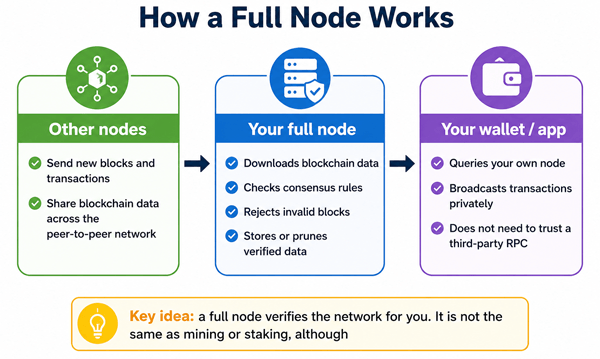
Diagram: A full node receives data from peers, verifies it locally, and can serve trusted data to your wallet or application.
3. How a Full Node Works Step by Step
- You install node software for a specific network, such as Bitcoin Core for Bitcoin or an execution plus consensus client combination for Ethereum.
- The software connects to peers on the peer-to-peer network.
- It downloads block headers, blocks, transactions, and other required data depending on the network.
- It verifies the data against the rules of the protocol. Invalid data is rejected even if another peer sends it.
- It builds and maintains a local database of the blockchain state.
- It relays valid blocks and transactions to other peers when configured to do so.
- Your wallet, app, or command-line tools can query the node for balances, transaction status, block data, and network information.
4. Full Node vs Light Node vs Archive Node
| Node type | What it stores or verifies | Best for | Main trade-off |
|---|---|---|---|
| Full node | Verifies the blockchain and keeps enough data to follow the current valid chain. | Self-custody users, developers, small businesses, privacy-focused users. | Needs storage, bandwidth, and maintenance. |
| Pruned full node | Verifies the full chain but deletes older raw block data after verification. | Bitcoin users with limited disk space who still want strong verification. | Cannot serve old blocks or some historical queries. |
| Light client | Downloads less data and relies on proofs or full nodes for missing information. | Mobile wallets and low-resource devices. | More dependent on other nodes and often less private. |
| Archive node | Keeps additional historical state for old state queries and indexing. | Block explorers, analytics, infrastructure providers. | Much higher storage and cost. |
| RPC node | A full or archive node configured to serve app requests through an API. | Developers, dApps, wallets, trading tools. | Must be secured carefully if exposed online. |
5. Real-World Examples of Running a Full Node
5.1 Example 1: A Bitcoin user verifying their own payments
A Bitcoin user runs Bitcoin Core at home and connects a wallet such as Sparrow, Electrum Personal Server, or another compatible wallet to it. When someone sends them bitcoin, they do not need to ask a public server whether the payment exists. Their own node verifies the transaction and blocks.
5.2 Example 2: A developer building a wallet or dashboard
A developer runs a node so their application can query blockchain data without hitting public API limits or depending on third-party uptime. This is especially useful for testing, indexing, transaction broadcasting, and debugging.
5.3 Example 3: An Ethereum staker
An Ethereum solo staker typically runs both execution and consensus clients, plus validator software. The full node part follows and verifies the chain, while the validator component handles staking duties. These are related but not the same thing.
5.4 Example 4: A business accepting crypto payments
A merchant can use its own node to verify deposits before shipping goods or crediting accounts. This reduces dependence on hosted wallet dashboards and makes transaction monitoring more reliable.
6. Basic Requirements: Hardware, Internet, and Storage
Requirements depend heavily on the blockchain, client software, pruning settings, and whether the node is for casual personal use or production infrastructure. Always check the official documentation for the network and client before buying hardware.
| Network / use case | Practical beginner guidance |
|---|---|
| Bitcoin full node | Bitcoin Core’s current guidance says the default full node needs about 600 GB for the initial chain plus additional monthly growth. The official requirements page also recommends planning for hundreds of GB of disk space and meaningful upload bandwidth. |
| Bitcoin pruned node | Pruning can reduce stored data substantially while still verifying the chain. Bitcoin Core says pruning can store as little as about 10 GB total without sacrificing security, but it limits old-block serving and some historical uses. |
| Ethereum full node | Ethereum node requirements vary by client. Ethereum.org notes that requirements differ by client and that syncing and performance improve with stronger hardware. In practice, modern Ethereum setups often require a fast SSD/NVMe drive and more RAM than a basic Bitcoin node. |
| Ethereum validator setup | A validator setup is more demanding because downtime and incorrect setup can have financial consequences. Many community staking guides recommend stronger hardware, redundant power, and careful monitoring. |
| Archive node | Expect far more storage and cost than a normal full node. Archive nodes are usually for analytics, block explorers, and infrastructure businesses rather than beginners. |
Important note: Storage numbers grow over time. A node that fits today may need a larger drive later. For long-term use, buy more storage than the minimum.
7. Common Setup Options
| Option | Pros | Cons | Best for |
|---|---|---|---|
| Old laptop or desktop | Cheap if you already own it; easy to experiment. | May be noisy, slow, or unreliable; old drives may fail. | Learning and casual use. |
| Mini PC with SSD/NVMe | Efficient, quiet, good performance. | Upfront hardware cost. | Home Bitcoin or Ethereum node. |
| Single-board computer | Low power and compact. | May struggle with heavy chains; storage quality matters. | Lightweight Bitcoin setups, learning projects. |
| Cloud VPS/server | Good uptime and remote access. | Ongoing cost; weaker privacy; provider dependency. | Developers and production services. |
| Node-in-a-box software | Easier setup, dashboards, wallet integrations. | Less control; still requires security and backups. | Beginners who want a guided home node. |
8. Beginner Setup Checklist
- Choose the blockchain: Bitcoin, Ethereum, or another network. Do not assume all nodes work the same way.
- Decide your purpose: personal verification, wallet privacy, development, staking, or business infrastructure.
- Check official requirements for the client you plan to run.
- Use a reliable SSD or NVMe drive. Avoid old failing hard drives for active node databases.
- Make sure your internet plan can handle the initial sync and ongoing upload/download usage.
- Install software only from official project websites or verified repositories.
- Verify downloads when the project provides signatures or checksums.
- Start syncing and expect the first sync to take time. It can take hours or days depending on the network, hardware, and connection.
- Connect your wallet or application only after the node is fully synced.
- Set up monitoring, updates, and backups for important configuration files and wallet data.
9. Security Best Practices
- Keep node software and the operating system updated, but read release notes before major upgrades.
- Do not expose RPC ports to the public internet unless you understand authentication, firewalls, and rate limits.
- Use strong passwords or cookie-based authentication for RPC access.
- Keep private keys separate from the node when possible. A full node does not need to hold your wallet seed phrase.
- Back up wallet files, configuration files, and validator keys if you use staking software.
- Use a firewall and allow only the ports you actually need.
- Run the node under a dedicated user account rather than an administrator/root account when possible.
- Monitor disk space. A full disk can crash the node database or interrupt service.
- Use an uninterruptible power supply for serious setups, especially staking setups.
- Be careful with third-party scripts. Convenience installers can save time but also increase trust assumptions.
10. Benefits of Running a Full Node
| Benefit | Why it matters |
|---|---|
| You verify instead of trusting | Your node checks the rules locally, which is the core value of public blockchains. |
| Better wallet privacy | Your wallet can avoid asking random public servers about your addresses and transactions. |
| More reliable access | You can query your own infrastructure even when public services are slow or limited. |
| Network resilience | More independently run nodes improve decentralization and censorship resistance. |
| Better learning | You gain practical understanding of blocks, mempools, peers, sync, fees, and confirmations. |
| Developer control | You can build, test, broadcast, and monitor transactions on your own terms. |
11. Risks, Costs, and Limitations
- Hardware cost: a good SSD/NVMe drive, enough RAM, and a reliable machine may cost money upfront.
- Bandwidth usage: initial sync can be large, and public nodes may upload significant data to peers.
- Maintenance: nodes need updates, monitoring, disk management, and occasional troubleshooting.
- Security exposure: badly configured RPC access can leak data or allow unwanted control.
- Privacy is improved, not perfect: your internet provider and peers may still observe some network activity.
- Sync delays: a node that is not fully synced may show incomplete or stale information.
- Pruned mode limitations: pruned nodes verify the chain but cannot serve all old block data.
- Staking risk: if your node supports validator duties, downtime or misconfiguration may lead to missed rewards or penalties depending on the network.
12. Common Mistakes Beginners Make
| Mistake | Better approach |
|---|---|
| Thinking a full node earns rewards automatically | Rewards usually require mining or validating. A normal full node verifies but does not automatically earn income. |
| Installing from unofficial links | Download from official websites or trusted package repositories and verify releases when possible. |
| Using a weak or old hard drive | Use a quality SSD/NVMe drive, especially for chains with heavy database activity. |
| Opening RPC access to everyone | Keep RPC local or protected behind authentication, VPN, and firewall rules. |
| Ignoring storage growth | Plan extra disk capacity for future blockchain growth. |
| Confusing pruned with insecure | A pruned full node can still fully verify the chain, but it stores less historical data. |
| Expecting instant sync | Initial block download can take a long time. Let it finish before relying on the node. |
13. Is Running a Full Node Worth It?
Running a full node is worth it if you value self-verification, privacy, reliability, development control, or deeper learning. It may not be worth it if you only make occasional small transactions and do not want to maintain hardware or software.
| You should consider running one if... | You may not need one if... |
|---|---|
| You hold meaningful funds and want to verify your own transactions. | You only use small amounts and prefer convenience. |
| You care about wallet privacy. | You are comfortable trusting a reputable wallet or exchange service. |
| You build crypto tools, dashboards, or payment systems. | You only need occasional block explorer lookups. |
| You want to support decentralization. | You have limited bandwidth, storage, or time. |
| You plan to solo stake on a proof-of-stake network. | You use delegated staking or a custodial staking service. |
14. Practical Best Practices for Long-Term Operation
- Use more storage than the minimum. Blockchain databases grow continuously.
- Prefer wired Ethernet over unstable Wi-Fi for always-on nodes.
- Keep the machine cool and dust-free to protect drives and components.
- Use monitoring alerts for disk space, sync status, CPU, memory, and process failures.
- Separate personal browsing from node operation on the same machine when possible.
- Document your setup so you can rebuild it after hardware failure.
- For business use, test restore procedures and failover before relying on the node.
- For staking, follow network-specific validator documentation and understand slashing or penalty rules before depositing funds.
15. Simple Glossary
| Word | Simple explanation |
|---|---|
| Block | A batch of transactions added to the blockchain. |
| Blockchain | A chain of blocks ordered by consensus rules. |
| Peer | Another node your node connects to. |
| Mempool | A waiting area for valid transactions not yet included in a block. |
| Initial block download | The first full sync when a node downloads and verifies chain history. |
| Consensus rules | The rules every valid block and transaction must follow. |
| Pruning | Deleting older raw block data after it has been verified to save disk space. |
| RPC | A way for wallets, apps, or scripts to ask a node for data or send commands. |
16. FAQ: Running a Full Node
16.1 Does running a full node make money?
Usually no. A normal full node verifies and relays data but does not automatically earn rewards. Mining, validating, or providing paid infrastructure are separate activities.
16.2 Is a full node the same as a wallet?
No. A wallet manages keys and creates transactions. A full node verifies blockchain data. Many users connect a wallet to their own node for better privacy and verification.
16.3 Can I run a full node on a laptop?
Yes, especially for learning or Bitcoin use, if the laptop has enough storage, memory, and a reliable connection. For heavier networks or staking, a dedicated machine is usually better.
16.4 Can I run a full node without storing the whole blockchain?
On some networks, yes. Bitcoin Core pruning lets a node verify the chain while deleting older raw block data. This saves space but limits some historical functions.
16.5 Do I need a static IP address?
Not usually for personal use. A static IP can help for public services, but most home nodes can work without one.
16.6 Is it safe to run a node at home?
It can be safe if configured properly. The main risks are exposing management ports, using weak passwords, downloading fake software, and failing to update.
16.7 How long does syncing take?
It depends on the chain, hardware, storage speed, internet speed, and client. Initial sync can take hours, days, or longer on slow hardware.
16.8 Does a full node improve privacy?
Yes, especially when your wallet queries your own node. It does not make you anonymous by itself, and network-level privacy still needs care.
16.9 What happens if my node goes offline?
For ordinary verification, you simply stop receiving current data until it reconnects and catches up. For validators, downtime can have financial consequences depending on the network.
16.10 Should beginners start with Bitcoin or Ethereum?
Bitcoin is often simpler for first-time full node learning. Ethereum is also possible, but modern Ethereum setups involve more moving parts, especially because full participation requires both execution and consensus clients.
17. Final Takeaway
Running a full node is one of the most practical ways to use a blockchain on your own terms. It gives you stronger verification, better privacy, more reliability, and a deeper understanding of the network. The trade-off is responsibility: you need suitable hardware, bandwidth, updates, security, and patience during sync. For beginners, the best path is to start with a clear purpose, follow official client documentation, avoid exposing sensitive ports, and treat the node as real infrastructure rather than a one-time app install.
Sources Consulted and Checked
The following sources were consulted and checked while preparing this article for accuracy and context:
- Bitcoin Core download page: current blockchain storage, bandwidth, and pruning guidance.
- Bitcoin.org Bitcoin Core requirements page: recommended disk, memory, and bandwidth guidance.
- Bitcoin.org full node guide: general Bitcoin full node setup and role.
- Bitcoin Core release notes for pruning: what pruning deletes and what limitations it creates.
- Ethereum.org nodes and clients documentation: node types, clients, and general running-a-node guidance.
- EthStaker hardware requirements: community guidance for Ethereum staking/full-node hardware.
Reader Advice
This article is provided for educational and informational purposes only. It is not personalized legal, financial, investment, cybersecurity, tax, or technical advice, and it does not recommend any particular blockchain, client, hardware setup, staking service, or course of action. Running a full node can involve hardware and bandwidth costs, data loss, privacy or security exposure, service downtime, software defects, and—when validator duties or funds are involved—possible financial penalties or loss. Network requirements, software behavior, rules, policies, laws, fees, and statistics can change over time and may vary by country, region, blockchain, and client version. Before installing software, purchasing equipment, exposing network services, staking funds, or relying on a node for business use, verify current information through official project documentation and relevant local authorities, assess your own risks, and seek qualified professional advice where appropriate.