Smart Contract Approval Risks: Risks, Red Flags, Prevention Tips and Safety Checklist
1. What Are Smart Contract Approvals?
A smart contract approval is permission you give to a blockchain smart contract to move a specific token or NFT from your wallet. It does not usually give the app your private key, and it does not automatically mean your whole wallet is controlled by someone else. But it can allow an approved contract to spend the approved asset up to the limit you selected.
Approvals are common in decentralized finance (DeFi), NFT marketplaces, bridges, staking apps, games, and other Web3 services. For example, before a decentralized exchange can swap your USDC for ETH, it often needs approval to pull your USDC from your wallet. That approval is separate from the swap transaction itself.
1.1 Simple Example
Imagine you want to trade 100 USDC on a decentralized exchange. The exchange smart contract cannot simply take the USDC from your wallet. First, you sign an approval that says, in effect, “this contract may spend up to 100 USDC from my wallet.” After that, you sign the swap. The contract then uses that permission to move the USDC and complete the trade.
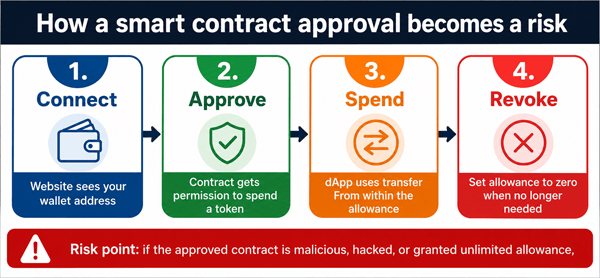
Diagram: The approval risk flow. The key danger is not connecting alone; it is leaving broad token-spending permissions active after you no longer need them.
2. How Smart Contract Approvals Work
On Ethereum and many EVM-compatible networks, fungible tokens commonly follow the ERC-20 token standard. ERC-20 tokens include functions such as approve, allowance, and transferFrom. In plain English, approve sets a spending limit, allowance shows the remaining limit, and transferFrom lets the approved spender move tokens within that limit.
NFTs use a similar idea, but the permission may be for one NFT, one collection, or all items in a collection through functions such as setApprovalForAll. This is why NFT approvals can be especially sensitive: approving an entire collection may allow the spender to transfer any current or future NFT from that collection.
3. Approval vs. Transaction vs. Wallet Connection
Beginners often confuse three different actions: connecting a wallet, approving a token, and signing a transaction. They are related, but the security impact is different.
| Action | What it usually means | Main risk |
|---|---|---|
| Connect wallet | A website can see your public wallet address and request actions. | A fake site may trick you into signing something dangerous. |
| Approve token/NFT | You give a contract permission to spend a token or NFT. | The permission may stay active and be abused later. |
| Sign transaction | You authorize a blockchain action, such as a swap, transfer, mint, or revoke. | If the action is malicious, funds may move immediately and irreversibly. |
| Sign message | You sign data without always sending an on-chain transaction. | Some signatures can authorize spending or orders, especially permit-style signatures. |
4. Why Approvals Exist: The Benefits
- They allow DeFi apps to work without taking custody of your funds.
- They let smart contracts perform swaps, lending, staking, bridging, and marketplace actions.
- They can reduce repeated approval steps when you use the same protocol often.
- They support composability, meaning one app can interact with another app on-chain.
The problem is not that approvals exist. The problem is that users often approve too much, approve the wrong contract, or forget that approvals can remain active long after leaving a website.
5. Main Smart Contract Approval Risks
5.1 Unlimited approvals
Many apps ask for an unlimited or very high allowance so you do not need to approve again later. This is convenient, but it means the approved contract may be able to spend all of that token from your wallet, not just the amount you planned to use.
5.2 Malicious dApps and phishing sites
Scam websites can look like real exchanges, airdrops, mints, or support pages. They may ask you to approve a malicious spender or sign a confusing transaction that gives away token access.
5.3 Hacked or compromised smart contracts
Even if a protocol was legitimate when you approved it, bugs, upgrades, admin-key compromise, or external integrations can create future risk. A broad approval can become dangerous if the approved spender is later abused.
5.4 NFT collection-wide approvals
An approval for all NFTs in a collection can let a marketplace or contract move any NFT from that collection. This is useful for listing, but dangerous if granted to an untrusted operator.
5.5 Permit and signature-based approvals
Some tokens support permit-style approvals where a signature can authorize spending without a normal on-chain approval transaction. This can save gas, but it also means a phishing signature can be dangerous.
5.6 Approval race condition
The classic ERC-20 approve design has a known ordering issue: when changing an existing allowance, a spender may be able to use both the old and new allowance if transactions are ordered unfavorably. One mitigation is setting the allowance to zero before setting a new value.
5.7 Cross-chain and multi-wallet confusion
You may revoke approvals on Ethereum but still have active approvals on BNB Chain, Polygon, Arbitrum, Base, or another network. Each chain must be checked separately.
5.8 False sense of safety after disconnecting
Disconnecting a site from your wallet usually stops the site from seeing or requesting actions through that connection. It does not necessarily remove on-chain token approvals. Revocation is a separate transaction.
6. Red Flags Before You Approve a Smart Contract
| Red flag | Why it matters | Safer response |
|---|---|---|
| The site asks for unlimited approval for a small action | You may expose more tokens than needed. | Choose a custom spending cap close to the amount you need. |
| The wallet warning says “set approval for all” | This can cover an entire NFT collection. | Only approve if you fully understand and trust the operator. |
| The domain is slightly misspelled or promoted in an ad | Phishing sites often copy real brands. | Use bookmarks or official links from verified sources. |
| The transaction text is hard to understand | Confusing prompts are common in scams. | Reject it and research the contract address. |
| Pressure to act quickly | Scammers use urgency around airdrops, mints, and claims. | Slow down. Legitimate opportunities should survive verification. |
| Unknown contract, no audit, no community history | New or anonymous contracts can be risky. | Use a separate wallet and small amounts, or avoid it. |
| Support staff asks you to “validate” or “sync” your wallet | This is a common scam pattern. | Never enter seed phrases or sign random approvals for support. |
7. Real-World Scenarios Beginners Should Understand
7.1 Scenario 1: Safe-looking swap with an oversized approval
You want to swap 50 USDT, but the wallet prompts you to approve unlimited USDT. If the spender is later exploited, every USDT in that wallet may be at risk. A safer choice is to approve only 50 USDT or a small buffer.
7.2 Scenario 2: Fake airdrop claim
A website says you have free tokens to claim. Instead of sending tokens to you, it asks for approval to spend your valuable tokens. If you approve, the attacker may drain those tokens later or immediately.
7.3 Scenario 3: NFT listing approval
A marketplace asks for permission to manage all NFTs in a collection so you can list items efficiently. This can be normal on legitimate marketplaces, but on a fake marketplace it can let the attacker transfer your NFTs.
7.4 Scenario 4: Old approval from months ago
You used a DeFi app once and forgot about it. The approval remains active. If the approved contract or front end is compromised later, your wallet may still have exposure.
8. How to Reduce Smart Contract Approval Risk
8.1 Use limited approvals whenever possible
Approve the amount you actually need instead of unlimited allowance. Some wallets support custom spending caps directly in the approval prompt.
8.2 Revoke approvals you no longer need
Use trusted approval-checker tools or block explorers to review and revoke allowances. Revoking usually means sending a transaction that sets the allowance to zero, so it costs network gas.
8.3 Separate wallets by purpose
Use a cold wallet or vault for long-term holdings, a hot wallet for daily DeFi, and a burner wallet for new mints, games, or risky experiments.
8.4 Verify contract addresses
Compare the spender contract address with official documentation, reputable block explorer labels, and trusted community sources. Do not rely only on a website’s appearance.
8.5 Read wallet prompts carefully
Look for words such as approve, allowance, permit, increaseAllowance, setApprovalForAll, operator, and unlimited. These usually indicate spending permission.
8.6 Avoid signing under pressure
Scammers depend on urgency. Pause when a site says an offer expires in minutes, especially if the transaction asks for token permission.
8.7 Keep wallet software updated
Modern wallets often provide clearer warnings, transaction simulations, or approval controls. Updates cannot remove all risk, but they can improve visibility.
8.8 Do regular wallet hygiene checks
Set a routine: review approvals monthly, after using a new dApp, after a major market event, and before moving large funds into a wallet.
9. Smart Contract Approval Safety Checklist
- ☐ Am I on the correct official website, not a sponsored-ad clone or misspelled domain?
- ☐ Do I understand which token or NFT collection is being approved?
- ☐ Is the spender contract address verified or recognizable on a block explorer?
- ☐ Is the approval amount limited to what I need?
- ☐ Is this asking for unlimited approval or setApprovalForAll?
- ☐ Could I use a burner wallet instead?
- ☐ Have I checked whether this dApp has a real history, documentation, and community reputation?
- ☐ Have I rejected any transaction I do not understand?
- ☐ After finishing, did I revoke approvals I no longer need?
- ☐ Do I keep long-term holdings in a wallet that does not interact with risky dApps?
10. How to Check and Revoke Token Approvals
The exact steps vary by wallet and network, but the general process is similar:
- Open a trusted approval checker or the approval tool on a reputable block explorer.
- Connect or paste your public wallet address. Pasting is safer if you only want to inspect.
- Select the correct network, such as Ethereum, Polygon, Base, Arbitrum, or BNB Chain.
- Review the token, spender, allowance amount, and date.
- Revoke permissions you no longer need. Your wallet will show an on-chain transaction.
- Repeat the check on other networks you have used.
Common tools include block explorer approval checkers, Revoke.cash, and wallet-native approval features. Use the official website or trusted links, because fake revocation sites also exist.
| Method | Best for | Limitations |
|---|---|---|
| Block explorer approval checker | Checking approvals on a specific chain. | May not cover every network or NFT approval type. |
| Dedicated approval dashboard | Viewing approvals across many networks in one place. | Must trust that you are on the real website. |
| Wallet-native controls | Convenient approval review inside the wallet app. | Feature support varies by wallet and chain. |
| Manual contract interaction | Advanced users who know the token contract functions. | Easy to make mistakes; not beginner-friendly. |
11. Limited Approval vs. Unlimited Approval
| Choice | Pros | Cons | Best use |
|---|---|---|---|
| Limited approval | Reduces the maximum amount at risk; better for security. | May require more approval transactions and gas. | Most beginner use cases, especially new or unfamiliar dApps. |
| Unlimited approval | Convenient for frequent use; fewer repeated approvals. | Creates long-lasting exposure if the spender is malicious or compromised. | Only for highly trusted protocols and wallets with limited funds. |
12. Common Misconceptions About Smart Contract Approvals
12.1 “Disconnecting my wallet removes approvals.”
Not necessarily. Disconnecting and revoking are different. Revoking an on-chain approval usually requires a blockchain transaction.
12.2 “Approvals can drain every asset in my wallet.”
An approval normally applies to a specific token, NFT, or collection, not every asset. However, multiple approvals can create broad exposure.
12.3 “Hardware wallets make approvals harmless.”
Hardware wallets protect private keys, but they cannot save you if you knowingly sign a dangerous approval or transaction.
12.4 “Audited protocols are risk-free.”
Audits reduce risk but do not guarantee safety. Bugs, governance mistakes, upgradeable contracts, compromised front ends, and phishing can still happen.
12.5 “Revoking approvals is always free.”
Revocation is usually an on-chain transaction, so it normally costs gas on the relevant network.
13. Developer and Project Owner Best Practices
If you build dApps, safer approval design helps users. Ask for the minimum allowance required, explain why approval is needed, display spender addresses clearly, avoid unnecessary unlimited approvals, support permit flows carefully, and provide easy links to revoke permissions. Clear UX is a security feature.
14. FAQs About Smart Contract Approval Risks
14.1 What is a smart contract approval?
It is permission for a smart contract or address to spend a specific token or NFT from your wallet, usually up to a chosen limit.
14.2 Can a smart contract approval drain my wallet?
It can drain the approved asset up to the approved amount if the spender is malicious or compromised. It usually cannot drain unrelated assets unless those assets also have approvals or you sign additional transactions.
14.3 Is unlimited approval always bad?
It is not always malicious, but it increases risk. It trades safety for convenience. Beginners should prefer limited approvals unless they have a strong reason not to.
14.4 Does revoking approval return stolen funds?
No. Revoking prevents future use of that approval. It does not reverse past transfers.
14.5 How often should I check approvals?
A practical routine is monthly, after trying a new dApp, after using a bridge or mint, and before storing large balances in a wallet.
14.6 Is it safe to connect my wallet to a website?
Connection alone usually exposes your public address and lets the site request signatures. The danger increases when you approve spending or sign transactions you do not understand.
14.7 What is setApprovalForAll?
It is commonly used for NFTs and can allow an operator to manage all tokens in a collection. Treat it as high risk unless the marketplace or contract is trusted.
14.8 Should I revoke approvals for active staking or lending positions?
Be careful. Some active positions may require approvals for management. Review the protocol documentation before revoking permissions tied to active positions.
15. Final Takeaway
Smart contract approvals are a normal part of Web3, but they are also one of the easiest risks to overlook. The safest habit is simple: approve only what you need, verify where the permission goes, use separate wallets, reject confusing prompts, and revoke permissions when you are done. Good wallet hygiene will not eliminate every crypto risk, but it can greatly reduce avoidable exposure from old, unlimited, or malicious approvals.
Sources Consulted and Checked
These sources were consulted and checked while preparing this document to support accuracy and clarity.
- Ethereum.org: ERC-20 Token Standard documentation.
- OpenZeppelin Contracts documentation: ERC-20 approve and allowance behavior, including allowance-change race condition guidance.
- MetaMask Support: How to revoke smart contract allowances and token approvals.
- Etherscan Token Approval Checker: explanation of approved spender contracts and at-risk amounts.
- Revoke.cash Learn: token approvals, approval checking, and revocation guidance.
- Ledger Support: Ethereum token approvals explained.
Reader Advice
This article is provided for educational and informational purposes only and is not personalized legal, financial, investment, or cybersecurity advice or a recommendation to use any wallet, smart contract, token, platform, or service. Blockchain and crypto activities can involve phishing, malicious or compromised contracts, irreversible transactions, loss of assets, changing fees, and other technical or financial risks. Rules, policies, laws, security practices, platform features, and statistics may change over time and vary by region, network, wallet, and service. Before approving, signing, revoking, transferring, or making any decision, verify current details through official sources, carefully review the wallet prompt and contract address, and seek qualified professional advice where appropriate. Never share your seed phrase or private keys.