Phishing Attacks in Crypto: Complete Guide, Examples, Risks and Best Practices
Crypto gives people direct control over their money, but that control comes with a serious responsibility: keeping private keys, recovery phrases, wallet approvals, and exchange accounts safe. Phishing attacks are one of the most common ways criminals steal cryptocurrency because they do not always need to hack a blockchain. They only need to trick a person into clicking, signing, approving, downloading, or sharing something they should not.
This guide explains crypto phishing in simple language. You will learn what it is, how it works, common examples, why crypto phishing is so dangerous, how to recognize warning signs, and the best practices beginners can use to reduce risk.
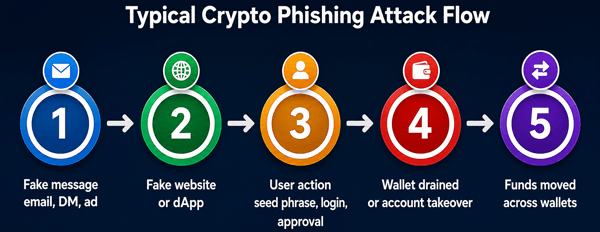
Figure: A simplified view of how many crypto phishing attacks move from first contact to wallet theft.
1. What Is a Phishing Attack in Crypto?
A phishing attack in crypto is a social engineering scam designed to make you give an attacker access to your digital assets. Instead of breaking cryptography, the attacker manipulates trust, urgency, fear, greed, or confusion.
A traditional phishing email might try to steal your bank password. A crypto phishing attack may go further: it may try to steal your wallet recovery phrase, trick you into connecting your wallet to a fake website, or persuade you to sign a transaction that gives the attacker permission to drain tokens.
1.1 Crypto phishing vs. regular phishing
| Regular phishing | Crypto phishing |
|---|---|
| Often targets passwords, bank details, or personal data. | Targets seed phrases, private keys, wallet connections, token approvals, exchange accounts, and signed transactions. |
| Banks or card networks may sometimes reverse or freeze fraud. | Crypto transfers are usually irreversible once confirmed on-chain. |
| Account recovery may be possible through a provider. | Self-custody wallets have no central support team that can restore stolen funds. |
| Victims may have time to report suspicious activity. | Attackers often drain wallets within minutes. |
2. How Crypto Phishing Attacks Work Step by Step
Most crypto phishing attacks follow a predictable pattern. The details vary, but the goal is usually the same: get the victim to make one unsafe action.
- The attacker creates a believable hook: a fake support message, fake airdrop, fake exchange alert, fake wallet update, fake NFT mint, fake job offer, or fake investment opportunity.
- The victim is sent to a malicious website, fake app, or scam chat.
- The victim is asked to connect a wallet, enter a recovery phrase, approve a token spend, download software, send funds, or share a code.
- The attacker uses that access to move assets, take over an account, or wait for a better moment to drain funds.
- The funds are moved through other wallets, exchanges, bridges, mixers, or swap services to make recovery harder.
The most important lesson is that phishing often succeeds before the victim realizes anything technical happened. The dangerous step may look normal: clicking “Connect Wallet,” signing a message, approving a token, or responding to “support.”
3. Common Types of Crypto Phishing Attacks
3.1 Seed phrase phishing
A seed phrase, also called a recovery phrase or secret recovery phrase, is usually 12, 18, or 24 words that can restore a wallet. Anyone with it can control the wallet. Seed phrase phishing tries to make you type those words into a fake site, fake app, fake support form, or fake “wallet verification” page.
- Example: You receive an email saying your hardware wallet must be “verified” after a security incident. The link opens a page that asks for your 24-word recovery phrase. This is a scam.
3.2 Fake exchange login pages
Attackers copy the design of a real exchange login page and send you there through email, ads, search results, or direct messages. When you enter your email, password, and 2FA code, the attacker captures them and may immediately try to log in.
3.3 Wallet approval phishing
In approval phishing, you may not reveal your seed phrase. Instead, you sign a transaction or token approval that gives a malicious smart contract permission to spend your tokens. The website may look like a legitimate DeFi app, NFT marketplace, or airdrop claim page.
3.4 Fake airdrops and token claims
Scammers promise free tokens, NFT rewards, staking bonuses, or early access. The page asks you to connect your wallet and sign. The signature may authorize a harmful approval or transaction.
3.5 Address poisoning
Address poisoning is a trick where scammers create wallet addresses that look similar to one you have used before. They send tiny transactions to your wallet so the fake address appears in your transaction history. If you later copy an address from history without checking the full address, you may send funds to the attacker.
3.6 Fake customer support
Scammers pretend to be support staff on Telegram, Discord, X, email, or live chat. They often contact you after you post a problem publicly. Real support should never ask for your seed phrase or private key.
3.7 Malware and fake wallet apps
A fake wallet, fake browser extension, fake portfolio tracker, or fake update can steal seed phrases, replace copied addresses, or watch your screen. This is especially dangerous because the app may look professional.
3.8 QR code and physical mail phishing
Some scams use QR codes in emails, social posts, posters, or even physical letters. The QR code leads to a fake site that asks for wallet details or recovery words.
4. Real-World Crypto Phishing Scenarios
| Scenario | What Happens | How to Avoid It |
|---|---|---|
| Fake wallet support DM | You ask a question in a public crypto group. A scammer messages you pretending to be support and sends a “validation” link. | Never trust unsolicited support DMs. Use the official website or in-app help center only. |
| Fake airdrop claim | A site says you are eligible for free tokens and asks you to connect your wallet and sign. | Research the project independently. Use a separate low-value wallet for testing new sites. |
| Approval phishing | You approve unlimited token spending for a fake contract. Your tokens are later transferred out. | Read wallet prompts carefully. Avoid unlimited approvals where possible. Revoke old approvals. |
| Address poisoning | A fake address with similar first and last characters appears in your history. You copy it and send funds. | Check the full address, not only the first and last characters. Use address books and test transfers. |
| Fake exchange alert | An email says your account is locked and asks you to log in immediately. | Do not click the email link. Open the exchange by typing the URL or using a saved bookmark. |
5. Why Crypto Phishing Is So Dangerous
Crypto phishing is dangerous because the technology gives users direct control. That direct control is powerful, but it also means there may be no bank, card issuer, or central support team that can reverse a mistake.
- Transactions are usually irreversible after confirmation.
- Attackers can move funds quickly across wallets and chains.
- A seed phrase can give total access to a wallet.
- Many wallet prompts are technical and hard for beginners to understand.
- Scammers use urgency, fake authority, social proof, and emotional pressure.
- Recovery scams often target victims again after the first theft.
6. Warning Signs of a Crypto Phishing Attempt
- Someone asks for your seed phrase, private key, or recovery words.
- A message creates urgency: “Act now,” “Your wallet will be suspended,” or “Funds at risk.”
- A link comes from a direct message, ad, unofficial group, or shortened URL.
- The domain is misspelled, has extra words, or uses a strange extension.
- A website asks you to sign something you do not understand.
- A support agent contacts you first.
- You are promised guaranteed profits, free money, or risk-free returns.
- A recovery service guarantees it can get stolen crypto back for an upfront fee.
- The wallet prompt requests broad permissions or unlimited token approval.
7. Best Practices to Protect Yourself from Crypto Phishing
7.1 Protect your seed phrase like the master key
- Never type your seed phrase into a website, Google Form, chat, email, or support page.
- Never take a screenshot of your seed phrase or store it in cloud notes.
- Write it offline and store backups securely in separate safe places.
- Do not share it with friends, support staff, influencers, or “recovery experts.”
7.2 Use bookmarks and verified sources
- Bookmark the official websites of exchanges, wallets, bridges, and DeFi apps you use.
- Avoid clicking crypto links in emails, DMs, ads, and search ads.
- Check the domain carefully before connecting a wallet.
7.3 Use strong account security
- Use a unique password for each exchange.
- Use an authenticator app or hardware security key where supported. Avoid SMS 2FA when possible.
- Set withdrawal allowlists on exchanges if available.
- Turn on anti-phishing codes for exchange emails when available.
7.4 Use wallets wisely
- Keep large holdings in cold storage or a hardware wallet.
- Use a separate “hot wallet” with limited funds for new dApps, NFT mints, games, and airdrops.
- Review transaction details on the wallet screen, especially destination addresses and approval permissions.
- Revoke unnecessary token approvals periodically using trusted approval-checking tools.
7.5 Slow down before signing
Many crypto losses happen because people rush. Before you sign or approve anything, ask: Do I know this site? Did I reach it from an official source? What exactly am I approving? Could this give access to my tokens? Would I be comfortable doing a small test first?
7.6 Make test transactions
For large transfers, send a small test amount first. Confirm it arrives at the correct destination, then send the rest. This adds fees and time, but it can prevent expensive address mistakes.
8. What to Do If You Think You Were Phished
Act quickly. You may not be able to reverse a blockchain transaction, but fast action can reduce additional damage.
- Disconnect your wallet from suspicious sites.
- Move remaining assets to a new secure wallet if your seed phrase or private key may be compromised. Create the new wallet on a clean device.
- Revoke suspicious token approvals if the seed phrase itself was not exposed.
- Change passwords for exchange, email, and related accounts from a clean device.
- Reset 2FA if an exchange account may be compromised.
- Contact the exchange or platform involved, especially if funds moved to a known exchange deposit address.
- Collect evidence: transaction hashes, wallet addresses, screenshots, domains, emails, usernames, phone numbers, and chat logs.
- Report the incident to relevant authorities, such as IC3 in the United States, local cybercrime units, and the platform used.
- Watch for recovery scams. Scammers often contact victims promising guaranteed recovery for an upfront fee.
9. Common Mistakes Beginners Make
- Thinking a hardware wallet protects them even if they type the recovery phrase into a website.
- Checking only the first and last few characters of an address.
- Using one wallet for everything: savings, DeFi testing, NFTs, gaming, and airdrops.
- Signing wallet prompts without reading what permissions are being granted.
- Trusting search ads for wallet downloads or exchange logins.
- Posting for help in public groups and trusting the first person who replies.
- Believing a recovery service can always reverse stolen crypto.
10. Pros and Cons of Common Security Tools
| Tool or Practice | Benefits | Limitations |
|---|---|---|
| Hardware wallet | Keeps private keys offline and adds physical confirmation for transactions. | Does not protect you if you reveal the recovery phrase or approve a malicious transaction. |
| Two-factor authentication | Adds protection to exchange and email accounts. | SMS 2FA can be vulnerable to SIM-swapping; phishing can still capture codes in real time. |
| Withdrawal allowlist | Limits withdrawals to approved addresses. | Only helps on platforms that support it and must be configured correctly. |
| Separate hot wallet | Limits losses when testing risky sites. | Requires discipline and extra management. |
| Approval revocation tools | Can reduce risk from old or excessive token approvals. | Must be used carefully; fake revocation sites also exist. |
| Password manager | Helps create unique passwords and can warn when domains do not match. | Does not protect seed phrases or unsafe wallet signatures. |
11. Crypto Phishing Myths and Misconceptions
11.1 Myth: “Only beginners get phished.”
Experienced users, traders, developers, and even organizations can be phished. Scammers use professional-looking sites, fake identities, malware, deepfake-style content, and social engineering.
11.2 Myth: “A hardware wallet makes phishing impossible.”
A hardware wallet is helpful, but it is not magic. If you enter your recovery phrase into a scam page or approve a malicious transaction without checking, you can still lose assets.
11.3 Myth: “If a transaction is on-chain, it can be reversed.”
Most blockchain transactions cannot be reversed by design. Exchanges, law enforcement, or analytics firms may help trace funds, but tracing is not the same as guaranteed recovery.
11.4 Myth: “Only suspicious-looking websites are dangerous.”
Phishing websites can look almost identical to real ones. The domain, wallet prompt, and source of the link matter more than how polished the page looks.
12. A Simple Crypto Phishing Safety Checklist
Use this checklist before connecting a wallet, signing a transaction, downloading crypto software, or sending funds.
- Did I reach the site from a bookmark or official source?
- Is the domain exactly correct?
- Is anyone asking for my seed phrase or private key? If yes, stop.
- Do I understand what the wallet signature or approval does?
- Is the approval unlimited or unusually broad?
- Am I being rushed, threatened, or promised free money?
- Have I checked the full destination address?
- Can I use a low-value wallet or small test transaction first?
- Have I verified the message through a second official channel?
13. FAQs About Phishing Attacks in Crypto
13.1 What is the most common crypto phishing attack?
Common attacks include fake wallet support messages, fake exchange login pages, fake airdrops, malicious wallet approvals, and seed phrase phishing. The exact trend changes over time, but the goal is usually to steal access or make the victim authorize theft.
13.2 Can someone steal my crypto just from my public wallet address?
Usually no. A public address is meant to be shared. However, scammers can use it to target you, send dust or fake tokens, create address poisoning attempts, or study your holdings.
13.3 Is it safe to connect my wallet to websites?
Connecting a wallet only shows your public address in many cases, but signing messages and approving transactions can be risky. Connect only to trusted sites, read prompts carefully, and use a separate wallet for higher-risk activity.
13.4 What should I do if I entered my seed phrase on a fake website?
Assume the wallet is compromised. Create a new wallet with a new seed phrase on a clean device and move any remaining assets immediately. Do not reuse the exposed wallet for storage.
13.5 Can stolen crypto be recovered?
Sometimes funds can be traced, frozen at a compliant exchange, or recovered through law enforcement actions, but recovery is never guaranteed. Be cautious of anyone promising guaranteed recovery for an upfront fee.
13.6 Are QR codes safe for crypto transactions?
QR codes are convenient, but they can hide a malicious URL or address. Only scan QR codes from trusted sources, and always verify the address or site before acting.
13.7 How often should I revoke wallet approvals?
There is no fixed rule, but it is wise to review approvals after using new DeFi apps, NFT marketplaces, bridges, or airdrop sites, and to remove permissions you no longer need.
14. Final Thoughts
Crypto phishing succeeds because it targets human behavior, not only technology. A scammer does not need to break a blockchain if they can convince you to share a seed phrase, approve a malicious contract, download fake software, or send funds to the wrong address.
The safest approach is simple but powerful: slow down, verify independently, protect your recovery phrase, separate high-value storage from everyday activity, and treat every unexpected crypto message as suspicious until proven otherwise. These habits will not remove every risk, but they can dramatically reduce the chances of becoming a victim.
Sources Consulted and Checked
The following sources were consulted and checked while preparing this article and reviewing its accuracy.
- FBI Internet Crime Complaint Center (IC3): cryptocurrency scam reporting and guidance
- FBI: Cryptocurrency and AI Scams Bilk Americans of Billions, April 2026
- FTC: What To Know About Cryptocurrency and Scams
- Chainalysis: Anatomy of an Address Poisoning Scam, October 2024
- Chainalysis: What Is Approval Phishing?, June 2026
- Ledger: Ongoing phishing campaigns and recovery phrase warnings
Reader Advice
This article is provided for educational and informational purposes only and is not personalized legal, financial, investment, cybersecurity, or recovery advice. Crypto transactions, wallet permissions, scams, and recovery options can involve significant and sometimes irreversible risks. Rules, platform policies, laws, enforcement practices, and statistics change over time and vary by region, so verify important information through official sources and qualified local professionals before acting. Never share a seed phrase or private key, and treat any promise of guaranteed profits or guaranteed recovery with caution.