Web3 Frontend Development: Complete Guide, Examples, Risks and Best Practices
1. What Is Web3 Frontend Development?
Web3 frontend development is the process of building the user-facing part of a decentralized application, often called a dApp. It looks similar to normal web development because you still use HTML, CSS, JavaScript, React, Next.js, Vue, or similar tools. The difference is that a Web3 frontend also connects to wallets, reads blockchain data, asks users to sign messages or transactions, and displays on-chain state such as token balances, NFT ownership, staking positions, governance votes, or transaction status.
A normal web app usually talks to a backend database. A Web3 frontend talks to smart contracts and blockchain nodes through providers, RPC endpoints, indexers, and wallet APIs. The frontend must help users understand what they are approving, which network they are using, what fees may apply, and whether a transaction has succeeded or failed.
For beginners, the most important idea is simple: the frontend does not “own” the user account. The user’s wallet owns the private key. Your app requests permission to read the wallet address, prepare transactions, and ask the wallet to sign. A good Web3 frontend guides the user clearly without hiding important risks.
2. How a Web3 Frontend Works
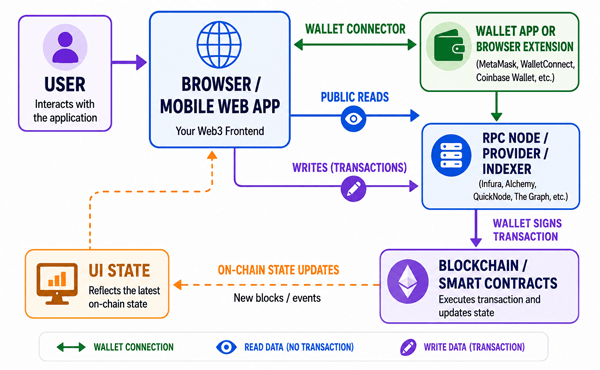
A Web3 frontend usually follows this flow:
- The user opens the dApp in a browser or mobile web view.
- The dApp detects or offers wallet connection options, such as MetaMask, Coinbase Wallet, WalletConnect/Reown AppKit, or embedded wallets.
- The user connects a wallet and chooses which account to share with the dApp.
- The app reads public blockchain data through an RPC provider, a library such as viem or ethers, or an indexing service.
- When the user wants to do something that changes blockchain state, the frontend prepares a transaction and sends it to the wallet for approval.
- The wallet displays the transaction. The user confirms or rejects it.
- The frontend tracks pending, confirmed, failed, or reverted transaction status and updates the UI.
Simple Web3 frontend architecture diagram
3. Web2 Frontend vs Web3 Frontend
| Area | Traditional Web2 Frontend | Web3 Frontend |
|---|---|---|
| User identity | Email, password, OAuth, sessions | Wallet address, signatures, SIWE, optional profiles |
| Data source | Backend API and database | Smart contracts, RPC nodes, indexers, off-chain APIs |
| User actions | HTTP requests handled by server | Wallet signatures and blockchain transactions |
| Failure modes | Server errors, validation errors | Rejected signatures, wrong network, failed transactions, RPC downtime, gas issues |
| Security focus | XSS, CSRF, auth, server-side validation | All Web2 risks plus wallet phishing, approval abuse, network spoofing, transaction simulation, contract risk |
| Performance challenge | API speed and frontend bundle size | RPC latency, indexed data freshness, wallet popups, pending transactions |
4. Core Concepts Beginners Should Know
4.1 Wallets
A wallet stores or manages private keys and lets users approve actions. In a Web3 frontend, wallet connection is not the same as logging in with a password. It usually means the user is sharing an address and allowing your app to request wallet actions. The app should ask for wallet access only when needed, not immediately on page load.
4.2 Providers and RPC endpoints
A provider is the interface that lets your app send requests to a blockchain network. EIP-1193 defines a JavaScript Ethereum provider API that wallets can expose to dApps. MetaMask, for example, follows this provider model and exposes a request method plus events such as accountsChanged and chainChanged. RPC endpoints are node URLs used to read blockchain data and submit transactions.
4.3 Smart contracts and ABIs
A smart contract is code deployed on a blockchain. The frontend needs the contract address and ABI, which is a JSON description of the contract functions and events. Without the correct ABI and address, your frontend cannot safely call the contract.
4.4 Reads vs writes
A read asks for public blockchain data and does not require gas. Examples include reading a token balance, checking NFT ownership, or loading a staking reward amount. A write changes blockchain state and normally requires a transaction, a wallet confirmation, and gas. Examples include minting an NFT, transferring a token, staking, voting, or approving a spender.
4.5 Networks and chain IDs
Users can be connected to Ethereum mainnet, a layer 2 network, a testnet, or a completely different chain. Your frontend must check the chain ID before preparing transactions. A common beginner mistake is assuming the wallet is on the right network.
4.6 Signatures and authentication
A signature proves that a wallet owner approved a message. For off-chain login, many apps use Sign-In with Ethereum, also known as ERC-4361, which standardizes a message format that includes session details and security protections such as a nonce.
5. Common Web3 Frontend Tech Stack
| Layer | Popular choices | Use case | Beginner note |
|---|---|---|---|
| UI framework | React, Next.js, Vue, Svelte | Build pages, components, routing, forms | React and Next.js are common in Ethereum dApps. |
| Wallet connection | wagmi, Reown AppKit, RainbowKit, MetaMask SDK | Connect wallets and manage accounts | Use mature libraries instead of hand-rolling all wallet logic. |
| Blockchain client | viem, ethers.js | Read contracts, estimate gas, encode calls, send transactions | viem is type-safe and modular; ethers remains widely used. |
| State/data fetching | TanStack Query, wagmi hooks, custom stores | Cache reads, track pending states | Blockchain data changes over time, so caching strategy matters. |
| Indexing | The Graph, Goldsky, SubQuery, custom backend | Query historical events and complex data | Direct RPC is often not enough for complex dashboards. |
| Testing | Vitest/Jest, Playwright/Cypress, Foundry/Hardhat local chains | Unit, integration, end-to-end testing | Test wallet states and failed transactions, not only happy paths. |
| Deployment | Vercel, Netlify, Cloudflare Pages, IPFS/Arweave | Host frontend assets | Decentralized hosting can improve censorship resistance but adds update and routing trade-offs. |
6. Recommended Beginner Architecture
For a first serious Web3 frontend, keep the architecture boring and understandable. Use a frontend framework, a wallet library, a blockchain client, and a small backend only when it is truly needed. Do not put private keys or secret admin credentials in the frontend. Anything shipped to the browser should be treated as public.
- Frontend: Next.js or React with TypeScript.
- Wallet layer: wagmi plus a wallet UI kit, or Reown AppKit if you want broad wallet support and onboarding features.
- Blockchain calls: viem or ethers.js.
- Contract data: generated TypeScript types where possible.
- Server/API: only for off-chain sessions, indexing, analytics, notifications, allowlists, or private integrations.
- Security: clear transaction previews, network checks, input validation, and no hidden approvals.
7. Practical Example: Connect Wallet and Read a Balance
The exact code depends on your stack, but the basic idea is always similar: configure supported chains, connect a wallet, read an address, then fetch data. With modern React tooling, libraries such as wagmi provide hooks for accounts, wallets, contracts, transactions, signing, ENS, and related Web3 actions.
Example workflow:
- Install your Web3 libraries.
- Configure supported networks and RPC transports.
- Add a wallet connect button.
- Read the connected account.
- Call a contract or read native token balance.
- Display loading, empty, error, and success states.
Pseudo-code example:
// Pseudo-code only: adapt to your library versions
const { address, isConnected } = useAccount()
const balance = useBalance({ address })

return (
  <main>
    <ConnectWalletButton />
    {isConnected ? <p>Balance: {balance.formatted}</p> : <p>Please connect your wallet.</p>}
  </main>
)
Good beginner practice: show the connected address in shortened form, show the current network, and provide a clear disconnect or switch-account path when supported by your wallet library.
8. Practical Example: Read From a Smart Contract
Suppose you have a simple NFT contract and want to display total supply. The frontend needs the contract address, the ABI, the target chain, and a read method.
Pseudo-code example:
const totalSupply = useReadContract({
  address: NFT_CONTRACT_ADDRESS,
  abi: nftAbi,
  functionName: 'totalSupply',
  chainId: 1
})

if (totalSupply.isLoading) return <p>Loading supply...</p>
if (totalSupply.error) return <p>Could not load supply.</p>
return <p>Total minted: {totalSupply.data.toString()}</p>
The important detail is not the exact syntax. The important detail is that reads should be resilient. RPC calls can fail, data can be temporarily stale, and the user may be on the wrong chain. Always design visible states for loading, error, no wallet connected, wrong network, and successful data.
9. Practical Example: Send a Transaction Safely
Sending a transaction is where Web3 frontend design becomes more serious. A user may spend gas or approve access to assets. The interface should explain what will happen before the wallet popup appears.
- Validate the user input before preparing the transaction.
- Check that the wallet is connected and on the right network.
- Show a human-readable transaction summary.
- Estimate or explain gas when possible.
- Ask for confirmation through the wallet.
- Show pending state after submission.
- Link to a block explorer once the transaction hash exists.
- Handle rejection, revert, dropped transaction, and timeout states.
Pseudo-code example:
async function mintNft() {
  if (!address) return showError('Connect your wallet first')
  if (chainId !== expectedChainId) return showError('Switch to the correct network')

  try {
    const hash = await writeContract({
      address: NFT_CONTRACT_ADDRESS,
      abi: nftAbi,
      functionName: 'mint',
      args: [address]
    })
    showPending(hash)
    await waitForTransactionReceipt({ hash })
    showSuccess('NFT minted successfully')
  } catch (error) {
    showFriendlyWalletError(error)
  }
}
10. Important UX Rules for Web3 Frontends
- Do not force wallet connection before the user understands what the app does.
- Use plain language for actions: “Approve USDC spending” is clearer than “Call approve()”.
- Never hide the difference between signing a message and sending a transaction.
- Show the current network clearly.
- Give users a safe way back when they reject a transaction.
- Treat pending transactions as normal, not as errors.
- Avoid infinite spinners. Provide retry and explorer links.
- Make mobile wallet flows a first-class experience, not an afterthought.
- Warn before token approvals, especially unlimited approvals.
- Do not use dark patterns that push users to sign quickly.
11. Security Risks in Web3 Frontend Development
Web3 frontends inherit normal web security risks and add wallet-specific risks. OWASP’s smart contract security project highlights the need for structured security practices across smart contracts, dApps, and EVM-based systems. A frontend cannot fix a vulnerable smart contract, but it can reduce user mistakes and avoid introducing new risks.
| Risk | What can go wrong | Frontend prevention | Beginner example |
|---|---|---|---|
| Phishing-style UI | Users sign something they do not understand | Clear transaction summaries, verified contract addresses, no fake urgency | A fake mint button asks for token approval instead of minting. |
| Wrong network | User sends transaction on the wrong chain | Check chain ID and guide network switching | App expects Polygon but wallet is on Ethereum mainnet. |
| Bad approvals | User grants excessive token spending | Explain approvals and avoid unlimited approvals unless justified | A DeFi app asks for unlimited USDC approval for a one-time action. |
| Frontend address tampering | Wrong contract address is used in production | Use environment controls, checksums, deployment maps, CI checks | A staging contract address accidentally ships to production. |
| XSS | Injected script manipulates UI or wallet prompts | Sanitize content, use CSP, avoid unsafe HTML, audit dependencies | NFT metadata contains malicious HTML. |
| RPC manipulation or downtime | Data is stale, unavailable, or misleading | Use reliable providers, fallback RPCs, verify critical data | Balance shows incorrectly because one RPC endpoint lags. |
| Signature replay | Same signature reused outside intended context | Use SIWE-style nonce, domain, chain ID, expiry, and backend verification | Login message has no nonce and can be reused. |
| Leaking secrets | Private keys or admin credentials exposed in client bundle | Never put secrets in frontend env variables | Developer stores deployer private key in NEXT_PUBLIC variable. |
12. Best Practices for Web3 Frontend Development
12.1 Use TypeScript and typed contract interactions
TypeScript helps catch mistakes before users see them. Typed ABIs can reduce errors in function names, argument order, return values, and event parsing. This is especially useful when contracts change during development.
12.2 Separate chain configuration from UI components
Keep contract addresses, chain IDs, RPC URLs, explorer URLs, and deployment metadata in a dedicated config file. This makes it harder to mix testnet and mainnet settings.
12.3 Design for every wallet state
A real dApp must handle no wallet installed, wallet locked, user rejected request, wrong network, unsupported network, disconnected wallet, account changed, chain changed, pending transaction, successful transaction, failed transaction, and insufficient funds.
12.4 Validate twice: once in the frontend and once in the contract
Frontend validation improves user experience, but it is not security. Smart contracts must still enforce permissions, limits, and business rules because anyone can call a contract directly without using your frontend.
12.5 Avoid unnecessary signatures
Users become numb when apps ask them to sign too often. Request signatures only when there is a clear purpose, such as login, order creation, voting, or permit-style approvals. Explain what the signature does.
12.6 Use transaction simulation and previews when possible
Before prompting the user, simulate contract calls or estimate gas where your stack supports it. Simulation is not perfect, but it catches many obvious failures before the wallet popup.
12.7 Use indexers for complex historical data
Direct contract reads are fine for simple values. For dashboards, event history, leaderboards, NFT galleries, or DeFi positions, an indexer is often faster and more reliable than making dozens of RPC calls from the browser.
12.8 Keep accessibility and mobile usability in scope
Many Web3 apps fail basic usability. Buttons should have clear labels, errors should be readable, color should not be the only status indicator, and wallet modals should work on mobile screens.
12.9 Monitor production
Track frontend errors, RPC failures, transaction failures, wallet connection issues, and conversion funnels. A dApp can appear “broken” because of one failing RPC endpoint or a confusing wallet prompt.
12.10 Keep dependencies updated but tested
Wallet libraries, chain clients, and frameworks change quickly. Update deliberately, read migration notes, test wallet flows, and lock versions for production builds.
13. Testing a Web3 Frontend
Testing should cover both normal frontend behavior and blockchain-specific behavior. A useful testing plan includes:
| Test type | What to test | Tools/examples |
|---|---|---|
| Unit tests | Formatting addresses, parsing amounts, validation, error mapping | Vitest, Jest |
| Component tests | Connect button states, forms, transaction preview cards | React Testing Library |
| Contract integration tests | Reads and writes against local or testnet contracts | Foundry, Hardhat, Anvil |
| Wallet flow tests | Connect, reject, switch network, account change | Playwright/Cypress with wallet mocks |
| Security tests | XSS surfaces, unsafe links, dependency issues | ESLint, npm audit, CSP checks, manual review |
| Production checks | RPC health, failed transactions, frontend exceptions | Sentry, Datadog, custom telemetry |
14. Common Beginner Mistakes
- Connecting the wallet automatically on page load without context.
- Assuming the user has MetaMask installed and ignoring mobile wallets.
- Not checking the chain ID before reads and writes.
- Putting private keys, admin API keys, or secret RPC keys in public frontend variables.
- Showing raw technical errors instead of friendly explanations.
- Using mainnet for early testing instead of local chains and testnets.
- Relying only on frontend checks for rules that must be enforced by smart contracts.
- Failing to handle rejected wallet requests.
- Making too many RPC calls from one page load.
- Treating transaction submission as success before confirmation.
15. Deployment and Hosting Options
A Web3 frontend can be hosted like any other static or server-rendered web app, but the hosting choice affects reliability, update speed, and decentralization.
| Hosting option | Pros | Cons | Best for |
|---|---|---|---|
| Vercel/Netlify/Cloudflare Pages | Fast deploys, previews, CDN, easy rollbacks | Centralized hosting dependency | Most product teams and MVPs |
| IPFS | Content-addressed, more decentralized | Routing, updates, and gateway reliability need planning | Static dApps and public archives |
| Arweave | Permanent storage model | Harder to update; costs and tooling differ | Permanent frontends, docs, NFT metadata pages |
| Hybrid | Fast web hosting plus decentralized backup | More operational complexity | Apps that want usability and resilience |
16. Performance Tips
- Batch reads where possible instead of calling many contracts one by one.
- Cache public data carefully and refresh after relevant transactions.
- Use indexers for event-heavy data.
- Avoid loading large ABIs and SDKs on pages that do not need them.
- Lazy-load wallet modals and heavy Web3 components.
- Use fallback RPC providers for important reads.
- Show optimistic UI only when it is safe and easy to reverse.
- Prefer clear progress states over blocking the whole page.
17. A Practical Beginner Roadmap
- Learn basic JavaScript, TypeScript, React, and HTTP APIs.
- Understand wallets, addresses, gas, transactions, smart contracts, and chain IDs.
- Build a read-only dashboard that displays balances or contract data.
- Add wallet connection and account state.
- Add one safe write action on a testnet or local chain.
- Add transaction status tracking and friendly error messages.
- Learn SIWE or another secure authentication flow if your app needs sessions.
- Test wallet states and failed transaction paths.
- Deploy a small dApp with clear environment configuration.
- Review security before mainnet launch.
18. Checklist Before Launching a Web3 Frontend
- ☐ All production contract addresses are verified and documented.
- ☐ The app blocks or warns on unsupported networks.
- ☐ No private keys or secrets are included in the client bundle.
- ☐ Wallet connect, disconnect, account change, and chain change are tested.
- ☐ Every transaction has a readable preview.
- ☐ Rejected, failed, pending, and confirmed transaction states work.
- ☐ Block explorer links point to the correct chain.
- ☐ Approvals are explained clearly.
- ☐ RPC provider failures have fallback or graceful error handling.
- ☐ Mobile wallet flows have been tested.
- ☐ Dependencies are reviewed and locked.
- ☐ Analytics and error monitoring are configured without collecting unnecessary wallet-sensitive data.
19. Frequently Asked Questions
19.1 Is Web3 frontend development hard?
It is harder than a normal beginner frontend because you must handle wallets, networks, signatures, gas, and transaction states. However, if you already know React or similar frontend tools, you can learn it step by step.
19.2 Do I need to know Solidity to build Web3 frontends?
You do not need to be an expert Solidity developer, but you should understand what smart contracts do, how ABIs work, and what contract functions your frontend calls. For production work, close collaboration with smart contract developers is important.
19.3 Which library should beginners use: ethers, viem, or wagmi?
For React apps, wagmi is beginner-friendly because it provides hooks for common wallet and contract tasks. Under the hood, modern wagmi works closely with viem. Ethers.js is also widely used and has a large ecosystem. The best choice depends on your team, existing codebase, and TypeScript preference.
19.4 Can a Web3 frontend be fully decentralized?
It can be more decentralized if hosted on IPFS or Arweave and connected to decentralized infrastructure, but many dApps still use centralized RPC providers, indexers, analytics, and domains. Decentralization is a spectrum, not a simple yes/no label.
19.5 What is the biggest Web3 frontend security mistake?
One of the biggest mistakes is making users sign or approve actions without clear explanation. Another serious mistake is placing secrets in frontend code. Anything in browser code can be inspected by users and attackers.
19.6 Do users pay gas for every Web3 frontend action?
No. Reading public blockchain data is usually free for the user. Writing to the blockchain usually requires gas, unless the app uses account abstraction, gas sponsorship, or another relayer pattern.
19.7 Why do dApps need indexers?
Blockchains are not optimized for every frontend query. Indexers organize events and historical data so the UI can load complex information quickly, such as all NFTs owned by a user or all votes in a DAO proposal.
19.8 How do I make wallet errors user-friendly?
Map common error cases to plain language: user rejected the request, wrong network, insufficient funds, transaction reverted, RPC unavailable, or wallet locked. Avoid showing only raw error codes.
20. Conclusion
Web3 frontend development is about more than connecting a button to a wallet. A good dApp frontend helps users understand what they are doing, reads blockchain data reliably, handles wallet and network states gracefully, and makes risky actions clear before users approve them. Beginners should start with a simple read-only app, then add wallet connection, then add one transaction flow, and finally improve security, testing, performance, and deployment.
The best Web3 frontends feel simple on the surface because the complexity is handled carefully underneath. That means clear copy, safe defaults, typed contract calls, good error handling, thoughtful wallet UX, and honest communication about risks.
Sources Consulted and Checked
These sources were consulted and checked while preparing this document to support accuracy and reliability.
- EIP-1193: Ethereum Provider JavaScript API
- ERC-4361: Sign-In with Ethereum
- MetaMask Ethereum Provider API
- MetaMask eth_requestAccounts JSON-RPC method
- wagmi documentation
- viem documentation
- ethers.js documentation
- Reown AppKit documentation
- OWASP Smart Contract Top 10
- OWASP Smart Contract Security
Reader Advice
This article is provided for educational and informational purposes only. It is not personalized legal, financial, investment, cybersecurity, or technical advice, and it should not be treated as a recommendation to use any particular blockchain, wallet, smart contract, token, platform, library, or service. Web3 activities may involve transaction fees, software vulnerabilities, scams, irreversible transactions, loss of funds, regulatory uncertainty, and other technical or financial risks. Rules, policies, laws, standards, product features, and statistics can change over time and may vary by country or region. Before making a decision, verify important information through current official documentation and applicable authorities, test carefully in a safe environment, protect private keys and recovery phrases, and seek qualified professional advice where appropriate.